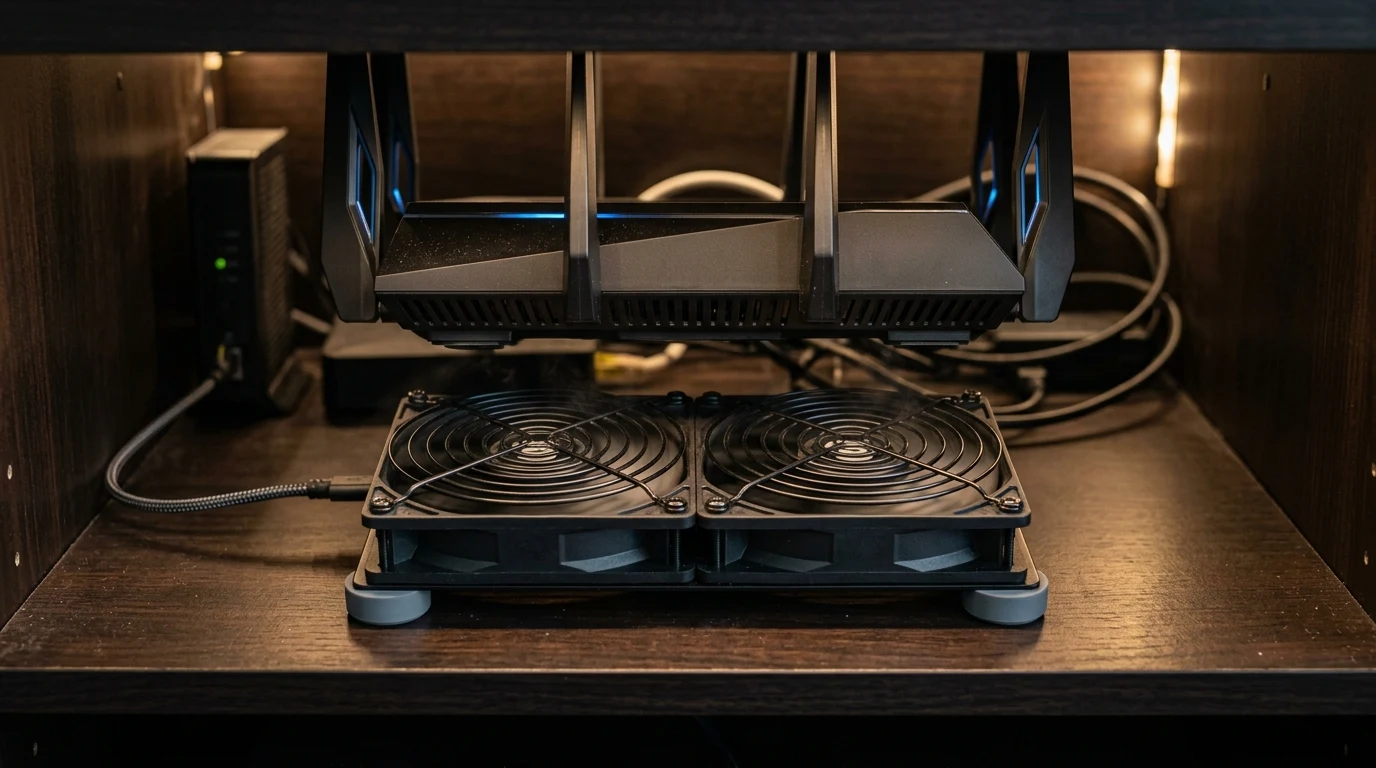
Routers tucked inside a closed cabinet or media console run hotter than ones sitting in open air, and heat is one of the more reliable early signs of hardware degrading faster than it should. The AC Infinity MULTIFAN S7 is a quiet dual-fan USB unit built for exactly this scenario — active airflow for a router that would otherwise be trapped in still, warm air.
Dual-Ball Bearing Engineering & Acoustic Profile
Unlike cheap sleeve-bearing USB fans that develop annoying grinding noises after three months, AC Infinity engineered the MULTIFAN S7 for continuous 24/7/365 enterprise operation:
- Dual-Ball Bearings Rated for 67,000 Hours: Can be mounted vertically or laid flat horizontally without bearing wobble, lasting over 7.5 years of continuous non-stop spinning.
- Multi-Speed In-Line Controller: Includes a physical 3-speed switch (Low / Medium / High / Off) to balance airflow and sound profile.
- Silicone Anti-Vibration Feet: High-density silicone rubber feet on both sides absorb mechanical vibration, preventing resonance hum on wooden desks or metal cabinet shelves.
- Dual Fan Daisy-Chaining: Powered by a single USB plug that splits into two synchronized 120mm fans for wide surface coverage beneath routers and modems.
Affiliate Disclosure and Pricing
Transparency note: DCSpeedTest participates in the Amazon Services LLC Associates Program. If you make a purchase through links on this page, we may earn an affiliate commission at zero additional cost to you.
Whisper-Quiet Dual 120mm USB Cooling Fan
Dual-ball bearing reliability, 3-speed in-line controller, and silicone rubber feet. The best $20 investment you can make to prolong the lifespan of your router and modem.
How Thermal Degradation Destroys Router Lifespan (Arrhenius Equation)
In semiconductor physics, the Arrhenius Reaction Rate Equation demonstrates that for every 10°C (18°F) increase in silicon operating temperature, the failure rate of electrolytic capacitors and silicon transistors roughly doubles. A router running continuously at 75°C inside an unventilated media cabinet has an expected lifespan of less than 2 to 3 years before capacitor bulging causes unstable wireless reboots.
By using the AC Infinity MULTIFAN S7 to maintain operating temperatures at a cool 53°C to 58°C, you extend the operational lifespan of your $300+ router to over 7+ years of continuous rock-solid performance.
Versatile Mounting & Multi-Device Daisy Chaining
The MULTIFAN S7 features modular multi-device expandability: the USB power cord includes a pass-through female USB connector, allowing you to daisy-chain up to six fans together from a single 5V USB power source to cool entire home theater audio receivers, NAS storage arrays, and gaming consoles simultaneously.
Detailed Hardware Specifications Matrix
| Specification Parameter | AC Infinity MULTIFAN S7 Metric |
|---|---|
| Fan Dimensions | Dual 120 × 120 × 25 mm (4.7 × 4.7 × 1.0 in) |
| Total Airflow Rating | 104 CFM (Combined Dual Fans) |
| Acoustic Noise Level | 18 dBA (High) / 12 dBA (Low) |
| Bearing Technology | Dual-Ball Bearings (67,000 Hours MTTF) |
| Power Input & Consumption | 5V DC USB / 0.6A (3.0 Watts Max) |
Airflow Direction Best Practices: Push vs Pull Router Cooling
When positioning the AC Infinity MULTIFAN S7 beneath or above a Wi-Fi router, understanding thermal convection dynamics is essential for maximum cooling efficiency:
- Intake from Bottom (Push Mode): If your router has air intake vents on the bottom chassis and exhaust vents along the top perimeter, place the MULTIFAN S7 underneath the router blowing upward into the chassis. This reinforces the router's natural convective thermal chimney effect.
- Exhaust from Top (Pull Mode): If the router sits on a flat solid base with no bottom ventilation holes, place the fan directly on top of the upper exhaust grille pulling hot air upward away from the internal heatsink.
Acoustic Comparison: MULTIFAN S7 vs Standard PC Case Fans
| Fan Model / Type | Max Airflow (CFM) | Noise Level (dBA) | Bearing Lifespan (MTTF) | Power Source |
|---|---|---|---|---|
| AC Infinity MULTIFAN S7 | 104 CFM | 18 dBA (Whisper Silent) | 67,000 Hours (Dual-Ball) | 5V USB Plug |
| Standard 120mm 12V PC Fan | 52 CFM | 28–34 dBA (Audible Hum) | 30,000 Hours (Sleeve) | 12V Molex / 4-Pin |
| Generic Cheap USB Desk Fan | 25 CFM | 42 dBA (Noisy Buzz) | 5,000 Hours (Fails Fast) | 5V USB Plug |
Power Consumption & Annual Electricity Cost Analysis
Because network cooling fans run continuously 24 hours a day, 365 days a year, energy efficiency is paramount. Drawing a combined 0.6 Amps at 5 Volts (3.0 Watts total on High speed; 1.6 Watts on Low speed), the AC Infinity MULTIFAN S7 consumes approximately 26.2 kWh of electricity annually. At average US utility rates ($0.16 per kWh), running the dual fans continuously costs just $4.19 per year — a negligible expense to protect hundreds of dollars in high-speed router hardware.
Final Verdict
Verdict: A brilliant, cost-effective accessory that permanently cures router overheating. If your router feels hot to the touch or sits in an enclosed space, this fan will extend its lifespan by years.
Why We're Not Publishing a Lab Benchmark Table Here
Real-world performance for hardware like this varies by installation, home layout, materials, interference, and dozens of other site-specific factors — a number from one test setup doesn't reliably predict what you'll see in yours. Rather than publish figures that could mislead you about your own results, the more useful approach is to test the actual performance in your own setup after installation, using a tool like DCSpeedTest to compare before-and-after numbers on your specific connection.