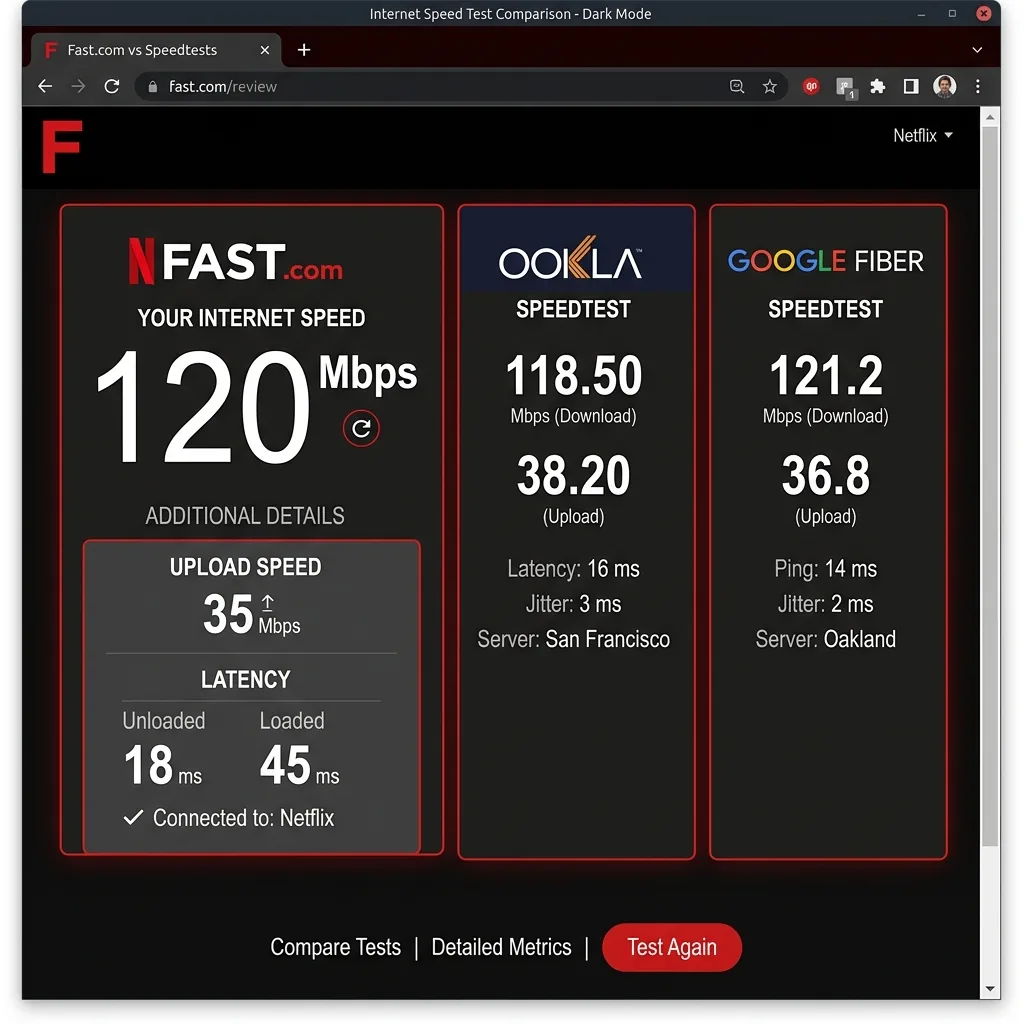
What Is Fast.com?
Fast.com is a free internet speed test tool created and operated by Netflix. Launched in 2016, it was designed with a singular, specific purpose: to let Netflix subscribers quickly check if their internet connection is fast enough to stream Netflix content without buffering.
Fast.com measures download speed by downloading data from Netflix's own content delivery network (CDN) — the same servers that stream your Netflix shows and movies. This makes it an excellent tool for diagnosing Netflix-specific streaming issues, but it has meaningful limitations when you want a comprehensive picture of your internet connection's total performance.
How Fast.com Works: The Technical Explanation
Fast.com uses a straightforward methodology:
- When you open Fast.com, your browser connects to the nearest Netflix Open Connect CDN server — the same infrastructure delivering Netflix video content
- The tool downloads data (typically test files) from this Netflix server using a single or small number of HTTP connections
- It measures the throughput of this download in real time and displays the result in Mbps
- By default, only download speed is shown — a large, single number in the center of the screen
- You can click "Show more info" to see upload speed, latency (ping), and buffer bloat — but these are hidden in the minimal default view
Key technical detail: Fast.com uses Netflix's CDN specifically — it does not test your connection to a neutral third-party server. This means Fast.com measures "how fast can your internet deliver Netflix video data," not "how fast is your internet connection to the general internet."
Fast.com Results: What the Numbers Mean
The Default View: Download Speed Only
When you open Fast.com, you see a single large number — your download speed in Mbps. For most users, this is all they wanted to know. If this number is above 25 Mbps, Netflix 4K should work smoothly. If it's below 5 Mbps, even HD Netflix will buffer.
Netflix's own recommended speeds:
| Netflix Quality | Download Speed Needed | Fast.com Result |
|---|---|---|
| SD (480p) | 3 Mbps | 3+ Mbps = sufficient |
| HD (1080p) | 5 Mbps | 5+ Mbps = sufficient |
| 4K Ultra HD | 15-25 Mbps | 25+ Mbps = sufficient |
| 4K HDR | 25 Mbps | 25+ Mbps = sufficient |
| Multiple 4K streams | 25 Mbps × streams | 50+ Mbps (2)/ 75+ (3) |
The "Show More Info" View
Clicking "Show more info" on Fast.com reveals additional metrics that are hidden by default:
- Upload speed: How fast you can send data to Netflix servers (important for live streaming, less so for watching)
- Latency (loaded): Ping measured while data is actively transferring — shows how much latency increases under load
- Latency (unloaded): Ping when no data is transferring — your baseline network latency
- Buffer bloat: The difference between loaded and unloaded latency — a high score (A-F grades) indicates your router struggles to manage traffic without adding latency
Fast.com Limitations: What It Doesn't Tell You
Fast.com is intentionally minimal — which is a strength for simplicity but creates blind spots for thorough connection diagnosis:
1. It Only Measures Netflix's CDN, Not Your Full Internet
This is the most significant limitation. Fast.com measures speed to Netflix's servers specifically. If your ISP has excellent connectivity to Netflix's CDN (which most do — Netflix pays ISPs for Open Connect placement) but throttles other traffic (YouTube, gaming servers, general browsing), Fast.com will show a high speed while your real-world non-Netflix performance is degraded.
This distinction matters: some ISPs have been documented delivering fast speeds to Netflix while throttling YouTube and other streaming platforms. A Fast.com test showing 400 Mbps does not mean YouTube loads at 400 Mbps.
2. No Jitter Measurement
Fast.com does not measure jitter — the variation in latency between packets. Jitter is critical for video calls (Zoom, Teams), VoIP phone calls, and online gaming. A connection with 20ms ping and 25ms jitter will cause choppy video calls even if Fast.com shows an excellent download speed.
3. No Packet Loss Measurement
Fast.com does not measure packet loss. Even 0.5% packet loss can cause video call drops, gaming lag spikes, and slow web browsing (TCP retransmissions make everything slower). Fast.com will show full download speed even with packet loss occurring in the background.
4. Minimal Default Interface Hides Key Data
The default Fast.com interface shows only download speed. Upload speed, latency, and buffer bloat are hidden behind "Show more info." Most users never click it, leaving them with an incomplete picture of their connection even within Fast.com's own measurement scope.
5. Uses Single-Direction Measurement (Primarily)
Fast.com's primary download test uses HTTP-based measurement which, unlike multi-stream TCP tests, may not fully saturate very high-speed connections (above 500 Mbps). Some high-speed fiber users see Fast.com reporting 300-400 Mbps while other tools show 800-900 Mbps on the same connection.
Fast.com vs DCSpeedTest vs Ookla vs Google: Full Comparison
| Feature | Fast.com | DCSpeedTest | Ookla (speedtest.net) | Google Speed Test |
|---|---|---|---|---|
| Download speed | ✅ | ✅ | ✅ | ✅ |
| Upload speed | ⚠️ Hidden (click for more) | ✅ Always shown | ✅ | ✅ |
| Ping / Latency | ⚠️ Hidden | ✅ Always shown | ✅ | ✅ |
| Jitter | ❌ Not measured | ✅ | ✅ | ⚠️ Limited |
| Packet loss | ❌ | ⚠️ Via extended test | ⚠️ Via app | ❌ |
| Buffer bloat | ✅ (hidden) | ❌ | ❌ | ❌ |
| Network used | Netflix CDN only | Cloudflare (neutral) | ISP-hosted servers | Google M-Lab |
| ISP bias risk | Medium — Netflix CDN optimized | None — neutral CDN | High — ISP owns servers | Low |
| Interface simplicity | Excellent (minimal) | Good (clear) | Clean | Very simple |
| Multiple test servers | ❌ Netflix CDN only | ✅ Cloudflare global | ✅ Choose server | ✅ M-Lab network |
| Best use case | Netflix troubleshooting | Full connection diagnosis | ISP comparison | Quick general test |
When Fast.com Shows Different Results Than Other Tools
Users frequently notice Fast.com showing different speeds than Ookla, DCSpeedTest, or Google. Here's why, and what it means:
Fast.com Shows HIGHER Than Other Tools
Possible cause: Your ISP preferentially routes traffic to Netflix CDN servers (which are often co-located within ISP networks via Netflix's Open Connect program). This means Netflix traffic takes a shorter, faster path than traffic to other servers. Your ISP may deliver excellent Netflix performance while general internet performance is lower.
What to do: Run DCSpeedTest (Cloudflare network) to check your general internet performance. If DCSpeedTest shows significantly lower speeds than Fast.com, your ISP may be optimizing Netflix traffic while the rest of your internet is slower than your plan.
Fast.com Shows LOWER Than Other Tools
Possible cause: Your ISP may be throttling Netflix traffic specifically (a documented practice some ISPs used before net neutrality enforcement), OR Fast.com's single-connection HTTP test doesn't saturate your high-speed connection as effectively as multi-stream tests used by Ookla and DCSpeedTest.
What to do: If Fast.com shows significantly less than your plan speed but DCSpeedTest matches your plan, your ISP may be selectively throttling Netflix traffic — this is a net neutrality concern worth documenting and reporting to the FCC.
Fast.com and Ookla Show Similar Results, DCSpeedTest Lower
If both Fast.com and Ookla show high speeds but DCSpeedTest (Cloudflare) shows lower speeds, both Netflix and your ISP's own servers are getting preferential treatment while general internet traffic (routed through Cloudflare's neutral network) is slower. This is the strongest evidence of ISP traffic manipulation.
Is Fast.com Accurate?
Fast.com is accurate for what it measures — download speed to Netflix's CDN servers. For Netflix streaming diagnosis, it's one of the best tools available precisely because it tests the exact path your Netflix content travels.
However, "accurate for Netflix" ≠ "accurate measurement of total internet performance." For comprehensive connection diagnosis — including upload speed, latency, jitter, and performance to the broader internet rather than just Netflix — Fast.com's intentionally simple design leaves important questions unanswered.
When to Use Fast.com vs When to Use DCSpeedTest
| Scenario | Best Tool | Why |
|---|---|---|
| Netflix keeps buffering or quality drops | Fast.com | Measures exactly how fast your Netflix content travels to you |
| Check if your internet meets Netflix 4K (25 Mbps) | Fast.com | Quick, simple, purpose-built answer |
| Diagnose video call quality (Zoom, Teams) | DCSpeedTest | Need ping, jitter — Fast.com doesn't measure jitter |
| Gaming lag or high ping troubleshooting | DCSpeedTest | Need accurate latency and jitter measurements |
| Verify ISP is delivering promised plan speed | DCSpeedTest | Neutral Cloudflare network avoids ISP-server bias |
| Comparing ISPs or internet plans | DCSpeedTest or Ookla | Both measure general internet performance |
| Documenting ISP performance for complaints | DCSpeedTest | Timestamped neutral results are stronger evidence |
| Testing if ISP throttles Netflix | Fast.com + DCSpeedTest | Compare results — gap reveals Netflix-specific routing |
| Quick download speed check (no other needs) | Fast.com | Simplest, fastest interface |
How to Do a Fast.com-Style Test on DCSpeedTest
If you love Fast.com's simplicity but want a neutral (non-Netflix) server for your download measurement:
- Open DCSpeedTest.com
- Click "Start Test" — the download speed test begins immediately
- Your download speed (in Mbps) displays prominently during and after the test, similar to Fast.com's main number
- Additionally, you'll automatically see upload speed, ping, and jitter — making it a true superset of what Fast.com offers
- The result comes from Cloudflare's neutral global network — no ISP-owned servers, no Netflix CDN bias
Frequently Asked Questions: Fast.com Speed Test
What is Fast.com?
Fast.com is a free internet speed test tool created by Netflix. It measures how fast your internet connection can download data from Netflix's own CDN (content delivery network) servers. Its primary purpose is to help Netflix subscribers determine if their internet connection is fast enough for smooth Netflix streaming. By default, it shows only download speed; upload speed and latency are available under "Show more info."
Is Fast.com accurate?
Fast.com is accurate for measuring download speed to Netflix's servers specifically. However, it may show different results than other tools (DCSpeedTest, Ookla, Google) because those tools use different server networks. Fast.com results reflect how fast Netflix content loads — not necessarily how fast your overall internet performs to websites, games, and other streaming services.
Why does Fast.com show a different speed than Speedtest.net or DCSpeedTest?
Three reasons: (1) Fast.com uses Netflix's CDN servers which may be co-located within your ISP's network, giving Netflix traffic a shorter, faster path. (2) Fast.com's HTTP-based measurement may not saturate high-speed connections as efficiently as multi-stream tests. (3) Your ISP may handle Netflix traffic differently than other internet traffic. Running both Fast.com and DCSpeedTest on the same connection and comparing the results reveals whether your ISP treats Netflix traffic differently from general internet traffic.
Does Fast.com measure ping and upload?
By default, Fast.com shows only download speed. To see upload speed and latency, click "Show more info" after the download test completes. Fast.com does not measure jitter — the variation in latency between packets — which is an important metric for video calls and gaming. For jitter measurement, use DCSpeedTest.com which shows all five key metrics (download, upload, ping, jitter, and buffer metrics) without requiring any additional clicks.
Is Fast.com better than Speedtest.net (Ookla)?
They measure different things on different networks. Fast.com measures download from Netflix's CDN with a minimal interface — ideal for Netflix troubleshooting. Ookla (Speedtest.net) measures from ISP-hosted servers with more metrics. Both have ISP bias risk: Fast.com is biased toward Netflix CDN performance; Ookla is biased toward ISP-hosted servers. DCSpeedTest uses Cloudflare's neutral network — neither Netflix nor ISP-owned — for the most unbiased general internet performance measurement.
What is a good Fast.com result?
For Netflix streaming: 25+ Mbps for 4K HDR (single stream). 50+ Mbps for two simultaneous 4K streams. 5+ Mbps for HD 1080p (single stream). For general internet use: Fast.com's download-only view tells you less than a full speed test. A good general internet result for a household in 2026 is 100+ Mbps download (which Fast.com can confirm) with under 20ms ping and under 10ms jitter (which you need DCSpeedTest or Ookla to measure properly).
Why does Fast.com sometimes show lower speed than my plan?
Common causes: (1) Your ISP may throttle Netflix traffic specifically (documented in some ISPs). (2) Fast.com's single-connection HTTP test may not saturate connections above 500 Mbps as effectively as multi-stream tests. (3) You may be testing during peak hours (7-10 PM) when network congestion reduces speeds. (4) WiFi interference is reducing your wireless speed before it even reaches the internet. Test via Ethernet and compare Fast.com with DCSpeedTest to isolate the cause.
The Bottom Line on Fast.com
Fast.com is a legitimate, purpose-built tool that does its intended job well: tell Netflix subscribers whether their connection can handle Netflix streaming. If you're troubleshooting Netflix specifically, it's the right first tool to reach for.
For complete connection diagnosis — upload speed, ping, jitter, neutral server measurement, and the ability to detect whether your ISP treats different traffic differently — DCSpeedTest.com provides all the metrics Fast.com shows plus the ones it doesn't, through Cloudflare's neutral global network.
The most informative approach when diagnosing connection issues: run both. A large gap between Fast.com and DCSpeedTest results is a meaningful signal about how your ISP routes different types of traffic.