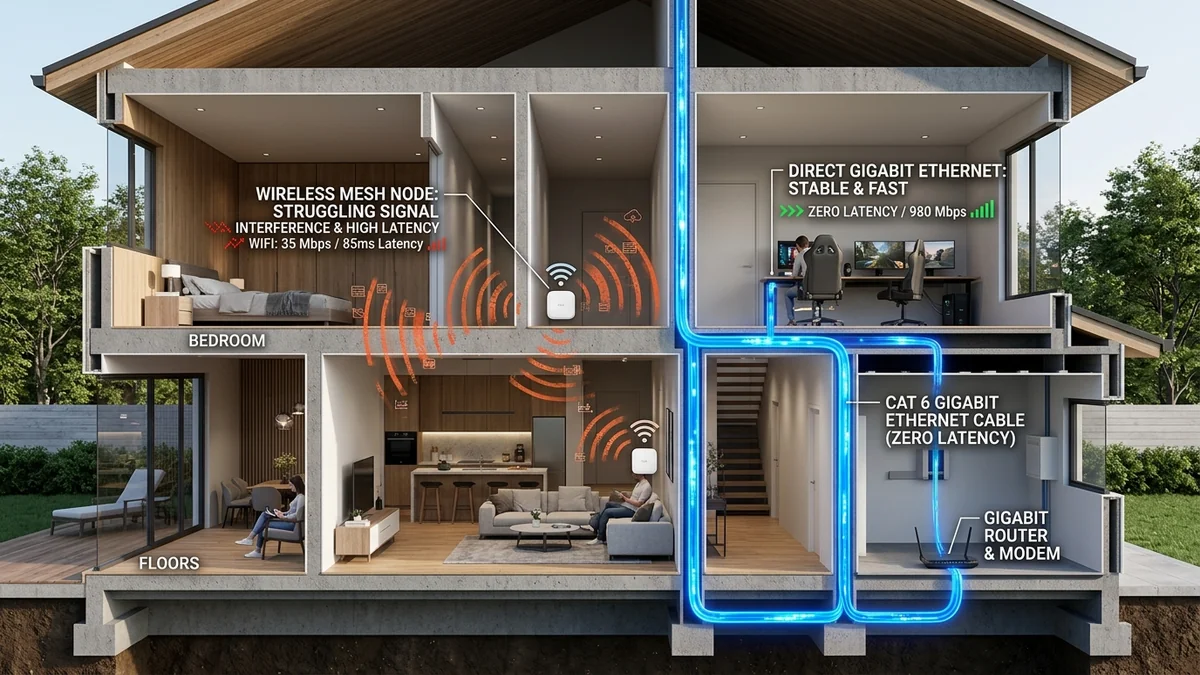
Mesh Wi-Fi systems (such as Eero, Google Nest Wifi, TP-Link Deco, and Netgear Orbi) have become the default solution for eliminating dead zones in multi-story homes. Marketing promises seamless whole-home roaming and gigabit coverage. However, competitive gamers who connect their PC or console to a satellite mesh node frequently report unexplained hit registration delays, micro-stutters, and ping jitter. Is a wireless mesh node truly equivalent to a direct Ethernet connection? Here is the empirical latency test comparing Wireless Mesh Backhaul vs. Dedicated Wired Ethernet Backhaul in 2026.
1. The Architecture: Wireless Backhaul vs. Wired Backhaul
- Wireless Backhaul (Airtime Re-Transmission Penalty): When you connect your PC to a secondary mesh satellite via Wi-Fi (or even via Ethernet into the satellite), the satellite must re-transmit your packets over the air to the main base station router. On dual-band mesh systems, this cuts wireless throughput by 50% and introduces a mandatory +5ms to +18ms round-trip latency hop penalty with high jitter variance.
- Tri-Band / Quad-Band Dedicated Wireless Backhaul: Premium mesh systems allocate a separate 5GHz or 6GHz radio exclusively for node-to-node communication. While this preserves bandwidth, it remains vulnerable to physical wall obstruction and RF packet collisions.
- Wired Ethernet Backhaul: Connecting each mesh satellite directly to the main router via Cat 6 Ethernet (or MoCA 2.5 coaxial adapters) completely offloads backhaul traffic from the air, delivering 0.2ms transit times, 100% throughput, and zero RF contention.
2. 📊 Gaming Benchmark: Wired vs. Wireless Mesh Topologies
| Connection Topology | Local LAN Hop Ping | Jitter (Standard Deviation) | Packet Loss Rate | Esports Viability |
|---|---|---|---|---|
| Direct Wired Cat 6 to Router | < 0.5 ms | 0.1 ms | 0.00% | Flawless / Tier-1 Esports |
| Mesh Satellite with Wired Ethernet Backhaul | 0.8 ms – 1.2 ms | 0.2 ms | 0.00% | Excellent |
| Tri-Band Dedicated Wireless Backhaul | 6.0 ms – 14.0 ms | ± 4.5 ms | 0.2% – 0.8% | Playable for Casual Gaming |
| Dual-Band Shared Wireless Backhaul (Daisy-Chained) | 18.0 ms – 45.0 ms+ | ± 15.0 ms | 1.5% – 4.0% | Unplayable (Stutters & Hitreg Drops) |
3. How to Get Wired Backhaul Without Running New Ethernet Cables
If running Cat 6 through your walls is not feasible, use MoCA 2.5 (Multimedia over Coax) Adapters:
- Most homes already have existing coaxial TV jacks in every bedroom.
- MoCA 2.5 adapters convert existing coaxial copper lines into a 2.5 Gbps full-duplex wired Ethernet pipeline with sub-1ms latency.
- Connect one MoCA adapter to your router and a second adapter to your remote mesh satellite or gaming PC for instant wired performance.
4. 🔬 The Airtime Collision Problem of Shared Wireless Mesh
To understand why wireless mesh backhaul induces severe jitter in fast-paced games (CS2, Valorant, Overwatch 2), consider the physics of Carrier Sense Multiple Access with Collision Avoidance (CSMA/CA). In a dual-band mesh system:
- Your PC transmits a 64-byte UDP gaming packet to the satellite node on 5GHz Channel 36.
- The satellite receives the packet, buffers it, and must wait for clear airtime before re-transmitting the exact same packet to the main router on the exact same Channel 36.
- If a neighbor's router or a household TV is broadcasting on the same channel, the satellite experiences a Clear Channel Assessment (CCA) backoff delay, stalling your packet by 10ms to 40ms.
- This doubling of airtime consumption cuts total available wireless bandwidth in half (the 50% throughput penalty) and introduces random latency spikes known as Packet Delay Variation (PDV).
5. ⚡ MoCA 2.5: The Ultimate In-Wall Wiring Secret
If your home lacks Cat 6 Ethernet drops but has existing black RG6 coaxial TV wall outlets (used previously for cable TV or satellite dishes), MoCA 2.5 (Multimedia over Coax Alliance) provides an enterprise-grade wired backhaul pipeline:
| Backhaul Technology | Real-World Throughput | Hop Latency Added | Installation Complexity |
|---|---|---|---|
| Pure Cat 6 Ethernet Backhaul | 1,000 – 10,000 Mbps | < 0.3 ms | Requires in-wall cable pulling |
| MoCA 2.5 Coaxial Adapters | 2,500 Mbps (Full Duplex) | < 1.0 ms | Plug-and-play over existing TV jacks |
| Tri-Band Wireless Backhaul (6GHz) | 600 – 1,200 Mbps | 5.0 ms – 12.0 ms | Zero cables required |
| Powerline AV2 (Electrical Wiring) | 50 – 150 Mbps | 15.0 ms – 50.0 ms+ | High electrical noise interference |
6. 🛠️ Complete Setup Guide: How to Enable Ethernet Backhaul on Any Mesh System
To ensure your mesh system properly recognizes wired Ethernet backhaul rather than falling back to wireless:
- Connect the main mesh router's WAN port to your modem/ONT.
- Connect an Ethernet cable from the main router's LAN port to an Unmanaged Gigabit/2.5G Switch.
- Run Cat 6 cables from the switch to the LAN/Ethernet ports on each secondary mesh satellite node.
- Open the mesh mobile app (e.g., Eero or Deco app) and verify that the connection status icon for each satellite changes from a Wi-Fi signal indicator to a 'Wired Ethernet' icon.
Establishing this physical wired star topology ensures maximum throughput across your entire property while reserving all wireless radio channels for active mobile smartphones and laptops.