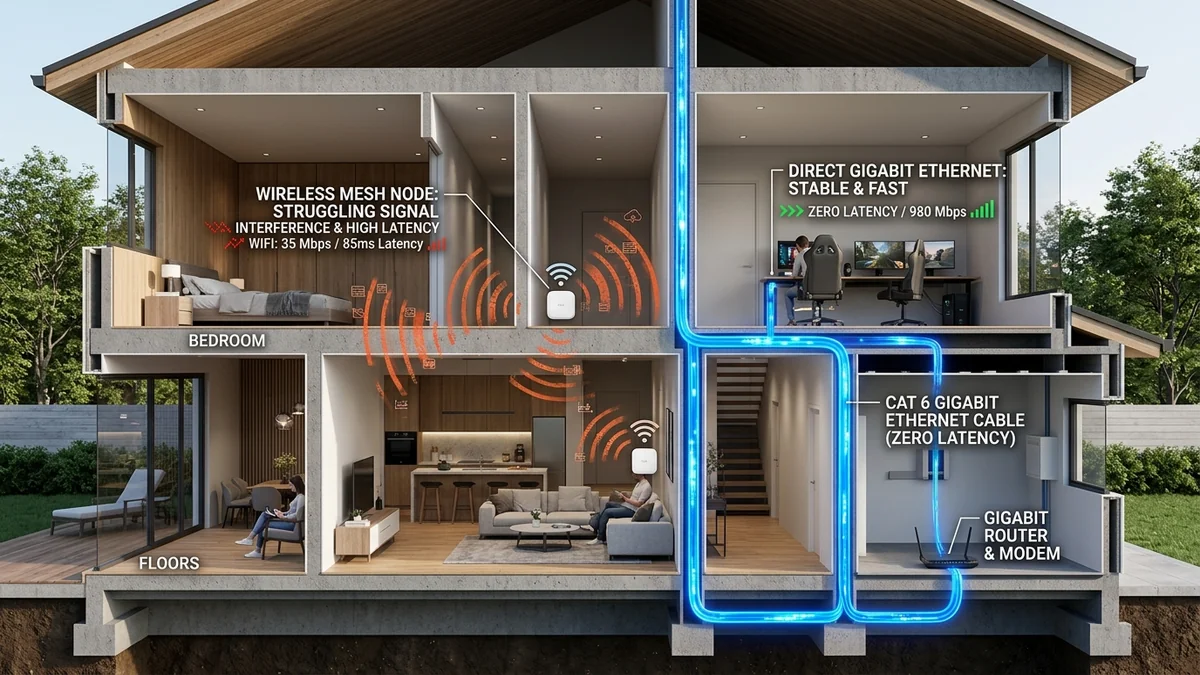
Can a wireless mesh system match wired Ethernet for competitive gaming? Discover the latency penalties of wireless backhaul hops and why wired backhaul is essential.
Mesh Wi-Fi systems (such as Eero, Google Nest Wifi, TP-Link Deco, and Netgear Orbi) have become the default solution for eliminating dead zones in multi-story homes. Marketing promises seamless whole-home roaming and gigabit coverage. However, competitive gamers who connect their PC or console to a satellite mesh node frequently report unexplained hit registration delays, micro-stutters, and ping jitter. Is a wireless mesh node truly equivalent to a direct Ethernet connection? Here is the empirical latency test comparing Wireless Mesh Backhaul vs. Dedicated Wired Ethernet Backhaul in 2026.
1. The Architecture: Wireless Backhaul vs. Wired Backhaul
- Wireless Backhaul (Airtime Re-Transmission Penalty): When you connect your PC to a secondary mesh satellite via Wi-Fi (or even via Ethernet into the satellite), the satellite must re-transmit your packets over the air to the main base station router. On dual-band mesh systems, this cuts wireless throughput by 50% and introduces a mandatory +5ms to +18ms round-trip latency hop penalty with high jitter variance.
- Tri-Band / Quad-Band Dedicated Wireless Backhaul: Premium mesh systems allocate a separate 5GHz or 6GHz radio exclusively for node-to-node communication. While this preserves bandwidth, it remains vulnerable to physical wall obstruction and RF packet collisions.
- Wired Ethernet Backhaul: Connecting each mesh satellite directly to the main router via Cat 6 Ethernet (or MoCA 2.5 coaxial adapters) completely offloads backhaul traffic from the air, delivering 0.2ms transit times, 100% throughput, and zero RF contention.
2. 📊 Gaming Benchmark: Wired vs. Wireless Mesh Topologies
Experiencing packet loss, jitter spikes, or evening ISP throttling? Connect directly to dedicated gaming routes or bypass traffic shaping:
| Connection Topology | Local LAN Hop Ping | Jitter (Standard Deviation) | Packet Loss Rate | Esports Viability |
|---|---|---|---|---|
| Direct Wired Cat 6 to Router | < 0.5 ms | 0.1 ms | 0.00% | Flawless / Tier-1 Esports |
| Mesh Satellite with Wired Ethernet Backhaul | 0.8 ms – 1.2 ms | 0.2 ms | 0.00% | Excellent |
| Tri-Band Dedicated Wireless Backhaul | 6.0 ms – 14.0 ms | ± 4.5 ms | 0.2% – 0.8% | Playable for Casual Gaming |
| Dual-Band Shared Wireless Backhaul (Daisy-Chained) | 18.0 ms – 45.0 ms+ | ± 15.0 ms | 1.5% – 4.0% | Unplayable (Stutters & Hitreg Drops) |
3. How to Get Wired Backhaul Without Running New Ethernet Cables
If running Cat 6 through your walls is not feasible, use MoCA 2.5 (Multimedia over Coax) Adapters:
- Most homes already have existing coaxial TV jacks in every bedroom.
- MoCA 2.5 adapters convert existing coaxial copper lines into a 2.5 Gbps full-duplex wired Ethernet pipeline with sub-1ms latency.
- Connect one MoCA adapter to your router and a second adapter to your remote mesh satellite or gaming PC for instant wired performance.
4. 🔬 The Airtime Collision Problem of Shared Wireless Mesh
To understand why wireless mesh backhaul induces severe jitter in fast-paced games (CS2, Valorant, Overwatch 2), consider the physics of Carrier Sense Multiple Access with Collision Avoidance (CSMA/CA). In a dual-band mesh system:
- Your PC transmits a 64-byte UDP gaming packet to the satellite node on 5GHz Channel 36.
- The satellite receives the packet, buffers it, and must wait for clear airtime before re-transmitting the exact same packet to the main router on the exact same Channel 36.
- If a neighbor's router or a household TV is broadcasting on the same channel, the satellite experiences a Clear Channel Assessment (CCA) backoff delay, stalling your packet by 10ms to 40ms.
- This doubling of airtime consumption cuts total available wireless bandwidth in half (the 50% throughput penalty) and introduces random latency spikes known as Packet Delay Variation (PDV).
5. ⚡ MoCA 2.5: The Ultimate In-Wall Wiring Secret
If your ISP delivers high speeds but your connection drops or suffers from bufferbloat during multi-device use, upgrading these verified components eliminates the bottleneck:
If your home lacks Cat 6 Ethernet drops but has existing black RG6 coaxial TV wall outlets (used previously for cable TV or satellite dishes), MoCA 2.5 (Multimedia over Coax Alliance) provides an enterprise-grade wired backhaul pipeline:
| Backhaul Technology | Real-World Throughput | Hop Latency Added | Installation Complexity |
|---|---|---|---|
| Pure Cat 6 Ethernet Backhaul | 1,000 – 10,000 Mbps | < 0.3 ms | Requires in-wall cable pulling |
| MoCA 2.5 Coaxial Adapters | 2,500 Mbps (Full Duplex) | < 1.0 ms | Plug-and-play over existing TV jacks |
| Tri-Band Wireless Backhaul (6GHz) | 600 – 1,200 Mbps | 5.0 ms – 12.0 ms | Zero cables required |
| Powerline AV2 (Electrical Wiring) | 50 – 150 Mbps | 15.0 ms – 50.0 ms+ | High electrical noise interference |
6. 🛠️ Complete Setup Guide: How to Enable Ethernet Backhaul on Any Mesh System
To ensure your mesh system properly recognizes wired Ethernet backhaul rather than falling back to wireless:
- Connect the main mesh router's WAN port to your modem/ONT.
- Connect an Ethernet cable from the main router's LAN port to an Unmanaged Gigabit/2.5G Switch.
- Run Cat 6 cables from the switch to the LAN/Ethernet ports on each secondary mesh satellite node.
- Open the mesh mobile app (e.g., Eero or Deco app) and verify that the connection status icon for each satellite changes from a Wi-Fi signal indicator to a 'Wired Ethernet' icon.
Establishing this physical wired star topology ensures maximum throughput across your entire property while reserving all wireless radio channels for active mobile smartphones and laptops.
Command-Line (CLI) Verification & Advanced Router Tuning for Mesh Wi-Fi vs Dedicated Ethernet Backhaul: The Definitive Gaming Latency Test
When browser-level telemetry reveals elevated loaded latency or inconsistent throughput during Mesh Wi-Fi vs Dedicated Ethernet Backhaul: The Definitive Gaming Latency Test evaluations, network engineers validate the transport path directly from the operating system kernel. Running native command-line diagnostics bypasses browser extensions, hardware acceleration bugs, and antivirus TLS proxies that occasionally distort multi-gigabit benchmarks for mesh wifi vs ethernet backhaul.
- Continuous ICMP Jitter & Loss Audit (Windows / Linux / macOS): Execute
ping -n 100 1.1.1.1(Windows) orping -c 100 -i 0.2 1.1.1.1(macOS/Linux) while running a simultaneous speed test. Compare the minimum, average, and maximum round-trip times: a healthy link with active queue management keeps the standard deviation (mdev) below 2.0 ms with 0% packet loss. - Path MTU Discovery & Fragmentation Check: Verify that your WAN link passes full-sized Ethernet frames without silent fragmentation by running
ping -f -l 1472 1.1.1.1. If the terminal returns Packet needs to be fragmented but DF set, lower your router WAN MTU to1500bytes (or1420bytes when routing through a WireGuard VPN tunnel). - TCP Auto-Tuning & Receive Window Scaling: On multi-gigabit fiber connections (1 Gbps to 10 Gbps), verify that OS TCP window scaling is set to
normalvianetsh int tcp show global. Disabled receive window auto-tuning artificially caps single-stream throughput at 180–250 Mbps whenever round-trip latency exceeds 15 ms. - Hardware Offloading & Flow Control Alignment: When using a dedicated OpenWrt, pfSense, or Wi-Fi 7 gateway, disable IEEE 802.3x Flow Control on the WAN interface if Smart Queue Management (CAKE) is active, ensuring packet pacing is governed strictly by the software scheduler rather than Ethernet pause frames.