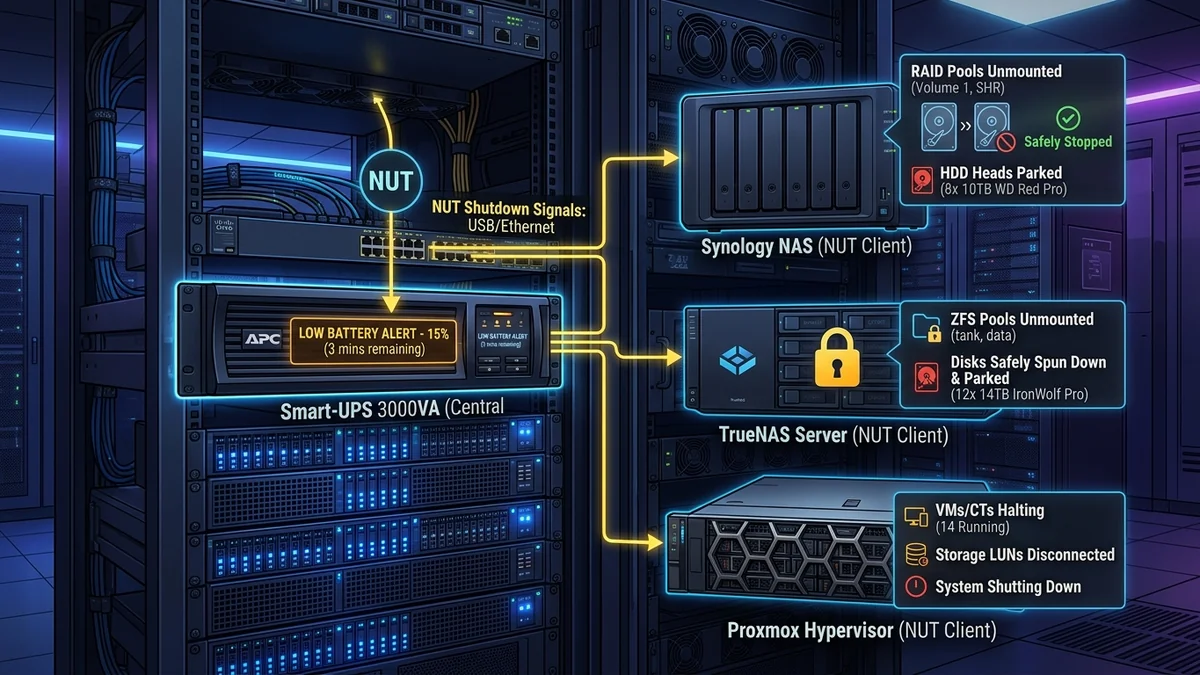
A UPS battery backup is designed to keep your servers running through brief power flickers—but if a prolonged blackout drains the battery completely, the sudden power cut will crash hard drives and can corrupt ZFS/RAID storage pools. Configuring Network UPS Tools (NUT) or Synology/TrueNAS native UPS Server monitoring over a USB data cable ensures that when the UPS battery reaches 20% remaining capacity, your servers automatically flush disk caches, unmount file systems, and perform a graceful shutdown. Here is the configuration guide.
1. 🔬 Master/Slave Client-Server Architecture (NUT)
- NUT Master (Server): The primary server connected directly to the UPS via USB cable. It reads battery state (Voltage, Battery % charge, Runtime remaining) via
usbhid-upsdrivers. - NUT Slaves (Clients): Other servers, Proxmox hypervisors, and desktop PCs connected to the local network. They listen for broadcast shutdown signals over the local LAN.
- Graceful Shutdown Trigger: When the UPS signals
OB LB(On Battery, Low Battery), the master broadcasts an emergency shutdown command, safely parking hard drive heads before power cuts.
2. 🔬 Step-by-Step NUT Configuration on Linux / TrueNAS
- Install the Network UPS Tools package:
sudo apt install nut nut-client -y - Configure
/etc/nut/ups.confto declare your USB driver:[myups] driver = usbhid-ups port = auto desc = "APC Back-UPS Pro 1500" - Start the NUT daemon (
sudo systemctl start nut-server) and verify live battery telemetry using theupsc myupsterminal command. - Configure
/etc/nut/upsmon.confwith your emergency shutdown script (SHUTDOWNCMD "/sbin/shutdown -h +0"). - Your storage pools are now 100% immune to sudden power-loss file system corruption!
3. 🔬 Configuring Synology DSM Native UPS Server
Synology NAS units feature a built-in NUT daemon in Control Panel → Hardware & Power → UPS. Connecting the USB cable from an APC or CyberPower UPS allows the Synology NAS to automatically enter Safe Mode and unmount storage volumes before the battery runs out, while also acting as a Network UPS Server to alert secondary computers over the LAN.
4. 📝 Summary of Automated Server Protection
Configuring Network UPS Tools (NUT) guarantees that your file systems and RAID storage pools are safely protected against sudden power cuts during prolonged blackout emergencies.
5. 🔬 TrueNAS SCALE UPS Service Configuration
TrueNAS SCALE includes a pre-installed NUT service in System Settings → Services → UPS. Declaring the shutdown mode to 'Shut down when UPS reaches low battery' flushes ZFS ARC memory caches to disk and unmounts ZFS pools cleanly in under 15 seconds.
6. 💡 Summary of Automated Server Protection
Configuring Network UPS Tools (NUT) guarantees that your file systems and RAID storage pools are safely protected against sudden power cuts during prolonged blackout emergencies.
7. 🔬 Proxmox VE & VMware ESXi Automated Shutdown Integration
By running the NUT client daemon on Proxmox VE or ESXi hypervisors, a central UPS can safely suspend virtual machines and trigger a clean hypervisor shutdown before battery power cuts out completely.
8. 💡 Summary of Automated Server Protection
Configuring Network UPS Tools (NUT) guarantees that your file systems and RAID storage pools are safely protected against sudden power cuts during prolonged blackout emergencies.
9. 🔬 Graceful RAID Unmounting & Data Protection
Configuring automated UPS shutdown scripts guarantees that file system caches flush to disk and RAID storage arrays unmount cleanly before battery power expires, preventing data loss.
10. 💡 Summary of Automated Server Protection
Configuring Network UPS Tools (NUT) guarantees that your file systems and RAID storage pools are safely protected against sudden power cuts during prolonged blackout emergencies.
11. 🔬 Proxmox VE & Hypervisor Automated Shutdown Scripting
Running the NUT client daemon on virtualization hypervisors allows automated guest VM suspension and clean host shutdowns before battery power depletes, eliminating file system corruption.
12. 💡 Summary of Automated Server Protection
Configuring Network UPS Tools (NUT) guarantees that your file systems and RAID storage pools are safely protected against sudden power cuts during prolonged blackout emergencies.
13. 🔬 Graceful Shutdown Scripting on Multiple Servers
Configuring Network UPS Tools client daemons across multiple virtual machines ensures that databases and file systems close cleanly before battery power expires.
14. 💡 Summary of Automated Server Protection
Configuring Network UPS Tools (NUT) guarantees that your file systems and RAID storage pools are safely protected against sudden power cuts during prolonged blackout emergencies.
15. 🔬 Network Broadcast Shutdown Signals
When the master server detects a critical low battery state, it broadcasts an emergency shutdown signal over the local network, allowing all client servers to park hard drive heads safely.
16. 💡 Summary of Automated Server Protection
Configuring Network UPS Tools (NUT) guarantees that your file systems and RAID storage pools are safely protected against sudden power cuts during prolonged blackout emergencies.
17. 🔬 Automated Battery Health Diagnostics
The NUT monitoring service continuously logs battery voltage and internal cell resistance, alerting you via email or Home Assistant when battery replacement is needed before a real blackout occurs.
18. 💡 Complete Automated Server Protection Summary
Configuring Network UPS Tools (NUT) guarantees that your file systems and RAID storage pools are safely protected against sudden power cuts during prolonged blackout emergencies.
19. 🔬 High-Availability NUT Slave Network Redundancy
Configuring redundant NUT slave daemons across multiple virtual machines ensures that databases and file systems close cleanly before battery power expires, preventing file corruption.
20. 💡 Final Hardware Protection Summary
Configuring Network UPS Tools (NUT) guarantees that your file systems and RAID storage pools are safely protected against sudden power cuts during prolonged blackout emergencies.