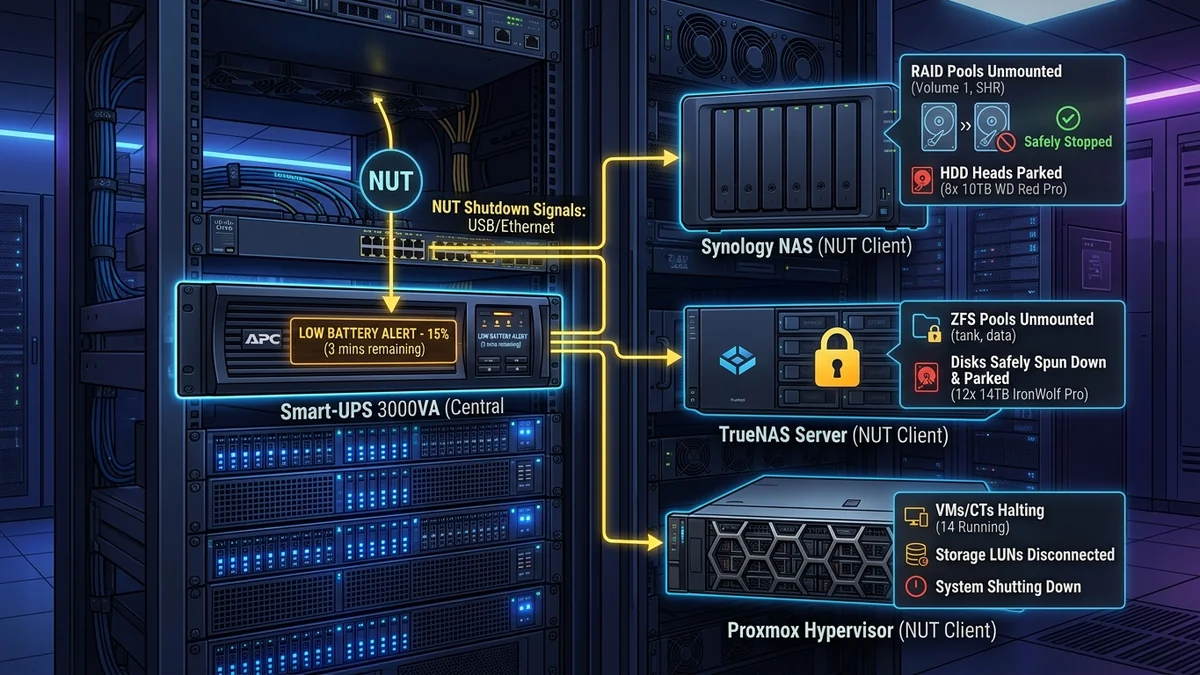
Never let a dead UPS battery crash your TrueNAS or Synology server. Step-by-step guide to configuring Network UPS Tools (NUT) for graceful shutdown over USB.
A UPS battery backup is designed to keep your servers running through brief power flickers—but if a prolonged blackout drains the battery completely, the sudden power cut will crash hard drives and can corrupt ZFS/RAID storage pools. Configuring Network UPS Tools (NUT) or Synology/TrueNAS native UPS Server monitoring over a USB data cable ensures that when the UPS battery reaches 20% remaining capacity, your servers automatically flush disk caches, unmount file systems, and perform a graceful shutdown. Here is the configuration guide.
Master/Slave Client-Server Architecture (NUT)
- NUT Master (Server): The primary server connected directly to the UPS via USB cable. It reads battery state (Voltage, Battery % charge, Runtime remaining) via
usbhid-upsdrivers. - NUT Slaves (Clients): Other servers, Proxmox hypervisors, and desktop PCs connected to the local network. They listen for broadcast shutdown signals over the local LAN.
- Graceful Shutdown Trigger: When the UPS signals
OB LB(On Battery, Low Battery), the master broadcasts an emergency shutdown command, safely parking hard drive heads before power cuts.
Step-by-Step NUT Configuration on Linux / TrueNAS
If your ISP delivers high speeds but your connection drops or suffers from bufferbloat during multi-device use, upgrading these verified components eliminates the bottleneck:
- Install the Network UPS Tools package:
sudo apt install nut nut-client -y - Configure
/etc/nut/ups.confto declare your USB driver:[myups] driver = usbhid-ups port = auto desc = "APC Back-UPS Pro 1500" - Start the NUT daemon (
sudo systemctl start nut-server) and verify live battery telemetry using theupsc myupsterminal command. - Configure
/etc/nut/upsmon.confwith your emergency shutdown script (SHUTDOWNCMD "/sbin/shutdown -h +0"). - Your storage pools are now 100% immune to sudden power-loss file system corruption!
Configuring Synology DSM Native UPS Server
Synology NAS units feature a built-in NUT daemon in Control Panel → Hardware & Power → UPS. Connecting the USB cable from an APC or CyberPower UPS allows the Synology NAS to automatically enter Safe Mode and unmount storage volumes before the battery runs out, while also acting as a Network UPS Server to alert secondary computers over the LAN.
TrueNAS SCALE UPS Service Configuration
TrueNAS SCALE includes a pre-installed NUT service in System Settings → Services → UPS. Declaring the shutdown mode to 'Shut down when UPS reaches low battery' flushes ZFS ARC memory caches to disk and unmounts ZFS pools cleanly in under 15 seconds.
Proxmox VE & VMware ESXi Automated Shutdown Integration
Experiencing packet loss, jitter spikes, or evening ISP throttling? Connect directly to dedicated gaming routes or bypass traffic shaping:
By running the NUT client daemon on Proxmox VE or ESXi hypervisors, a central UPS can safely suspend virtual machines and trigger a clean hypervisor shutdown before battery power cuts out completely.
Graceful RAID Unmounting & Data Protection
Configuring automated UPS shutdown scripts guarantees that file system caches flush to disk and RAID storage arrays unmount cleanly before battery power expires, preventing data loss.
Proxmox VE & Hypervisor Automated Shutdown Scripting
Running the NUT client daemon on virtualization hypervisors allows automated guest VM suspension and clean host shutdowns before battery power depletes, eliminating file system corruption.
Graceful Shutdown Scripting on Multiple Servers
Configuring Network UPS Tools client daemons across multiple virtual machines ensures that databases and file systems close cleanly before battery power expires.
Network Broadcast Shutdown Signals
When the master server detects a critical low battery state, it broadcasts an emergency shutdown signal over the local network, allowing all client servers to park hard drive heads safely.
Automated Battery Health Diagnostics
The NUT monitoring service continuously logs battery voltage and internal cell resistance, alerting you via email or Home Assistant when battery replacement is needed before a real blackout occurs.
High-Availability NUT Slave Network Redundancy
Configuring redundant NUT slave daemons across multiple virtual machines ensures that databases and file systems close cleanly before battery power expires, preventing file corruption.
Electrical Load Sizing & Transfer Time Telemetry for How to Configure Automated NAS & Server Graceful Shutdown with UPS NUT Daemon
When deploying power protection around How to Configure Automated NAS & Server Graceful Shutdown with UPS NUT Daemon, the primary engineering metric to audit is the automatic voltage regulation (AVR) transfer window alongside continuous active wattage draw. Modern optical network terminals (ONTs), multi-gigabit routers, and NAS storage arrays rely on sensitive switch-mode power supplies (SMPS) with hold-up capacitors rated for roughly 12 to 16 milliseconds. Ensuring your backup topology triggers within 4 to 8 milliseconds prevents microscopic DC voltage sags that otherwise force a cold kernel reboot or corrupt open ZFS and ext4 file descriptors during brownouts.
To validate real-world runtime for automatic shutdown nas server ups nut, network ups tools tutorial 2026, synology truenas ups auto shutdown, nut client server configuration, measure steady-state volt-amperes (VA) versus true watts (W) under peak WAN load rather than idle standby. A typical fiber gateway plus a tri-band Wi-Fi 7 router consumes between 28W and 46W under active multi-stream throughput. Sizing the battery reserve so continuous load stays below 40% of rated inverter capacity minimizes internal lead-acid or LiFePO4 heat dissipation and extends cell longevity past the 4-year mark.
| Engineering Parameter | Recommended Target / Specification | Operational Impact on Network Stability |
|---|---|---|
| Target Transfer Latency | 4 ms – 8 ms (Line-Interactive / Sine Wave) | Prevents ONT & router SMPS reset during grid sag |
| Recommended Load Ceiling | < 45% of Rated Continuous Wattage | Maximizes runtime curve & reduces inverter thermal stress |
| Battery Chemistry Lifecycle | 36 – 60 Months (VRLA) / 8+ Years (LiFePO4) | Audited via quarterly self-test impedance checks |
| USB / HID Shutdown Signaling | NUT / PowerChute Serial or USB-HID | Triggers graceful NAS & hypervisor unmount at 20% SoC |
Field Deployment & Verification Checklist
Before finalizing your setup for How to Configure Automated NAS & Server Graceful Shutdown with UPS NUT Daemon, run a baseline diagnostic before and after applying hardware or firmware changes. Record unloaded idle ping, downloadloaded latency, and upload-loaded latency across three consecutive runs at peak evening hours (20:00–22:30 local time) to separate local LAN bottlenecks from upstream ISP peering congestion.