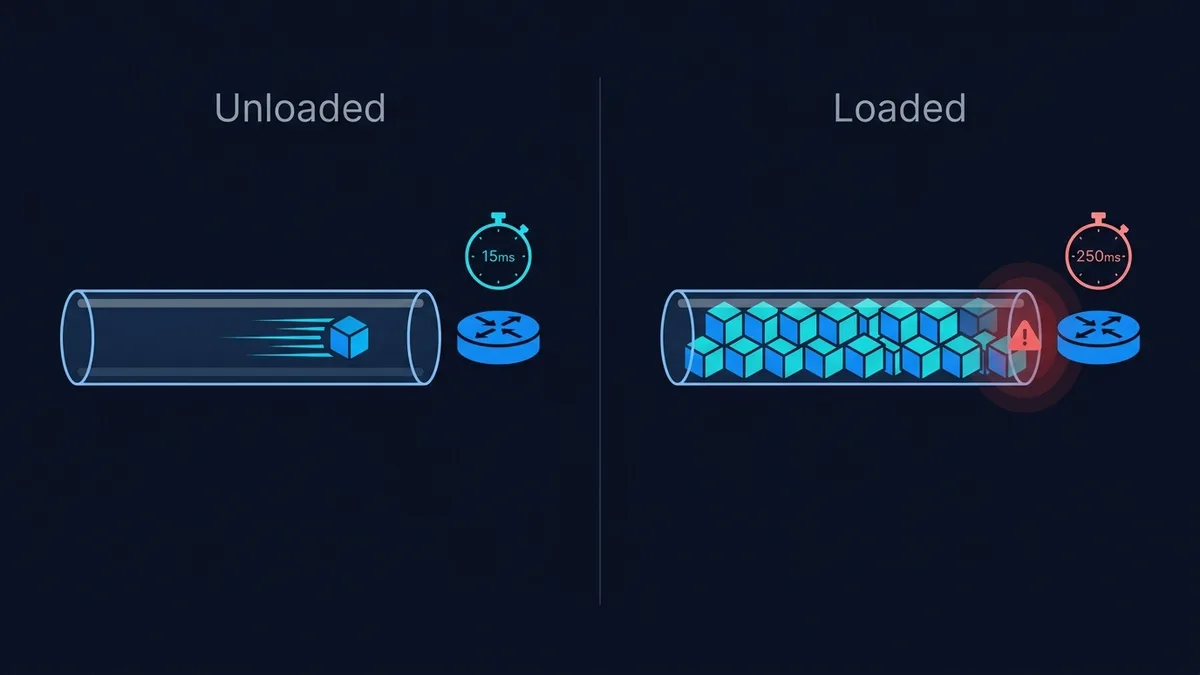
Run a ping test on an idle connection and you might see 12ms. Start a download in the background and run it again — now it's 180ms. Both numbers are real. They're just measuring two different things: unloaded ping tells you the latency floor of your connection; loaded ping tells you what actually happens to that latency once the line is doing real work.
Unloaded Ping: The Best-Case Number
Unloaded ping is measured with nothing else competing for bandwidth — no downloads, no uploads, no other devices streaming. It reflects the physical and routing distance between you and the test server: fiber typically floors around 2-8ms to a nearby server, cable around 10-20ms, satellite well over 500ms due to the round trip to orbit. This is the number most speed tests report by default, and it's the number ISPs quote in marketing.
The problem: almost nobody uses their internet connection with nothing else running. Unloaded ping tells you what's theoretically possible, not what you'll actually feel during a video call while someone else in the house is streaming.
Loaded Ping: What You Actually Feel
Loaded ping is measured while the connection is simultaneously handling a large download or upload — exactly the condition that exists every time a game update installs, a cloud backup runs, or another device on the network starts a 4K stream. If your unloaded ping is 12ms but your loaded ping climbs to 150ms, that 138ms gap is the number that actually explains why your video call gets choppy the moment a download starts.
This gap has a name: bufferbloat. It happens because routers and modems queue outgoing packets in a buffer to avoid dropping them — a reasonable design goal that backfires when the buffer is oversized. Instead of dropping excess packets quickly (which would let your connection recover fast), the device holds onto them and delivers them late, and that queuing delay shows up as inflated ping on every other packet trying to get through at the same time, including the ones carrying your voice or your game inputs.
Why the Gap Matters More Than Either Number Alone
A connection with 20ms unloaded ping and 25ms loaded ping is functionally excellent — the gap is small enough that you'd never notice it. A connection with 8ms unloaded ping and 300ms loaded ping looks great on paper (that 8ms is genuinely fast) but will feel terrible the moment any real load hits it. If you've ever described your internet as "fast but somehow still laggy," this gap is almost always the reason — the marketing number (download speed, or best-case ping) was accurate, but it didn't describe the condition you actually experience day to day.
DCSpeedTest measures both automatically during a normal test and grades the difference from A+ to F, using the loaded-latency measurement the underlying test engine already collects — you don't need a separate bufferbloat test to see it.
What Actually Fixes a Bad Loaded-Ping Gap
- Enable Smart Queue Management (SQM) or CAKE on a router that supports it (stock firmware on some routers, OpenWrt/AsusWrt-Merlin on others). This actively manages the buffer instead of letting it grow unchecked, and is the single most effective fix.
- Set an upload/download limit slightly below your real max — SQM works by controlling queueing at a rate just under your true line speed, so leaving 5-10% headroom on both directions gives it room to actually manage the queue instead of the ISP's own upstream equipment doing it uncontrolled.
- Switch from WiFi to Ethernet for the loaded-ping test itself, and for anything latency-sensitive. WiFi adds its own queuing and retransmission behavior on top of whatever bufferbloat already exists on the wired line, which can make an already-bad gap look worse than it is.
Frequently Asked Questions
Is a high loaded ping the ISP's fault or my router's fault?
Usually the router or modem — bufferbloat is a buffer-management problem in the device queuing your packets, not a capacity problem with the ISP's line. A router with SQM enabled on the exact same ISP connection typically shows a dramatically smaller gap.
Does a faster internet plan fix bufferbloat?
Rarely on its own. A bigger pipe just means the oversized buffer fills with more data before it starts causing delay — the underlying queue-management problem is usually still there. SQM/CAKE addresses the actual cause; upgrading your plan mostly doesn't.
Why does gaming feel worse than the ping number suggests?
Competitive games are sensitive to momentary spikes, not just the average. A connection that's normally 20ms but spikes to 150ms for a few seconds every time a download starts will feel far worse in a fast-paced game than a connection that's a steady 40ms the whole time, even though the average might look similar.
How to Measure the Gap on Your Own Connection
You don't need special tools to see this for yourself. Run a speed test with nothing else active, note the ping. Then start a large download — a game update, a big file transfer, anything that runs for at least 30 seconds — and run the ping test again while it's in progress. The difference between those two numbers is your real-world loaded-ping gap, and it's a far more useful figure than either number alone.
Some routers also expose real-time buffer statistics in their admin interface, usually under a QoS or "advanced" settings tab, which can show the queue actually filling up in real time as load increases — useful for confirming that bufferbloat, specifically, is the mechanism at work rather than something else like WiFi interference or an oversubscribed local network segment.