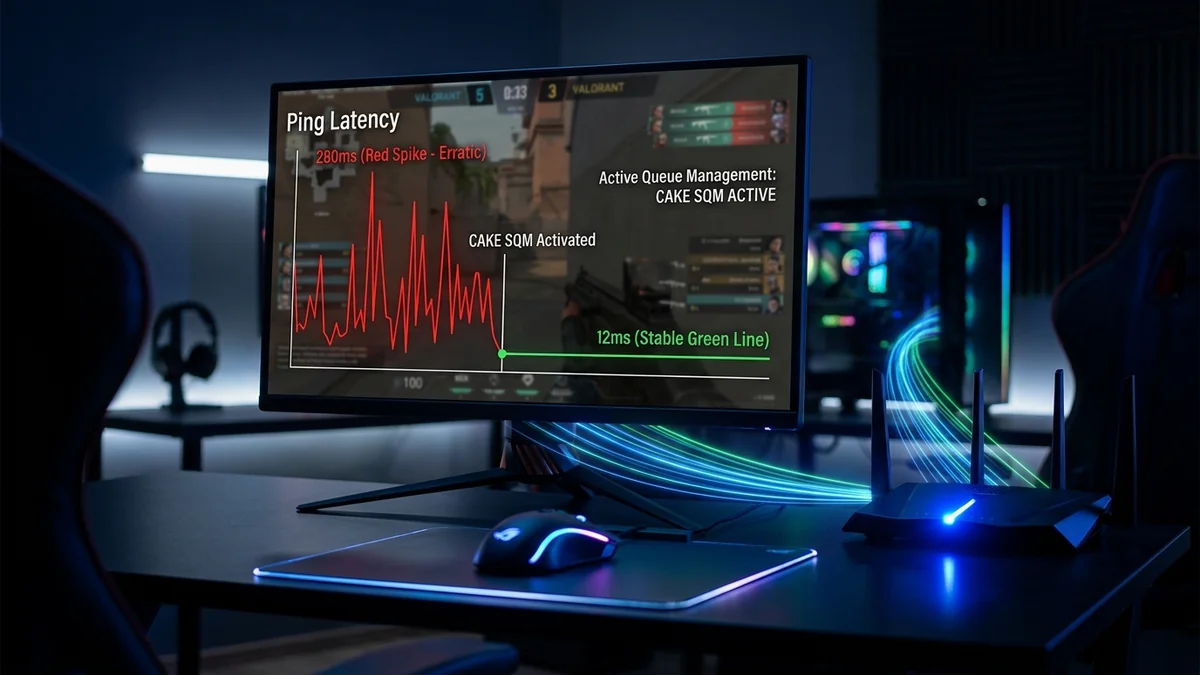
You are in the middle of a clutch 1v1 in Valorant, Counter-Strike 2, or Apex Legends with a crisp 18ms ping. Suddenly, a family member launches a 4K Netflix stream or an iPhone begins backing up photos to iCloud. Instantly, your in-game ping shoots to 240ms, your character rubberbands across the map, and your shots fail to register. This maddening phenomenon is not an ISP line outage—it is the textbook manifestation of Bufferbloat. Here is the engineering science of unmanaged hardware buffers and the exact steps to achieve an A+ Bufferbloat score in 2026.
1. What Is Bufferbloat? The 'Water Pipe' Analogy
To understand bufferbloat, imagine your internet connection as a water drainage pipe. When traffic is light, packets flow through freely with zero delay (Unloaded Ping). However, when a device initiates a large upload or download, it transmits packets faster than the ISP's narrow bottleneck pipe can process.
To prevent immediate packet loss, your router stores excess packets in internal memory buffers (FIFO - First-In, First-Out). If these hardware buffers are excessively large and unmanaged, your tiny, time-sensitive gaming packets (UDP) get stuck at the back of a massive queue behind thousands of bulk file transfer packets. The time your gaming packet spends waiting in this buffer queue adds 100ms to 800ms of artificial latency.
2. 📊 The 4 Queue Management Technologies Compared
| Algorithm / System | Queuing Mechanism | Loaded Latency Delta | Bufferbloat Grade |
|---|---|---|---|
| Standard FIFO (Stock ISP Gateway) | Single unmanaged queue, tail-drop | +150ms to +600ms | Grade D / F (Severe Lag Spikes) |
| Traditional QoS / Priority Queuing | Static port/IP bandwidth reservation | +45ms to +120ms | Grade C / B (Inflexible) |
| FQ-CoDel (Fair Queuing Controlled Delay) | Flow-based sub-queues with active packet drops | +2ms to +10ms | Grade A (Excellent) |
| CAKE (Common Applications Kept Enhanced) | State-of-the-art flow isolation, automatic ACK filtering & RTT pacing | +0ms to +3ms | Grade A+ (Flawless Gaming) |
3. 🛠️ The 3-Step Permanent Solution to Fix Bufferbloat
Step 1: Test Your Current Loaded Ping on DCSpeedTest
Run a comprehensive benchmark on DCSpeedTest. Observe your Unloaded Ping (idle latency) versus your Loaded Download & Upload Ping. If your loaded ping increases by more than 20ms during upload or download saturation, bufferbloat is degrading your connection.
Step 2: Deploy a Router with Native Smart Queue Management (SQM)
Traditional consumer routers lack advanced active queue management. To fix bufferbloat, deploy hardware running CAKE SQM (such as a router flashed with OpenWrt, Asuswrt-Merlin with cake-qos, or GL.iNet Flint 2 / GL-MT6000 routers).
Step 3: Configure Bandwidth Shaper Limits (The 90% Rule)
In your router's SQM configuration portal:
- Set the active queuing algorithm to CAKE and queue discipline to piece_of_cake.
- Measure your real-world baseline speeds on DCSpeedTest.
- Set the Download Shaper to 90%–93% of your baseline speed.
- Set the Upload Shaper to 90%–92% of your baseline speed.
- Why this works: By intentionally capping bandwidth slightly below the physical line maximum, your router retains control of packet queuing, preventing buffers at the ISP modem from ever filling up.
4. 🔬 The Mathematical Mechanics of CAKE Flow Isolation
To understand why the CAKE (Common Applications Kept Enhanced) algorithm outperforms older priority systems, we must look at how it processes network flows. Under traditional FIFO (First-In, First-Out), all incoming and outgoing packets enter a single monolithic hardware queue.
CAKE implements a Set-Associative Hash Table with 1024 virtual sub-queues. When packets arrive from different devices (e.g. your gaming PC, a smart TV streaming 4K, and a smartphone uploading photos), CAKE automatically sorts packets into separate per-host and per-flow sub-queues based on IP addresses and transport ports.
CAKE then services these queues using a Deficit Round Robin (DRR++) scheduler combined with Active Queue Management (AQM). Small, latency-sensitive packets (like 64-byte gaming UDP position updates or TCP ACKs) are immediately given transmission clearance ahead of large 1500-byte bulk file segments. If a bulk download fills its individual sub-queue, CAKE drops or marks (ECN) packets only within that specific transfer, leaving your gaming latency completely untouched at 15ms.
5. 🛡️ Blue vs. Red Traffic: Automatic ACK Pacing
In asymmetric broadband connections (like Cable DOCSIS with 500 Mbps down and 20 Mbps up), large file downloads require thousands of return TCP Acknowledgement (ACK) packets. Unmanaged routers allow these outgoing ACKs to congest the narrow upload pipe, causing downstream downloads to choke.
CAKE features integrated ACK Filtering and Pacing. It inspects redundant TCP ACKs in the queue and drops obsolete cumulative acknowledgements, freeing up to 30% of precious upstream bandwidth for real-time gaming voice and telemetry packets.
6. 📋 Step-by-Step Bufferbloat Troubleshooting Flowchart
- Step 1: Benchmark Unloaded Latency: Run an idle test on DCSpeedTest when no other household devices are active (e.g., 14ms).
- Step 2: Benchmark Loaded Download Latency: Saturate downstream bandwidth and record the latency increase. An increase greater than +15ms indicates downstream bufferbloat.
- Step 3: Benchmark Loaded Upload Latency: Saturate upstream bandwidth. An increase greater than +25ms indicates upstream bufferbloat (the #1 cause of gaming hitreg lag).
- Step 4: Enable SQM on WAN Interface: Configure CAKE with link-layer framing adaptation set to
ethernetwith 18 bytes overhead.