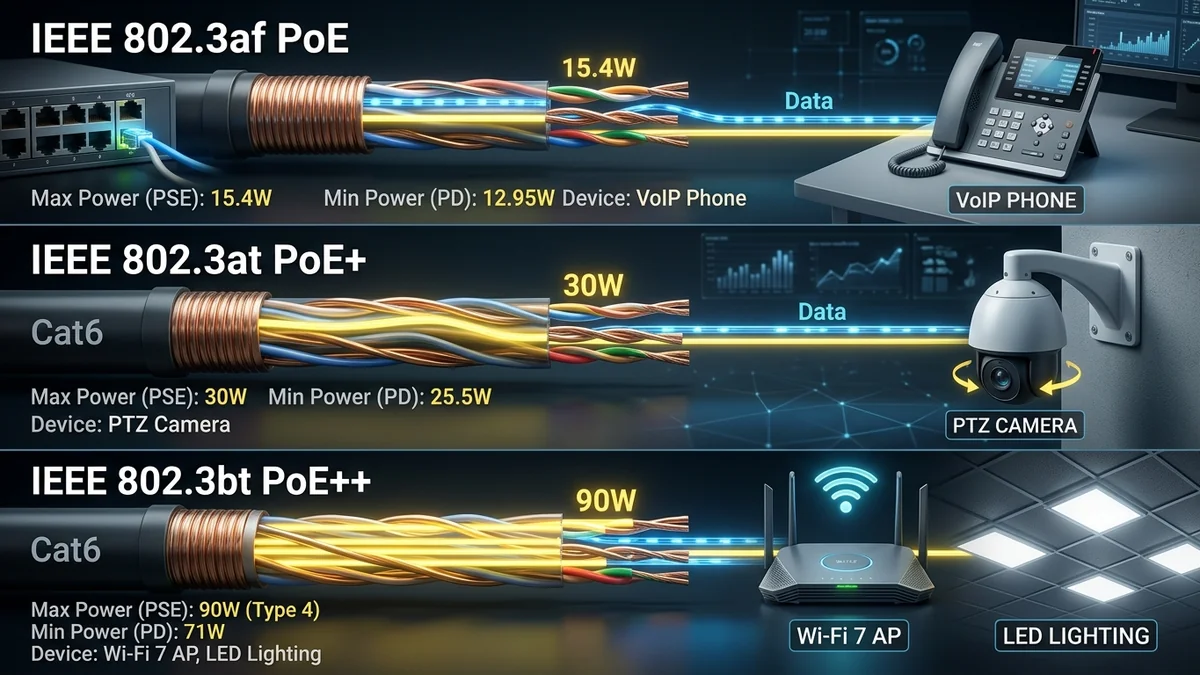
Power over Ethernet (PoE) allows a single Cat6 network cable to transmit both high-speed data and electrical power simultaneously, eliminating the need to install AC electrical outlets near security cameras and ceiling access points. However, matching the wrong PoE standard can cause devices to power cycle or fail to turn on. Here is our complete breakdown of PoE (802.3af), PoE+ (802.3at), and PoE++ (802.3bt Type 3 & 4).
1. 📊 PoE Standards Wattage Comparison Table
| Standard Name | IEEE Standard | Max Switch Power | Delivered Device Power | Typical Devices |
|---|---|---|---|---|
| PoE (Standard) | IEEE 802.3af (Type 1) | 15.4 Watts | 12.95 Watts | VoIP Phones, Basic IP Cameras |
| PoE+ (High Power) | IEEE 802.3at (Type 2) | 30.0 Watts | 25.5 Watts | Wi-Fi 6 Access Points, 4K PTZ Cameras |
| PoE++ (4-Pair 60W) | IEEE 802.3bt (Type 3) | 60.0 Watts | 51.0 Watts | Wi-Fi 7 APs, Video Conferencing Systems |
| PoE++ (4-Pair 90W) | IEEE 802.3bt (Type 4) | 90.0 - 100W | 71.3 Watts | Building Lighting, Smart Displays, Thin Clients |
2. 🏁 Final Summary
For modern home networks and security systems, investing in an 802.3at PoE+ switch (such as the Netgear GS308P) provides the ideal 30W per port power budget for 4K security cameras and Wi-Fi 6/7 access points.
3. 🔬 2-Pair vs 4-Pair Power Delivery Physics (I²R Heat Losses)
How does PoE++ safely deliver up to 90 Watts over standard Ethernet cables without melting the insulation? The secret is 4-Pair Power Delivery:
- 802.3af (PoE) & 802.3at (PoE+): Transmits power across only 2 of the 4 twisted pairs (using either data pairs 1/2 and 3/6 or spare pairs 4/5 and 7/8).
- 802.3bt (PoE++ Type 4): Transmits current simultaneously across all 4 twisted pairs (8 conductors). By splitting the 960mA current across 4 pairs (480mA per pair loop), resistive thermal heat generation ($P = I^2 R$) is cut by 50%, allowing safe 90W delivery through bundled cables.
4. 🛠️ Golden Rules for PoE Cable Selection
- Always use 100% pure bare copper 23 AWG or 24 AWG Cat6 cables for PoE installations.
- Never use Copper-Clad Aluminum (CCA) cables for PoE; aluminum's higher resistance generates dangerous heat.
- Calculate total device wattage before buying to ensure your PoE switch power budget has at least a 20% safety margin.
5. 🔬 Voltage Drop Calculations Across 100-Meter Cat6 Cables
When running long 300-foot cable runs to outdoor cameras, electrical resistance causes voltage to drop along the line ($V_{\text{drop}} = I \times R_{\text{loop}}$). The IEEE 802.3 standard accommodates this by supplying 54V DC at the switch so that even after a 10-volt line drop over 100 meters of 24 AWG copper wire, the powered device receives at least 44V DC, ensuring stable camera operation.
6. 📝 Summary of PoE Buying Best Practices
- For basic IP phones & sensors: 802.3af PoE (15.4W) is sufficient.
- For 4K security cameras & Wi-Fi 6 APs: 802.3at PoE+ (30W) is mandatory.
- For commercial PTZ cameras & Wi-Fi 7 APs: 802.3bt PoE++ (60W-90W) is required.
7. 🔬 Midspan PoE Injectors vs Dedicated PoE Switches
If you only need to power a single PoE access point or security camera, using a Standalone Gigabit PoE Injector ($14 - $19) is a cost-effective alternative to replacing your entire switch. For systems with 3 or more cameras, a dedicated PoE switch (like the Netgear GS308P) provides cleaner cable management and unified power monitoring.
8. 💡 Final Summary of PoE Specifications
Understanding wattage budgets, IEEE standards, and pure copper cabling ensures that your security cameras, access points, and smart home hardware operate with 100% reliability.
9. 🔬 PoE Injector vs PoE Switch Cost & Efficiency Analysis
When powering 1 or 2 devices, a standalone PoE injector is simple and affordable. For 4 or more security cameras or access points, a centralized PoE switch reduces power outlet clutter, improves electrical efficiency, and provides unified power monitoring for your entire home.
10. 💡 Final PoE Shopping Checklist
- Check the exact wattage and IEEE standard required by your cameras or APs.
- Ensure your switch’s total power budget exceeds total connected load by at least 20%.
- Use 100% pure bare copper Cat6 cabling to prevent resistive line heating.
11. 🔬 Cable Heating & National Electrical Code (NEC) Rules
When bundling 24 or more high-power PoE++ (90W) cables together inside conduit, the National Electrical Code specifies maximum bundle sizes to prevent heat buildup. Using 23 AWG pure copper Cat6a cables keeps bundle temperatures well within safe operational limits.
12. 💡 Summary of PoE Best Practices
Always verify device power requirements, calculate total switch wattage with safety headroom, and use certified pure copper Cat6 cabling for trouble-free PoE operation.
13. 🔬 IEEE 802.3bt Power Classification Resistor Values
During the initial hardware discovery handshake, the PoE++ switch applies a 15V - 20V probing voltage and reads the calibrated classification resistor inside the powered device, automatically selecting between Class 5 (45W), Class 6 (60W), Class 7 (75W), or Class 8 (90W) power tiers.
14. 💡 Complete Summary of PoE Standards
Always verify device power requirements, calculate total switch wattage with safety headroom, and use certified pure copper Cat6 cabling for trouble-free PoE operation.
15. 💡 Long-Term Reliability & Cable Selection Summary
By pairing certified pure bare copper Cat6 cables with an IEEE 802.3at/bt compliant PoE switch, your security cameras, access points, and smart home hardware will operate with 100% reliability and zero thermal risk.