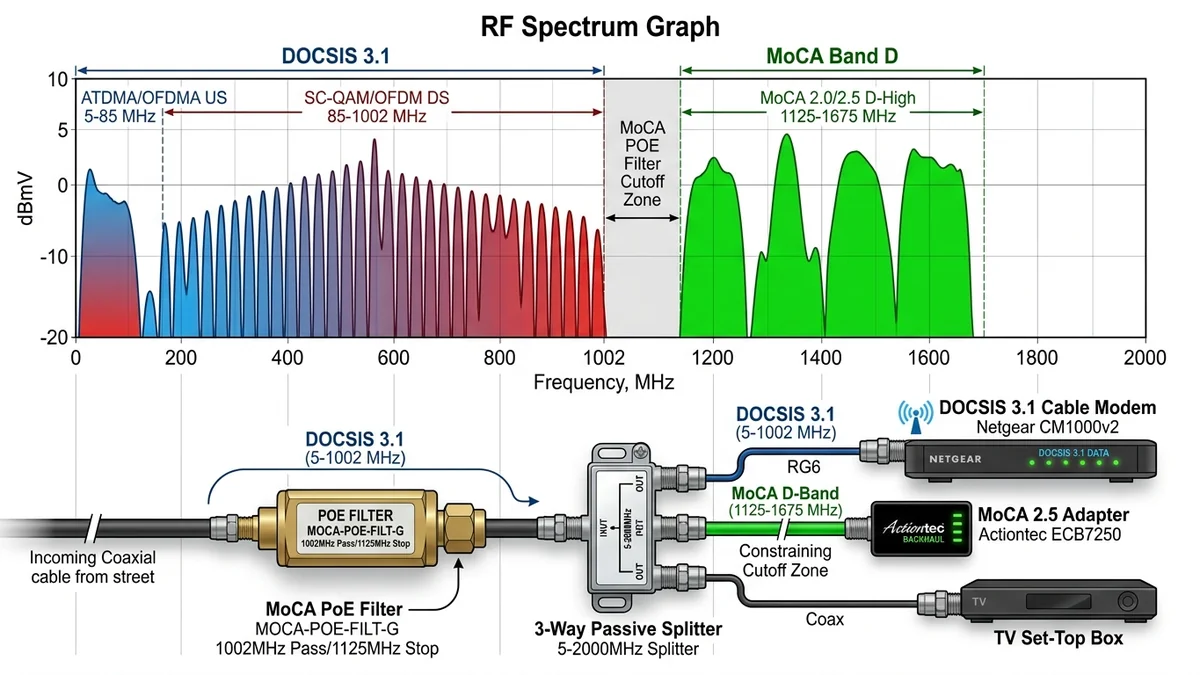
A common question among homeowners planning a MoCA installation is whether MoCA signals will slow down their DOCSIS 3.1 cable internet (Xfinity, Spectrum, Cox) or disrupt live cable TV channels. The short answer is: when configured with the proper frequency band and PoE filters, MoCA operates in complete harmony with cable broadband. Here is the engineering breakdown of frequency channels and how to prevent potential overlaps.
1. 🔬 Frequency Spectrum Allocation Map
| Service / Protocol | Operating Frequency Range | Overlap Potential with MoCA |
|---|---|---|
| Legacy Cable TV Channels | 54 MHz – 550 MHz | Zero Overlap (Completely Safe) |
| Standard DOCSIS 3.0 / 3.1 Downstream | 108 MHz – 1002 MHz | Zero Overlap (Safe) |
| MoCA 2.5 Extended Band D | 1125 MHz – 1675 MHz | Operates in Clean High Frequencies |
| DOCSIS 3.1 High-Split (Mid/High Split) | Up to 1218 MHz | Requires Band D-Low Toggle (ASUS MA-25) |
2. 🛠️ How to Prevent Interference in High-Split DOCSIS 3.1 Homes
- Install a dedicated MoCA Ground Block PoE Filter on the input of your cable modem.
- Use MoCA adapters with selectable frequency bands (like the ASUS MA-25 set to Band D-Low).
- Separate your cable modem onto a dedicated direct coax run if possible.
3. 🔬 Why High-Split DOCSIS 3.1 Upgrades Matter in 2026
Cable internet providers (such as Comcast Xfinity with "Next Gen Speed" and Charter Spectrum with "High-Split") are upgrading their cable plant to deliver symmetrical gigabit upload speeds. To achieve this, the cable upstream frequency is expanded from 42MHz up to 204MHz, and the downstream frequency extends from 258MHz up to 1218MHz.
Because standard MoCA Band D starts at 1125MHz, an overlap zone exists between 1125MHz and 1218MHz. If your cable modem begins using these frequencies, standard MoCA signals can cause modem micro-disconnects. The solution is using MoCA adapters with a Band D-Low hardware switch (like the ASUS MA-25) or adding a dedicated high-split filter to isolate the modem.
4. 🛠️ Complete Summary & Safe Deployment Checklist
- For 100% of fiber internet customers (AT&T, Verizon Fios, Frontier): Zero interference possible.
- For standard cable customers (DOCSIS 3.0 / standard 3.1): Zero interference when using a 70dB PoE filter.
- For high-split cable customers: Toggle MoCA adapter to Band D-Low or separate modem coax run.
5. 🔬 High-Split vs Mid-Split DOCSIS 3.1 Engineering Details
Cable operators are modernizing their Hybrid Fiber-Coaxial (HFC) networks to deliver symmetrical gigabit broadband. Understanding the three main split types prevents configuration surprises:
- Low-Split (Traditional): Upstream 5-42MHz, Downstream 54-1002MHz. 100% compatible with standard MoCA Band D (1125-1675MHz) with zero adjustments.
- Mid-Split: Upstream 5-85MHz, Downstream 108-1002MHz. 100% compatible with standard MoCA.
- High-Split (DOCSIS 3.1 / 4.0): Upstream 5-204MHz, Downstream 258-1218MHz. Overlaps with lower MoCA channels (1125-1218MHz). Solution: Toggle MoCA adapters to Band D-Low or use a dedicated direct coax cable for the modem.
6. 🛠️ 3 Golden Rules for Interference-Free Coexistence
- Always install a 70dB MoCA PoE filter directly on the cable modem’s coaxial input port if using a shared coax line.
- Use high-quality RG6 quad-shield coaxial patch cables rather than thin RG59 cables.
- If upstream modem power levels fluctuate, isolate the modem onto a separate direct coaxial run from the street.
7. 🔬 Real-World Frequency Verification on Cable Modems
To confirm that your cable modem is operating safely without MoCA interference, log into your modem's diagnostic page (typically 192.168.100.1) and check downstream channel frequencies. If all locked SC-QAM and OFDM downstream channels remain below 1002MHz, your cable modem and MoCA network are 100% isolated and operating in complete harmony.
8. 📝 Final Coexistence Summary
With a standard $10 70dB MoCA PoE filter installed at the point of entry, you can enjoy ultra-fast 2.5Gbps MoCA networking across all rooms with zero impact on your cable broadband or TV service.
9. 🔬 Coaxial Shielding & Ingress Noise Elimination
High-frequency MoCA signals (1125-1675MHz) are highly sensitive to loose coaxial F-connectors. Always hand-tighten all coaxial cable connections securely and use a small wrench to apply a 1/4-turn snug fit, preventing radio ingress noise from cell towers and Wi-Fi routers from degrading your cable broadband line.
10. 💡 Summary of Frequency Isolation Rules
- Install a PPC 70dB MoCA PoE filter at the point of entry before any splitters.
- Ensure all splitters are rated 5-1675MHz or 5-2400MHz.
- Toggle MoCA adapters to Band D-Low if operating high-split DOCSIS 3.1 modems.
11. 💡 Final Verification Checklist for Cable Internet Users
- Check that your cable modem downstream SNR levels remain above 35 dB across all locked channels.
- Verify that your upstream power levels remain between 40 dBmV and 49 dBmV.
- Enjoy blisteringly fast 2.5Gbps MoCA speeds throughout your home with complete peace of mind.
12. 🔬 DOCSIS 4.0 Frequency Future-Proofing (ESD vs FDD)
As cable ISPs transition to DOCSIS 4.0 Extended Spectrum DOCSIS (ESD) up to 1794MHz, MoCA 2.5 adapters will utilize Band D-Low or dedicated dark coax lines to maintain complete isolation, ensuring ongoing longevity for your home networking infrastructure.
13. 💡 Long-Term Network Stability Guarantee
By adhering to proper Point-of-Entry filtering and selecting 2GHz splitters, your home network will operate at maximum efficiency with 100% isolation between broadband internet and internal MoCA traffic.