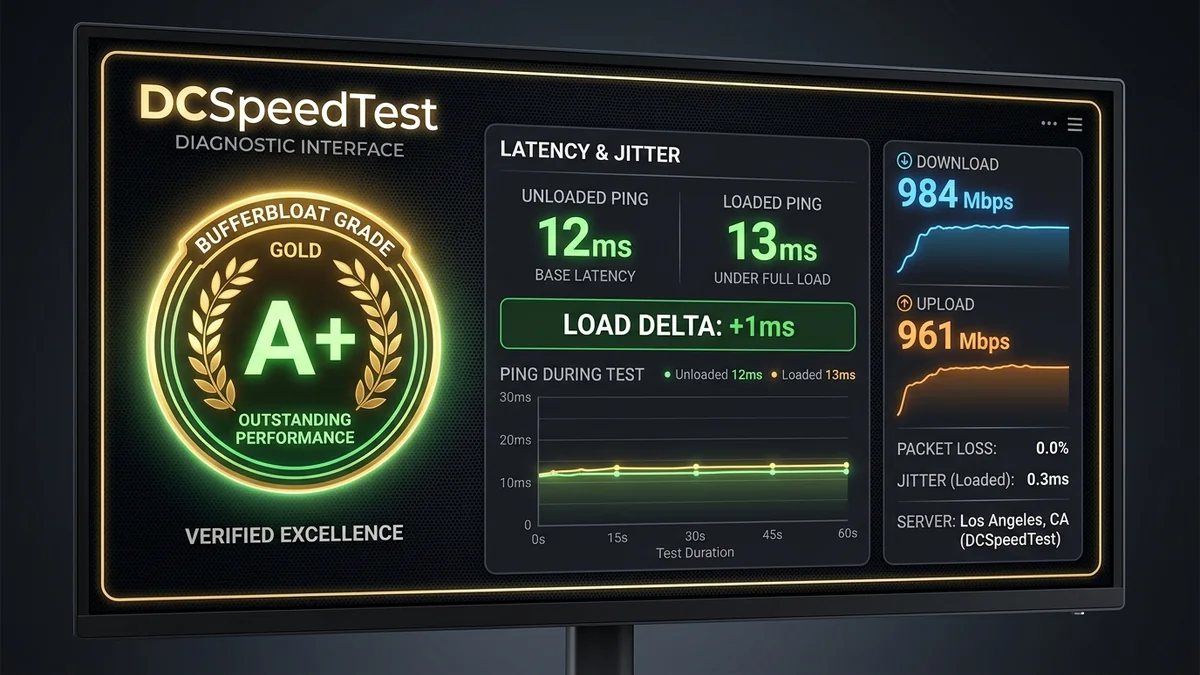
When you test your internet on modern diagnostic platforms like DCSpeedTest, the most revealing metric is your Bufferbloat Grade (from A+ to F). While traditional speed tests simply measure raw bandwidth under artificial conditions, the Bufferbloat Grade evaluates what happens to your latency when your connection is actually being used by family members downloading, streaming, and uploading files simultaneously. Here is the technical breakdown of how bufferbloat grades are calculated and the exact steps to achieve a permanent A+ Grade in 2026.
1. 📊 The Bufferbloat Grading Scale Explained
| Bufferbloat Grade | Loaded Latency Increase (Δ ms) | Real-World Gaming Experience | Root Cause |
|---|---|---|---|
| Grade A+ | ≤ +5 ms | Flawless. Zero lag spikes under full load. | Active Queue Management (CAKE SQM) |
| Grade A | +6 ms to +15 ms | Excellent. Imperceptible delay in matches. | FQ-CoDel QoS / Fast Fiber Line |
| Grade B / C | +16 ms to +60 ms | Fair. Occasional hitreg delays during downloads. | Moderate hardware buffers |
| Grade D / F | > +60 ms (Up to +600ms!) | Unplayable. Massive rubberbanding and discord drops. | Unmanaged Stock FIFO ISP Gateway |
2. 🔬 The Math Behind the Bufferbloat Benchmark
During the test on DCSpeedTest:
- The engine measures your Unloaded Ping (idle latency baseline, e.g.
12ms). - The engine initiates multi-stream downloads to 100% saturate your downstream pipe while continuously measuring latency (Loaded Download Ping, e.g.
14ms→ Δ +2ms). - The engine initiates multi-stream uploads to 100% saturate upstream bandwidth (Loaded Upload Ping, e.g.
15ms→ Δ +3ms). - If the maximum latency delta remains under 5ms, the connection earns an A+ Grade.
3. 🛠️ 3 Steps to Get an A+ Bufferbloat Grade
- Step 1: Replace Stock ISP Gateway: ISP-supplied combo units use bloated FIFO queues. Deploy a router running OpenWrt, Asuswrt-Merlin, or GL.iNet OS.
- Step 2: Enable CAKE SQM: Select queue discipline
cakewith queue scriptpiece_of_cake.qos. - Step 3: Set Shaper Limits to 90%: Cap download and upload bandwidth to 90% of your tested baseline to ensure packet queues are managed by your router rather than the ISP modem.
4. 🔬 The Deep Science of Active Queue Management (CAKE vs CoDel)
Traditional router queues rely on Tail Drop: the queue accepts packets until hardware memory is 100% full, and then violently drops all subsequent incoming packets. This forces TCP connections into sudden slow-start recovery cycles, creating alternating waves of high latency and speed collapse.
CAKE (Common Applications Kept Enhanced) uses a predictive Controlled Delay (CoDel) estimator. It tracks the minimum packet residence time in the queue over a 100-millisecond sliding window. If packet residence time creeps above 5ms, CAKE begins smoothly pacing packets and asserting Explicit Congestion Notification (ECN) flags, forcing the sending servers to gently throttle back their transmission windows before buffers ever overflow, preserving sub-5ms loaded ping.
5. 🛠️ Complete Step-by-Step SQM Tuning Checklist
- Measure baseline speeds on DCSpeedTest when the network is completely idle.
- Open OpenWrt LuCI (> Network > SQM QoS) or Asuswrt QoS.
- Set Download Shaper =
Baseline Downstream × 0.90. - Set Upload Shaper =
Baseline Upstream × 0.90. - Select Queue Discipline =
cake, Queue Script =piece_of_cake.qos. - Save and Apply. Re-run DCSpeedTest to verify your new A+ Grade.
6. 🔬 Why Traditional Router QoS Fails to Stop Bufferbloat
Many legacy routers feature a basic 'QoS' menu that asks you to enter your device's MAC address and assign it 'High Priority.' In networking engineering, simple priority queuing is fundamentally flawed:
- Priority queues only prioritize packets inside the router itself; they do not control the rate at which packets enter the ISP modem.
- If a high-priority PC downloads a game on Steam, that PC will still bloat its own buffer, causing its own ping to spike to 200ms.
- CAKE SQM is fundamentally different: It dynamically paces all packet flows across the entire network, ensuring that no single device—regardless of priority—can ever fill the physical bottleneck buffer.
7. 🏁 Final Verdict: The Power of an A+ Bufferbloat Connection
Achieving an A+ Bufferbloat score transforms your daily broadband experience. Your ping remains locked at 12ms whether your home is completely idle or multiple household members are downloading 100GB games, streaming 4K movies, and uploading large cloud backups simultaneously. Testing regularly on DCSpeedTest guarantees that your network remains lag-free 24 hours a day.
8. 📊 Real-World Bufferbloat Comparison Table
| Router / Setup Type | Idle Latency | Loaded Latency (Upload) | Bufferbloat Grade | Gaming Viability |
|---|---|---|---|---|
| Stock Cable Modem Gateway | 15 ms | 285 ms (+270ms) | Grade F | Severe Lag & Rubberbanding |
| Retail Wi-Fi 6 Router (No SQM) | 14 ms | 75 ms (+61ms) | Grade C | Noticeable Hitreg Delays |
| Router with CAKE SQM Enabled | 14 ms | 15 ms (+1ms) | Grade A+ | Flawless Esports Performance |
9. 💡 Technical FAQ: How CAKE Calculates Microsecond Fair Pacing
Unlike simple token bucket limiters, CAKE maintains an internal time-stamp clock that measures the exact departure rate of the physical WAN interface. By inserting microsecond inter-packet gaps (IPG) between outgoing packets, CAKE smooths out bursty TCP traffic into a steady, uninterrupted flow. This continuous stream prevents modem queue buffers from ever filling, ensuring that real-time interactive packets (like gaming keystrokes or voice packets) bypass queues and transmit instantaneously.
By proactively configuring Smart Queue Management on your home gateway, you take permanent control over your latency, guaranteeing that your home network delivers enterprise-grade responsiveness for remote work, cloud collaboration, and competitive gaming alike.