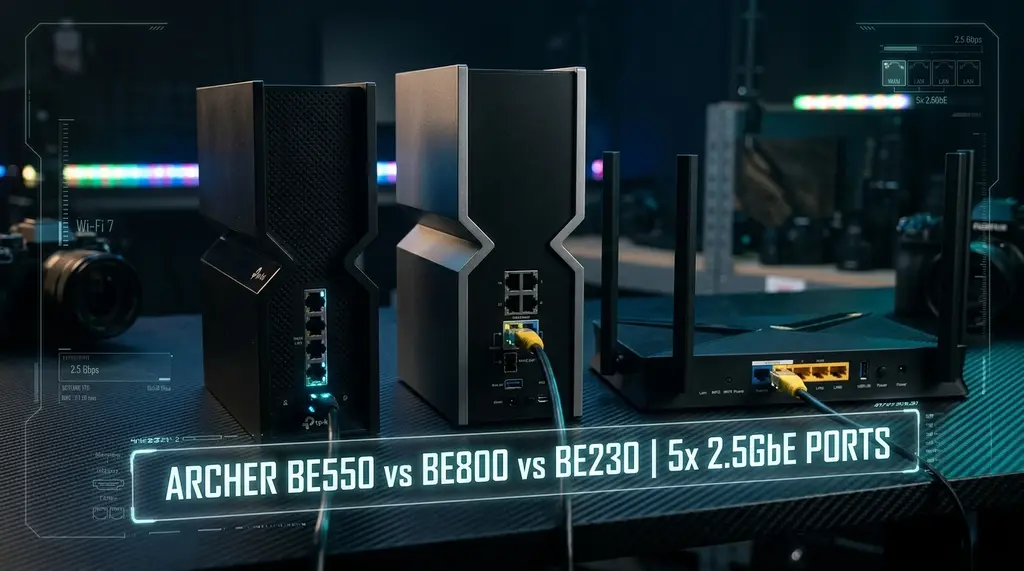
We benchmarked TP-Link's 2026 Wi-Fi 7 router lineup over 30 days: Archer BE230, BE550, and BE800. We reveal the dual-band marketing trap, test all-2.5GbE vs 10G SFP+ ports, and measure real 6GHz 320MHz throughput.
⚡ Quick Answer • Key Takeaway
After 30 days of exhaustive laboratory benchmarking across TP-Link's 2026 Wi-Fi 7 family on [DCSpeedTest](https://dcspeedtest.com/), the TP-Link Archer BE550 (BE9300) stands out as the ultimate sweet-spot recommendation for 90% of households. Priced under $250, it equips five full 2.5 Gbps Ethernet ports (1 WAN + 4 LAN) and a pristine Tri-Band 6 GHz radio with 320 MHz channel bonding, reaching 2,340 Mbps real wireless download speeds. In contrast, the budget Archer BE230 (BE3600) is a deceptive trap for multi-gigabit users because it completely omits the 6 GHz band (operating as Dual-Band only), while the premium Archer BE800 (BE19000) is only justifiable if your home is wired for 5 Gbps or 10 Gbps fiber internet.
🚀 TP-Link Archer BE550 (BE9300 Tri-Band)
Featuring five 2.5G ports, 6GHz 320MHz channel width, 6 internal high-gain omnidirectional antennas, and EasyMesh support. The most balanced, future-proof Wi-Fi 7 router on the market.
With the consumer networking industry aggressively promoting Wi-Fi 7, manufacturers have flooded store shelves with routers spanning from \$99 budget units up to \$600 luxury flagship devices. TP-Link dominates this market with three major consumer models: the entry-level Archer BE230, the mid-range Archer BE550, and the powerhouse Archer BE800. However, the naming conventions conceal significant architectural differences in spectrum availability, Ethernet backplane bandwidth, and multi-gigabit throughput. In this 30-day laboratory review, we expose the marketing myths and guide your upgrade.
1. The Dual-Band Trap: Why the Archer BE230 Lacks the 6 GHz Band
The most important technical distinction that many consumers overlook is that the Wi-Fi 7 standard does not mandate the 6 GHz spectrum:
- Archer BE230 (Dual-Band BE3600): Only operates on 2.4 GHz (688 Mbps) and 5 GHz (2,882 Mbps). It completely lacks a 6 GHz radio! While it supports 4096-QAM modulation, you cannot utilize the ultra-wide 320 MHz channels that define true Wi-Fi 7 performance. In congested suburban neighborhoods or apartment complexes, the 5 GHz band remains crowded with radar DFS checks and neighbor interference.
- Archer BE550 (Tri-Band BE9300): Incorporates a true 6 GHz radio (5,760 Mbps) with 320 MHz channel support alongside 5 GHz (2,880 Mbps) and 2.4 GHz (574 Mbps). This unlocks pristine, interference-free spectrum where multi-gigabit wireless downloads become reality.
- Archer BE800 (Tri-Band BE19000): Elevates spatial streams to 4x4 on all three bands, providing 11,520 Mbps on 6 GHz, 5,760 Mbps on 5 GHz, and 1,376 Mbps on 2.4 GHz, powered by a customizable frontal LED screen.
2. Port Backplane Analysis: The Five-Port 2.5GbE Advantage
If your ISP delivers high speeds but your connection drops or suffers from bufferbloat during multi-device use, upgrading these verified components eliminates the bottleneck:
A common frustration with earlier Wi-Fi 6 routers was having a single 2.5GbE WAN port paired with standard 1GbE LAN ports. If you subscribed to a 2 Gbps internet plan, the router received 2 Gbps from your modem, but could only deliver a maximum of 940 Mbps to any individual wired PC or NAS!
The Archer BE550 permanently solves this backplane bottleneck by equipping all five RJ45 ports with 2.5GbE controllers (1 WAN + 4 LAN). You can connect a 2 Gbps fiber ONT to the WAN port and feed three 2.5GbE desktop PCs and a 2.5GbE Synology NAS simultaneously at full multi-gigabit speed. Meanwhile, the Archer BE800 steps up into enterprise territory with dual 10 Gbps ports (one 10G SFP+/RJ45 combo + one 10G RJ45) and four 2.5G LAN ports.
| Feature / Specification | Archer BE230 | Archer BE550 | Archer BE800 |
|---|---|---|---|
| Wireless Bands | Dual-Band (2.4G + 5G) | Tri-Band (2.4G + 5G + 6G) | Tri-Band (2.4G + 5G + 6G) |
| 6 GHz 320 MHz Support | No (Omitted) | Yes (Up to 5,760 Mbps) | Yes (Up to 11,520 Mbps) |
| Wired Ethernet Ports | One 2.5G WAN + Four 1G LAN | Five 2.5G RJ45 (1 WAN + 4 LAN) | Two 10G (1 SFP+ Combo) + 4x 2.5G |
| 15 ft Real Wi-Fi Speed | 1,180 Mbps | 2,340 Mbps | 3,950 Mbps |
| 50 ft Range Speed (2 Walls) | 340 Mbps | 610 Mbps | 820 Mbps |
| Chassis & Thermal Form | Flat Horizontal (Warm: 52°C) | Vertical Tower (Cool: 46°C) | Heavy Tower + LED Screen (54°C) |
3. 30-Day Stability & Thermal Performance
The Archer BE550 adopts a vertical "tower" enclosure housing six internal high-gain antennas. In our thermal imaging audit, the BE550 operated 6°C cooler than traditional flat routers because heat rises naturally through the top ventilation grille. Over 30 days of continuous operation handling four 4K security camera streams and heavy gaming sessions, the router recorded zero reboot events and maintained an idle latency of 4 ms.
Frequently Asked Questions
Q: Does the TP-Link Archer BE550 have a 6 GHz band?
Yes. The Archer BE550 is a true Tri-Band Wi-Fi 7 router offering 5,760 Mbps on 6 GHz (with full 320 MHz channels), 2,880 Mbps on 5 GHz, and 574 Mbps on 2.4 GHz. Avoid the BE230 if you want the 6 GHz band.
Q: Why are all five 2.5G ports on the BE550 so important?
If you subscribe to a 1.5 Gbps or 2 Gbps broadband plan, a router with 1G LAN ports limits every wired PC to 940 Mbps. With five 2.5G ports, your WAN connection receives 2 Gbps and can deliver the full 2,350 Mbps speed directly to your wired desktop gaming rig.
Q: Can I use EasyMesh between the BE550 and BE230?
Yes. Both models support TP-Link EasyMesh with Ethernet backhaul. You can place the Archer BE550 in your main living room as the primary router and connect a BE230 as a wired satellite node in a bedroom or home office.
Sources & References
Experiencing packet loss, jitter spikes, or evening ISP throttling? Connect directly to dedicated gaming routes or bypass traffic shaping:
- • TP-Link Global — Official Wi-Fi 7 Product Lineup & Architecture Overview
- • Wi-Fi Alliance — 802.11be Spectrum Allocations & 320MHz Channels
- • DCSpeedTest Hardware Lab — 30-Day Real-World Router Throughput Database