T-Mobile SIM Card: Everything You Need to Know in 2026
A T-Mobile SIM card (Subscriber Identity Module) is a small chip that stores your T-Mobile account credentials and connects your device to T-Mobile's 5G network. Without a properly configured SIM card, your phone has no cellular identity — it can't make calls, send texts, or access mobile data on T-Mobile's network.
In 2026, T-Mobile supports both physical SIM cards and eSIM (embedded SIM), which eliminates the physical card entirely. Understanding which type you need, which size fits your device, and how to get one — is what this guide covers in full.
Get a T-Mobile SIM card on Amazon — delivered to your door, no store visit needed. Works with any unlocked phone on T-Mobile's 5G network: Buy T-Mobile SIM on Amazon →
T-Mobile SIM Card Types: Physical SIM vs eSIM
T-Mobile offers two fundamentally different SIM technologies in 2026:
Physical T-Mobile SIM Card
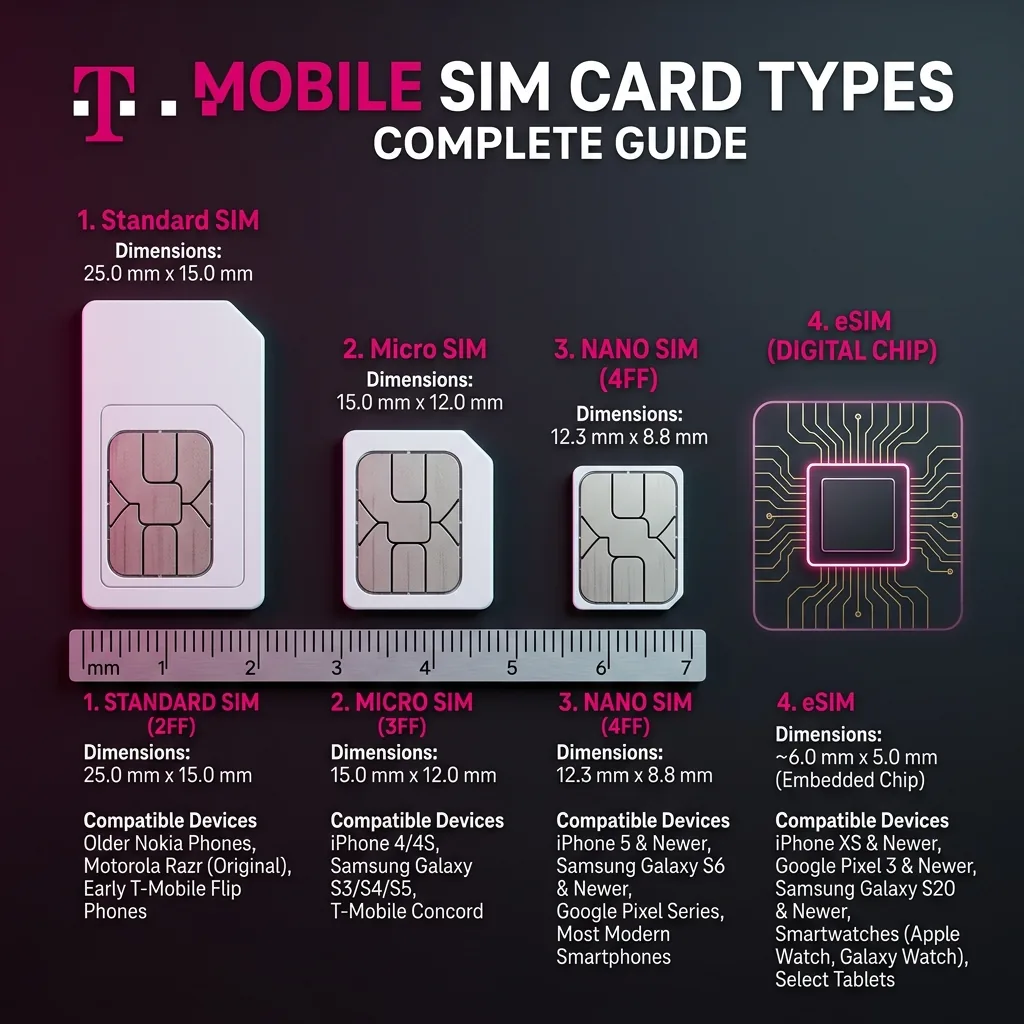
A physical SIM card is a removable chip you insert into your phone's SIM card tray. It comes in a multi-format card that you snap to the correct size:
| SIM Size | Dimensions | Compatible Devices | Also Called |
|---|---|---|---|
| Standard SIM | 25 × 15 mm | Older phones, some tablets/routers | Mini SIM, 2FF |
| Micro SIM | 15 × 12 mm | iPhone 4/4S/5, older Android devices | 3FF |
| Nano SIM | 12.3 × 8.8 mm | iPhone 5 and later, Samsung S5 and later, virtually all modern phones | 4FF |
T-Mobile SIM cards ship as a triple-cut card — one physical card containing all three sizes. Simply snap out the size that matches your phone's SIM tray. The nano SIM is the correct size for 99% of smartphones manufactured since 2015.
T-Mobile eSIM (Embedded SIM)
An eSIM is a digital SIM that's permanently embedded in your phone's hardware — there's no physical card to insert. You activate T-Mobile service by scanning a QR code or downloading a profile from T-Mobile's website or app. The profile is stored directly on your phone's chip.
T-Mobile eSIM advantages:
- Instant activation — no waiting for delivery
- No physical SIM slot required — works on devices with no SIM tray (like Apple Watch, some tablets)
- Multiple eSIM profiles can be stored on one phone (dual SIM functionality on supported devices)
- No risk of losing or damaging a physical card
- Easy to switch carriers without swapping hardware
T-Mobile eSIM compatible devices (2026):
- iPhone: iPhone XS, XR, 11, 12, 13, 14, 15 series and later (US models)
- Samsung: Galaxy S21, S22, S23, S24 series; Galaxy Z Fold/Flip series
- Google Pixel: Pixel 3 and later
- iPad: iPad Pro (2018+), iPad Air (3rd gen+), iPad mini (5th gen+)
- Apple Watch: Series 3 and later (with compatible iPhone)
How to Get a T-Mobile SIM Card in 2026
There are four ways to get a T-Mobile SIM card — each with different convenience levels and wait times:
1. Amazon (Fastest, Most Convenient)
Order online and receive in 1-2 days with Prime, or 3-5 days standard. Activate entirely online — no store visit, no line, no sales rep. This is the most convenient option for most users.
📦 Order T-Mobile SIM Card on Amazon →
2. T-Mobile.com (Free, 3-5 Days Shipping)
Order at t-mobile.com — T-Mobile ships SIM cards for free. Standard shipping takes 3-5 business days. eSIM is available for instant download on compatible devices — zero wait time.
3. T-Mobile Store (Same Day)
Walk into any T-Mobile store and get a SIM card immediately. A representative can also help you choose a plan and complete activation in store. SIM cards are free at T-Mobile stores when paired with a new plan activation.
4. Walmart, Target, Best Buy, Dollar General
T-Mobile SIM starter kits are widely stocked at major retail chains. Prices are $0-10 (the SIM itself is free or nominal — you pay for the plan when activating). Usually available in the electronics section or pre-paid phone aisle.
T-Mobile SIM Card Activation: Step-by-Step
Activating a Physical T-Mobile SIM Card
- Check unlock status: Your phone must be unlocked to use a T-Mobile SIM. If you bought the phone from another carrier (Verizon, AT&T, etc.), contact them to unlock it before inserting the new SIM.
- Power off your phone completely before inserting the SIM.
- Find the SIM tray: Use the SIM eject tool (or an unfolded paperclip) in the pinhole on the side of your phone to pop out the SIM tray.
- Snap out the correct SIM size from the T-Mobile multi-cut card. Almost all modern phones use nano SIM (smallest size).
- Insert the SIM with the gold chip facing down in the correct orientation for your phone model.
- Power on your phone. In Settings, confirm the T-Mobile SIM is detected (Settings → General → About on iPhone; Settings → About phone on Android).
- Activate your plan: Open a browser and go to t-mobile.com/activate, or call 1-877-778-2106. Enter the ICCID number printed on your SIM card, choose your plan, and pay. Activation completes in 5-15 minutes.
- Test your connection: Once activated, open DCSpeedTest.com to verify 5G data is working and measure your real download and upload speeds.
Activating T-Mobile eSIM
- Confirm your device is eSIM-compatible (see list above).
- Go to t-mobile.com/activate or open the T-Mobile app.
- Select "Set up new line" and choose the eSIM option.
- On iPhone: Go to Settings → Cellular → Add Cellular Plan and scan the QR code T-Mobile provides. On Samsung: Settings → Connections → SIM Manager → Add eSIM.
- Label the new plan "T-Mobile" and set it as your default data line.
- Activation completes within minutes — no hardware required.
T-Mobile SIM Card Replacement: When and How
You need a new T-Mobile SIM card in these situations:
- Upgrading from 4G to 5G SIM: If your current SIM is more than 3 years old, it may be a 4G-only SIM that limits your speeds. T-Mobile provides free SIM upgrades to 5G-capable SIM cards at any store or by mail.
- Lost or damaged SIM: Request a replacement at t-mobile.com/account, the T-Mobile app, or any T-Mobile store. Replacement SIMs are free for existing customers on active plans.
- Moving to a new phone with a different SIM size: If you're upgrading from an older phone that used a micro SIM to a new phone requiring nano SIM, you need a replacement (free from T-Mobile).
- SIM card not recognized or showing "No SIM" error: See the troubleshooting section below.
T-Mobile SIM Card Compatibility: Which Phones Work?
Any unlocked GSM phone that supports the following T-Mobile frequency bands will work with a T-Mobile SIM card:
| Network | Band | Frequency | Coverage |
|---|---|---|---|
| 5G Ultra Capacity (fast) | n41 | 2.5 GHz | 85% US population |
| 5G Extended Range | n71 | 600 MHz | 99% US population |
| 4G LTE | B2, B4, B12, B66, B71 | Various | National |
| 2G/3G fallback | B2, B4 | 1900/2100 MHz | Limited (being shutdown) |
Fully compatible devices (all T-Mobile 5G bands):
- iPhone 12, 13, 14, 15 series (all models) — full 5G UC support
- Samsung Galaxy S20, S21, S22, S23, S24 series
- Samsung Galaxy A53, A54, A55
- Google Pixel 5, 6, 7, 8, 9 series
- OnePlus 9 Pro, 10 Pro, 11, 12 (unlocked US versions)
- Most unlocked Android flagship phones from 2020 or later
Limited compatibility (LTE only, no 5G):
- iPhone 5, 6, 7, 8, SE (1st gen) — LTE only
- Samsung Galaxy S-series before S20 — LTE only
- Phones locked to Verizon (CDMA-only, no GSM) — not compatible
T-Mobile SIM Card Not Working: Troubleshooting Guide
If your T-Mobile SIM card shows "No SIM," "Invalid SIM," or "SIM Not Supported," follow these steps in order:
- "No SIM Inserted": Power off, remove the SIM, clean both the SIM and tray contacts with a dry cloth, and reinsert firmly. Restart the phone. This resolves most hardware detection issues.
- "Invalid SIM" or "SIM Not Supported": Your phone may be locked to another carrier. Contact your previous carrier's customer support to request an unlock. Unlocking is free and required by FCC regulations for all US carriers.
- SIM detected but no service: The SIM may not be activated. Go to t-mobile.com/activate and complete activation using the ICCID on the SIM card. Or call T-Mobile support at 611 from any T-Mobile phone.
- SIM activated but slow speeds: Your SIM may be a 4G-only SIM on a 5G phone. Visit a T-Mobile store or request a free SIM upgrade via the T-Mobile app → Manage SIM.
- SIM works for calls but not data: Check APN settings. Go to Settings → Cellular → Cellular Data Network → APN and enter "fast.t-mobile.com" (iOS) or Settings → Mobile Network → APNs → T-Mobile (Android).
- Still not working: Contact T-Mobile support at 1-877-453-1304. A bad SIM card (hardware failure) is rare but possible — T-Mobile replaces faulty SIMs for free.
T-Mobile SIM Card vs eSIM: Which Should You Choose?
| Feature | Physical T-Mobile SIM | T-Mobile eSIM |
|---|---|---|
| Setup time | 2-5 days (shipping) | Instant (download) |
| Device compatibility | All phones with SIM tray | iPhone XS+, Samsung S21+, Pixel 3+ |
| Dual SIM capability | One SIM at a time (unless phone has dual SIM tray) | Yes — use physical + eSIM simultaneously |
| Portability between phones | Easy — physically remove and reinsert | Requires deactivation on old phone first |
| Risk of loss/damage | Yes — tiny card can be lost | Zero — embedded in phone hardware |
| International travel | Swap to local SIM while abroad | Add local eSIM profile alongside T-Mobile |
| Cost | Free | Free |
| Speed/performance | Identical | Identical |
Recommendation: If your phone supports eSIM (iPhone 12+, Samsung S21+) and you're activating a new plan, choose eSIM for instant activation. If you need to move between phones frequently, or you're buying a SIM on Amazon to hold until your device arrives, choose the physical SIM.
Is a T-Mobile SIM Card Free?
Yes, in most cases:
- At a T-Mobile store: Free when activating a new plan
- Replacement SIM for existing customers: Free (in-store or by mail)
- eSIM activation: Free — no physical card needed
- On Amazon: The SIM starter kit is typically $0-5 with no plan included. You purchase the plan separately when activating online.
On Amazon, you're paying nominal shipping/handling for a physical SIM card — the SIM card itself has no inherent cost. The value is in the T-Mobile plan you activate on it. Get the T-Mobile SIM card on Amazon →
Frequently Asked Questions: T-Mobile SIM Card
What size SIM card does T-Mobile use?
T-Mobile uses nano SIM cards (12.3 × 8.8 mm, 4FF) for virtually all smartphones manufactured since 2014. T-Mobile SIM cards ship as a multi-cut triple card (standard/micro/nano in one) — snap out the nano size for any modern iPhone or Android phone. Some older devices, mobile routers, and tablets may use micro or standard SIM.
How do I get a T-Mobile SIM card?
The fastest way is to order on Amazon (available here →) for delivery in 1-2 days, then activate online at t-mobile.com/activate. You can also get one free at any T-Mobile store, order free at t-mobile.com (3-5 day shipping), or use eSIM for instant activation on compatible phones.
Can I use a T-Mobile SIM card in an unlocked phone?
Yes — any unlocked phone that supports T-Mobile's 4G LTE bands (especially Band 2, 4, 12, 66, 71) will work with a T-Mobile SIM card. For T-Mobile 5G UC (the fast tier), your phone must support Band n41 (2.5 GHz). iPhone 12 and later, Samsung Galaxy S20 and later, and most 2021+ Android flagship phones support T-Mobile 5G UC.
How long does T-Mobile SIM activation take?
Online activation at t-mobile.com/activate takes 5-15 minutes after completing payment. eSIM activation is usually faster: 2-5 minutes after downloading the profile. If activating by transferring a number from another carrier (porting), the port typically completes within 4-24 hours.
Can I get a T-Mobile SIM card without a contract?
Yes. T-Mobile offers prepaid plans ($35-50/month) and postpaid plans (monthly, no annual contract) — both available on the same SIM card. Activate a prepaid plan on any T-Mobile SIM for no-contract service with no credit check required.
What do I do if my T-Mobile SIM card is not working?
First: power off, remove the SIM, clean the contacts, and reinsert. If still not working: check if your phone is unlocked (locked phones show "SIM Not Supported"). If unlocked but still no service: complete activation online at t-mobile.com/activate using the SIM's ICCID number. If data works but speeds are slow: visit a T-Mobile store for a free 5G SIM upgrade.
What is the difference between a T-Mobile SIM card and eSIM?
A physical T-Mobile SIM card is a removable chip you insert into your phone's SIM tray. An eSIM is a digital profile downloaded to a chip permanently embedded in your phone — no physical card needed. Both provide identical T-Mobile 5G service. eSIM is faster to activate (instant) and supports dual-SIM without a second SIM tray. Physical SIM works on any phone with a SIM slot, including older devices that don't support eSIM.
Test T-Mobile Speed After SIM Activation
After inserting and activating your T-Mobile SIM card, run a speed test at DCSpeedTest.com to confirm you're connected to T-Mobile's 5G network. Look for the "5G UC" indicator on your phone's status bar — that confirms you're on T-Mobile's fast mid-band 5G UC tier. A good result is 150+ Mbps download and 30-35ms ping.
Ready to get on T-Mobile's 5G network? Order your T-Mobile SIM card on Amazon — fast delivery, activate online, no store visit required: Get T-Mobile SIM on Amazon →