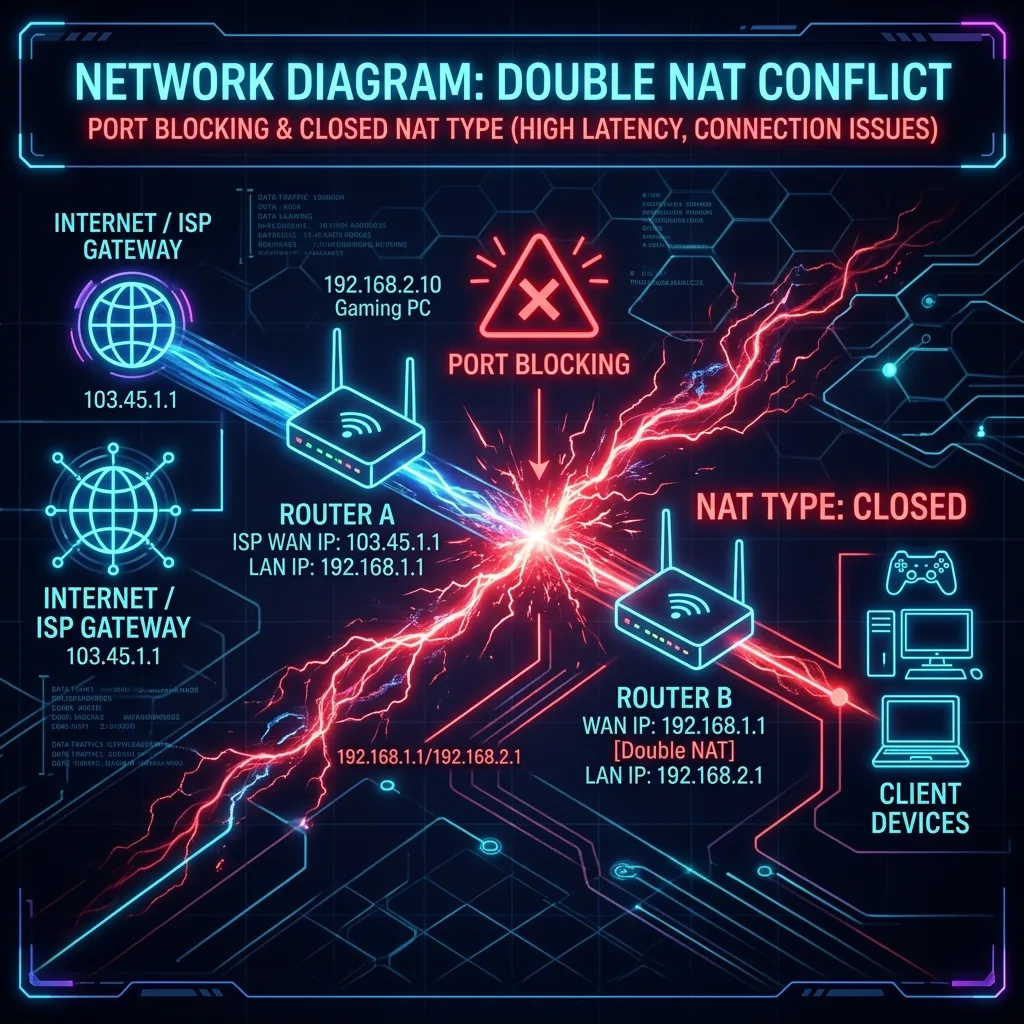
If you have recently added a new mesh Wi-Fi system or a second router to your house, you might notice some strange behavior: your smart home devices refuse to communicate with each other, your remote desk software won't connect, and your gaming console displays a warning: "Closed NAT Type." The silent culprit behind these issues is **Double NAT**. While it doesn't always show up as slower megabits on a generic speed test, Double NAT blocks connection ports and adds unnecessary routing lag. Here is how to diagnose and fix it.
What is NAT and Why Does Double NAT Occur?
NAT stands for **Network Address Translation**. Your ISP assigns your home a single **Public IP Address** (e.g., 103.45.1.1). However, you have dozens of smart TVs, phones, and computers in your house. Your router uses NAT to assign these devices private, internal IP addresses (usually starting with 192.168.x.x), translating their individual requests so they can share the single public IP.
Double NAT occurs when you have **two routers in series** executing translation at the same time:
Modem/Router Combo (from ISP) ---> Your Own Router (ASUS/Mesh) ---> Client Devices
Your ISP gateway translates the packet, and then your personal router translates the packet again. This dual translation creates a routing loop, blocking incoming traffic from reaching your console or server.
Why Double NAT is a Nightmare
- Port Forwarding Fails: If you host a game server or local media server (Plex), you must forward incoming ports. In a Double NAT setup, the ISP gateway receives the packet but doesn't know how to route it to your personal router, causing port forwarding to fail completely.
- Closed NAT in Gaming: Multiplayer networks (like Xbox Live or PlayStation Network) require an Open NAT to pair you with other players. A Closed NAT caused by Double NAT blocks peer-to-peer matchmaking, making it impossible to join lobbies or use voice chat.
- Local Device Isolation: Devices connected to the ISP gateway cannot communicate with devices connected to your second router. Your phone won't be able to cast video to your Smart TV because they are trapped on separate networks.
How to Check if You Have Double NAT
To verify if your connection is executing dual translation, log into your personal router's admin panel:
- Find the **WAN / Internet Status** page.
- Look at the **WAN IP Address** assigned to your router.
- If the WAN IP is a **Private IP Address** (e.g.,
192.168.1.X,192.168.0.X, or10.0.0.X), your personal router is connected to another router. You have **Double NAT**.
The 3-Step Technical Protocol to Fix Double NAT
Method 1: Enable Bridge Mode on the ISP Gateway (Recommended)
The cleanest way to fix Double NAT is to tell your ISP modem/router combo to stop acting as a router.
The Fix: Log into your ISP gateway admin panel. Find the internet configuration page and toggle the operation mode from "Routing" to **Bridge Mode** (or IP Passthrough). This completely disables the ISP gateway's Wi-Fi and NAT features, passing the public IP address directly to your personal router. Your personal router is now in full, unhindered control of your network.
Method 2: Convert Your Second Router to Access Point (AP) Mode
If you cannot enable Bridge Mode on your ISP gateway, you can disable the NAT and routing features of your personal router instead.
The Fix: Log into your personal router, navigate to the **System / Administration** page, and change the operating mode to **Access Point (AP) Mode**. This disables its DHCP server and NAT translator, converting it into a dumb wireless transmitter. Your ISP gateway handles all routing, consolidating all home devices onto a single network.
Method 3: Set Your Router in the ISP Gateway's DMZ
If your ISP gateway doesn't support Bridge Mode, you can use a DMZ (Demilitarized Zone) bypass.
The Fix: Note your personal router's WAN IP. Log into the ISP gateway, navigate to the **DMZ settings**, enable it, and input your router's WAN IP. This tells the ISP gateway to forward all incoming traffic directly to your personal router, bypassing its translation filter and opening your NAT ports.
Conclusion
Double NAT is a silent network blocker that breaks port forwarding, casting, and multiplayer matchmaking. By configuring your ISP gateway to Bridge Mode or converting your personal router into an Access Point, you can consolidate your home networks, open up your NAT ports, and enjoy seamless, lag-free connectivity.