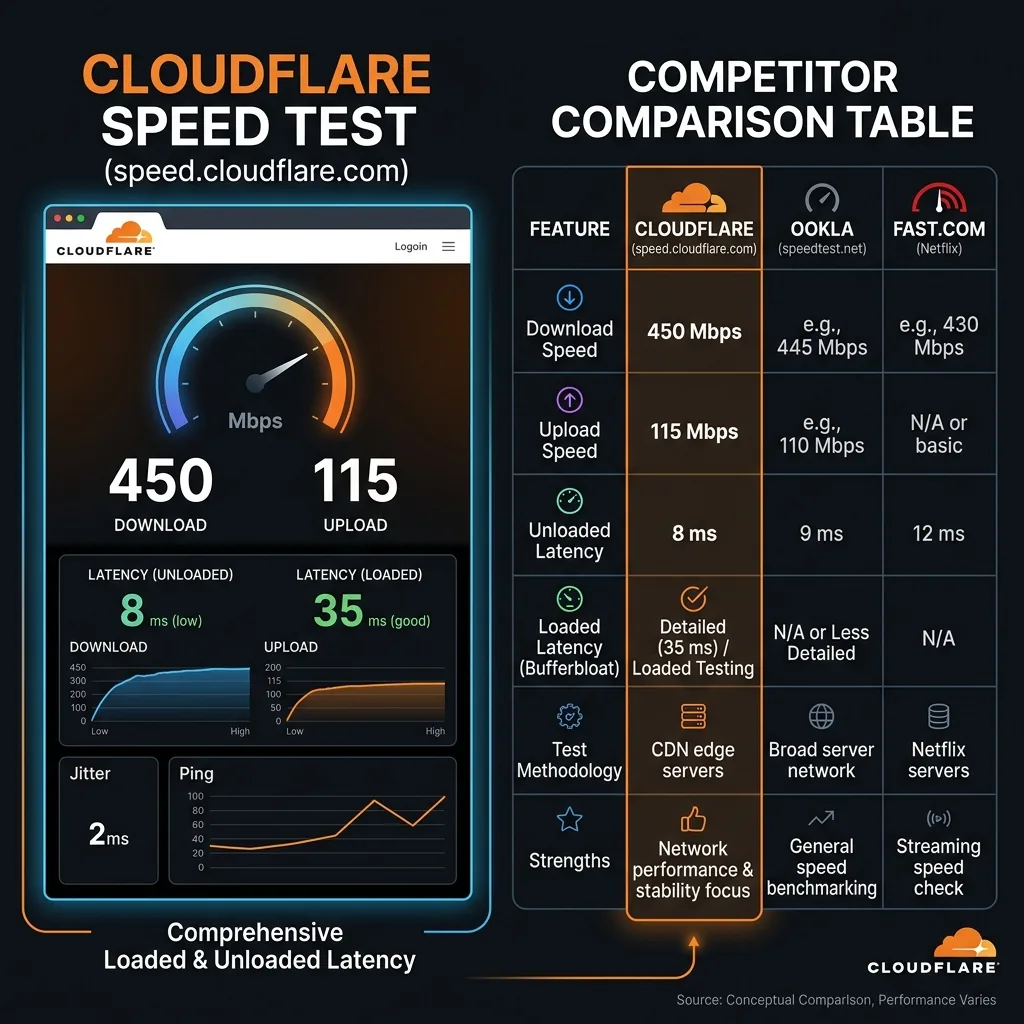
What Is the Cloudflare Speed Test?
The Cloudflare speed test, available at speed.cloudflare.com, is a free internet speed measurement tool operated by Cloudflare — the world's largest content delivery network and internet security company. Unlike speed test tools operated by ISPs (Ookla uses ISP-hosted servers) or streaming companies (Fast.com is Netflix's tool), Cloudflare's speed test runs on infrastructure that is inherently independent of any single ISP or content company.
Cloudflare operates one of the world's largest and most distributed networks, with data centers (called "Points of Presence" or PoPs) in over 330 cities across 120+ countries. When you run a Cloudflare speed test, your data travels to the nearest Cloudflare edge server — typically within your metropolitan area — providing a measurement of your internet performance with minimal routing overhead.
Why this matters for you: Because Cloudflare is not an ISP, does not sell internet service, and is not financially incentivized to make your connection look faster than it is, the Cloudflare speed test is widely regarded by network engineers and researchers as one of the most neutral and unbiased speed measurement tools available to consumers.
Cloudflare Speed Test Unique Metrics: What It Measures That Others Don't
The Cloudflare speed test at speed.cloudflare.com measures more dimensions of internet performance than most other free tools. Here's every metric it reports and what it means:
Standard Metrics (Also in Ookla and DCSpeedTest)
| Metric | What It Measures | Good Value |
|---|---|---|
| Download Speed | Throughput receiving data from Cloudflare servers (Mbps) | Above 80% of ISP plan |
| Upload Speed | Throughput sending data to Cloudflare servers (Mbps) | 5+ Mbps for video calls; 20+ for work |
| Latency (Ping) | Round-trip time for a packet (ms) | Under 20ms (fiber/cable); under 50ms (4G/5G) |
| Jitter | Variation in latency between packets (ms) | Under 10ms for stable calls/gaming |
Cloudflare-Exclusive Metrics (Not in Ookla or Fast.com)
| Metric | What It Measures | Why It Matters |
|---|---|---|
| DNS Response Time | How long your DNS resolver takes to look up a domain name (ms) | Slow DNS (above 100ms) makes all websites feel slow even on fast connections — every new website visit starts with a DNS lookup |
| Connection Time | Time to establish a TCP connection to Cloudflare's server (ms) | High connection time indicates routing issues or network overhead between your device and Cloudflare's infrastructure |
| Loaded Latency | Latency measured while data is actively downloading (ms) | Shows how much latency increases under load — key for detecting buffer bloat where your router can't handle simultaneous traffic without adding delay |
| Unloaded Latency | Latency measured when no data is transferring (ms) | Your baseline network latency — compare loaded vs unloaded to measure buffer bloat impact |
| Packet Loss | Percentage of packets that fail to arrive (during extended test) | Even 0.5% packet loss causes TCP retransmissions that slow all connections; video calls drop; gaming shows rubber-banding |
Key insight on DNS Response Time: Many users with fast connections (100+ Mbps) experience slow web browsing because their ISP's DNS resolver is slow (100-300ms per lookup). Switching DNS to Cloudflare 1.1.1.1 or Google 8.8.8.8 can dramatically speed up perceived browsing speed without changing your ISP plan. The Cloudflare speed test is one of the few tools that surfaces this issue.
How Cloudflare's Speed Test Works Technically
The Cloudflare speed test uses a sophisticated multi-stage measurement methodology that differs from Ookla's simpler approach:
Stage 1: Server Selection
When you open speed.cloudflare.com, Cloudflare's anycast routing automatically directs your connection to the nearest Cloudflare edge node — the same infrastructure serving billions of web requests daily. There's no manual server selection — Cloudflare's global anycast network ensures you always test against the optimal server location.
Stage 2: Latency Measurement
Before any data transfer begins, Cloudflare measures your unloaded latency using ICMP-like HTTP requests — small packets that go to the Cloudflare edge and return. This baseline latency measurement takes 2-3 seconds and captures your true idle network latency without any throughput content.
Stage 3: DNS Measurement
Cloudflare measures your DNS resolver's response time by timing how long a fresh DNS lookup takes. This captures your DNS performance — which directly affects how fast websites "feel" to load, independent of your download or upload speed.
Stage 4: Download Test
The Cloudflare speed test downloads multiple files at different sizes (90 KB to 100 MB) through a series of sequential and parallel HTTP transfers. This multi-file, multi-size approach captures how your connection handles both small quick requests (like web pages) and large sustained downloads (like video or software downloads). The test calculates the 90th percentile speed across all samples — which is more representative of real-world performance than the peak speed.
Stage 5: Upload Test
Similarly, the upload test uses multiple file sizes to capture upload performance across different request types. The 90th percentile is used as the result.
Stage 6: Loaded Latency Measurement
While data is actively transferring (download or upload), Cloudflare simultaneously measures latency. This "loaded latency" reveals buffer bloat — if your router's queue management is poor, latency spikes while downloading (from 10ms idle to 200ms+ loaded). Good routers with active queue management (AQM) or CAKE maintain low latency even under full download load.
Cloudflare Speed Test vs Other Tools: Full Comparison
| Feature | Cloudflare (speed.cloudflare.com) | DCSpeedTest | Ookla (speedtest.net) | Fast.com | |
|---|---|---|---|---|---|
| Download speed | ✅ | ✅ | ✅ | ✅ | ✅ |
| Upload speed | ✅ | ✅ | ✅ | ⚠️ Hidden | ✅ |
| Latency / Ping | ✅ (Loaded + Unloaded) | ✅ | ✅ | ⚠️ Hidden | ✅ |
| Jitter | ✅ | ✅ | ✅ | ❌ | ⚠️ |
| DNS response time | ✅ Exclusive | ❌ | ❌ | ❌ | ❌ |
| Connection time | ✅ Exclusive | ❌ | ❌ | ❌ | ❌ |
| Buffer bloat detection | ✅ (Loaded vs Unloaded latency) | ❌ | ❌ | ⚠️ Partial | ❌ |
| Packet loss | ✅ (Extended test) | ⚠️ | ⚠️ App only | ❌ | ❌ |
| Network used | Cloudflare (fully neutral) | Cloudflare (neutral) | ISP-hosted (biased) | Netflix CDN (biased) | Google M-Lab |
| ISP bias risk | None | None | High | Medium | Low |
| Interface simplicity | Technical (advanced users) | Clean (all users) | Clean | Minimal | Minimal |
| Historical results | ❌ | ❌ | ✅ With account | ❌ | ❌ |
Why Cloudflare's Network Is the Most Neutral for Speed Testing
The neutrality of the Cloudflare speed test comes from three structural facts about Cloudflare's business model:
1. Cloudflare Is Not an ISP
Ookla's primary business model involves ISPs paying for Speedtest certification and co-locating servers within ISP networks. This creates an incentive structure where ISPs may prioritize traffic to Ookla servers to appear faster. Cloudflare sells security and CDN services to websites — not to ISPs — eliminating this conflict of interest.
2. Cloudflare Serves 20%+ of the Internet's Traffic
Cloudflare's edge network handles traffic for millions of websites, streaming services, and APIs. When you run a Cloudflare speed test, you're measuring your connection's ability to reach the same infrastructure delivering a significant fraction of the actual internet — making the measurement more representative of real-world performance than a test to a single ISP-hosted server.
3. Cloudflare Uses Anycast Routing
Cloudflare's anycast network routes your test to the geographically nearest PoP automatically. This means the speed test always reflects your connection's performance to a server that's as close as possible — reducing the chance that network routing overhead between your ISP and a distant server inflates latency or reduces throughput in the result.
Cloudflare Speed Test vs DCSpeedTest: Which to Use When
| Your Need | Best Tool | Why |
|---|---|---|
| Quick, clean speed check (all users) | DCSpeedTest | Simple interface with clear download/upload/ping/jitter — no technical clutter |
| Technical deep-dive (network engineers) | speed.cloudflare.com | DNS time, connection time, buffer bloat, loaded vs unloaded latency |
| ISP delivery verification | Both (compare results) | Same Cloudflare network — both give identical neutral measurement |
| Detect slow DNS | speed.cloudflare.com | Only tool that reports DNS response time directly |
| Detect buffer bloat | speed.cloudflare.com | Loaded vs unloaded latency comparison exposes buffer bloat |
| Smartphone speed check | DCSpeedTest | Mobile-optimized interface; speed.cloudflare.com is harder to read on small screens |
| Share results with ISP | DCSpeedTest or Ookla | Cleaner result format for screenshots and timestamps |
| Compare against Netflix performance | DCSpeedTest + Fast.com | Compare Cloudflare-based result to Netflix CDN result to detect ISP traffic manipulation |
DCSpeedTest and Cloudflare: What the Connection Means for You
DCSpeedTest.com uses the Cloudflare network as its measurement infrastructure — the same global edge network as speed.cloudflare.com. This means:
- Same neutrality: DCSpeedTest measures your internet speed to Cloudflare's infrastructure — fully neutral, no ISP bias
- Same global coverage: Cloudflare's 330-city network ensures DCSpeedTest connects to a nearby edge server regardless of your location
- Better user experience: DCSpeedTest provides a cleaner interface, clearer metric display, and a better mobile experience than speed.cloudflare.com's technical dashboard
- Equivalent accuracy: Since both tools use the same underlying Cloudflare infrastructure, speed measurements between DCSpeedTest and speed.cloudflare.com should match within ±5% on the same connection
Think of DCSpeedTest as Cloudflare's speed measurement infrastructure with a consumer-friendly interface — the same neutral technology, optimized for everyday users who want clear results without technical complexity.
How to Read the Cloudflare Speed Test Results
Download and Upload: Standard Interpretation
Compare these to your ISP's advertised plan. On Ethernet (not WiFi), you should see 85-95% of your plan's stated speed. On WiFi, expect 40-80% depending on WiFi standard and distance from router.
DNS Response Time: The Hidden Bottleneck
- Under 20ms: Excellent DNS performance (Cloudflare 1.1.1.1 or Google 8.8.8.8)
- 20-50ms: Good DNS performance (most ISP resolvers)
- 50-150ms: Slow DNS — websites feel sluggish even on fast connections — consider switching to 1.1.1.1
- Above 150ms: Very slow DNS — significant impact on perceived internet speed — switch DNS immediately
Loaded vs Unloaded Latency: Buffer Bloat Test
- Loaded ≈ Unloaded (within 5-10ms): Router has good queue management — no buffer bloat
- Loaded 2-5× Unloaded: Moderate buffer bloat — some degradation during simultaneous downloading and gaming/calls
- Loaded 10× or more Unloaded: Severe buffer bloat — video calls will drop and gaming will lag badly during any simultaneous download activity
If you have severe buffer bloat: check if your router supports SQM (Smart Queue Management) or CAKE (Common Applications Kept Enhanced) QoS — enabling these eliminates buffer bloat. Alternatively, a router with CAKE support (e.g., GL.iNet routers with OpenWRT) can dramatically improve simultaneous-use experience.
Frequently Asked Questions: Cloudflare Speed Test
What is the Cloudflare speed test?
The Cloudflare speed test at speed.cloudflare.com is a free internet speed measurement tool operated by Cloudflare — the world's largest CDN with network infrastructure in 330+ cities. It measures download speed, upload speed, latency, jitter, DNS response time, connection time, and buffer bloat (loaded vs unloaded latency). Because Cloudflare is not an ISP, its speed test is considered the most neutral available — without the ISP-hosting bias of Ookla or Netflix-CDN bias of Fast.com.
Is the Cloudflare speed test accurate?
Yes — the Cloudflare speed test is one of the most accurate free tools available. Its anycast routing connects you to the nearest Cloudflare edge server, its multi-file multi-size methodology captures performance across different request types, and it uses the 90th percentile (not peak) which is more representative of real performance. Because Cloudflare has no financial relationship with ISPs regarding speed test server hosting, results are uninfluenced by ISP traffic prioritization.
What is the difference between speed.cloudflare.com and DCSpeedTest?
Both use Cloudflare's network infrastructure for measurement, so speed results are equivalent (within ±5%). The difference is interface and metrics: speed.cloudflare.com shows additional technical metrics (DNS response time, connection time, buffer bloat, loaded/unloaded latency) geared toward network engineers. DCSpeedTest presents download, upload, ping, and jitter in a cleaner, more accessible interface optimized for all users including mobile. For everyday speed checking, DCSpeedTest is easier to use. For technical network diagnosis, speed.cloudflare.com provides more granular data.
Why does the Cloudflare speed test show different results than Ookla?
Different tools use different server networks. Ookla uses ISP-hosted servers, while Cloudflare uses its own neutral CDN infrastructure. Your ISP may route traffic differently to Ookla's servers (which are physically inside your ISP's network) vs Cloudflare's edge (which is neutral third-party infrastructure). If Ookla consistently shows higher speeds than Cloudflare, your ISP may be prioritizing traffic to its own hosted servers — which inflates Ookla results vs real-world general internet performance. Cloudflare's result more accurately represents your speed to the broader internet.
Is the Cloudflare speed test the same as testing with 1.1.1.1?
Cloudflare 1.1.1.1 is Cloudflare's DNS resolver (free DNS service for faster lookups). speed.cloudflare.com is Cloudflare's speed test tool. They're both Cloudflare products but serve different purposes. The Cloudflare speed test measures your internet speed. The 1.1.1.1 DNS service speeds up domain lookups. You can use 1.1.1.1 as your DNS while also running the Cloudflare speed test — in fact, using Cloudflare 1.1.1.1 DNS will improve the DNS response time metric in the Cloudflare speed test result.
Run a Cloudflare-Powered Speed Test Right Now
DCSpeedTest.com delivers Cloudflare's neutral network measurement with a clean, easy-to-read interface. Open DCSpeedTest.com and click Start Test for your download speed, upload speed, ping, and jitter — measured through Cloudflare's global edge network in 15 seconds. For the additional technical metrics DNS response time, connection time, and buffer bloat — visit speed.cloudflare.com for the extended diagnostic view.