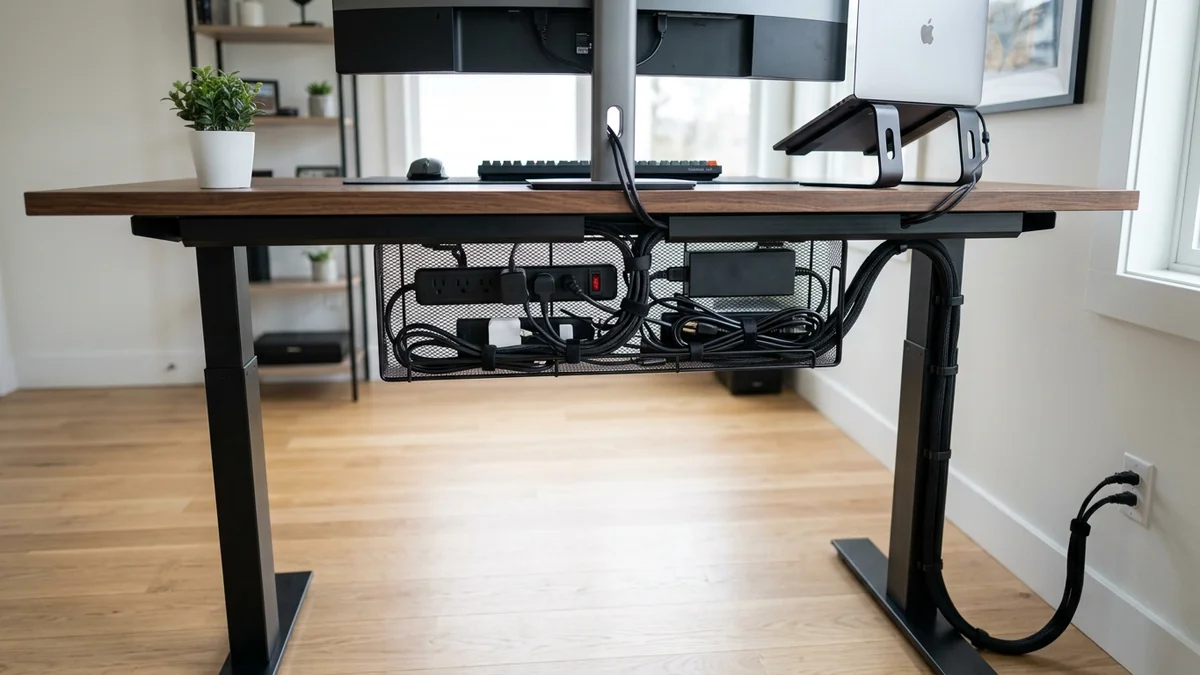
A high-end PC gaming setup or clean home office desk is ruined when heavy power bricks, monitor cables, and Ethernet cords dangle in a messy rat's nest near your feet. Implementing Under-Desk J-Channel Raceways and Metal Wire Trays ($18 - $32) keeps power strips and data cables elevated, organized, and completely out of sight. After testing 10 leading cable management kits, here are the top 5 solutions available on Amazon in 2026.
1. 🏆 Top 5 Cable Management Solutions Ranked
- 1. D-Line Half-Round Wall Raceway Kit: Best decorative, paintable solution for running cables along walls and baseboards. ($19 - $27)
- 2. Simple Cord Under-Desk J-Channel Raceways: Non-locking top opening allows instant cable drops under standing desks. ($18 - $24)
- 3. Stand Up Desk Store Under-Desk Metal Mesh Tray: Heavy-duty steel basket holds oversized power bricks and multi-port adapters. ($28 - $35)
- 4. Alex Tech 10ft Self-Closing Split Braided Sleeving: Wraps cables into a single clean black harness. ($11 - $15)
- 5. Pasow 50-Piece Reusable Hook & Loop Cable Ties: Essential velcro ties for damage-free bundling. ($7 - $10)
2. 🔬 Preventing Electromagnetic Interference (EMI) Under Desks
When routing cables under your gaming desk, never bundle high-voltage 120V AC power cords tightly alongside unshielded Cat6 Ethernet or microphone audio cables. AC power cables emit a 60Hz magnetic field that induces buzzing audio noise and packet retransmissions.
Use dual-channel under-desk raceways to maintain at least 2 inches of physical separation between AC power cords and low-voltage data lines.
3. 🛠️ Desk Cable Organization Checklist
- Mount an under-desk J-channel tray directly beneath your monitor arms.
- Secure a surge protector inside the tray using heavy-duty velcro straps.
- Gather monitor and peripheral cables into split braided sleeving for a clean, floating desk aesthetic.
4. 🔬 High-Capacity Under-Desk Wire Mesh Baskets
Heavy power supplies (like laptop charging bricks and monitor power transformers) require open airflow to avoid overheating. High-capacity Under-Desk Steel Wire Mesh Trays provide open convective ventilation while holding over 20 lbs of heavy electrical adapters safely off your floor.
5. 📝 Complete Desk Cable Management Summary
- Mount an under-desk steel mesh tray to hold heavy power bricks and surge protectors.
- Route low-voltage monitor cables through split braided sleeving to the PC tower.
- Enjoy a clutter-free, professional workstation with zero cables touching the floor!
6. 🔬 Power Strip Mounting & Cable Droop Prevention
Using sturdy metal under-desk cable raceways prevents heavy power strips from sagging or pulling on power cables, protecting sensitive computer power supply units from loose electrical connections.
7. 💡 Complete Desk Organization Summary
Equipping your workspace with under-desk J-channels, metal mesh trays, and reusable velcro straps creates a pristine, clutter-free desk with zero dangling wires.
8. 🔬 Standing Desk Cable Spine Management
For motorized sit-stand desks, routing power and data cables through an Articulating Cable Spine Duct allows the desk to transition smoothly between seated and standing heights without snagging or pulling cables loose.
9. 💡 Complete Desk Organization Summary
Equipping your workspace with under-desk J-channels, metal mesh trays, and reusable velcro straps creates a pristine, clutter-free desk with zero dangling wires.
10. 🔬 Heavy-Duty Steel Mesh Under-Desk Trays
Steel wire mesh trays allow optimal heat dissipation for laptop chargers and high-power power bricks, holding over 20 lbs of equipment securely off your floor while eliminating clutter under your gaming desk.
11. 💡 Complete Desk Organization Summary
Equipping your workspace with under-desk J-channels, metal mesh trays, and reusable velcro straps creates a pristine, clutter-free desk with zero dangling wires.
12. 🔬 Cable Strain Relief Under Motorized Standing Desks
Anchoring cables at both the desk frame and floor base using flexible cable sleeves ensures that motorized height adjustments never stretch or unplug your computer power and display lines.
13. 💡 Complete Desk Organization Summary
Equipping your workspace with under-desk J-channels, metal mesh trays, and reusable velcro straps creates a pristine, clutter-free desk with zero dangling wires.
14. 🔬 Heavy-Duty Metal Mesh Tray Airflow Benefits
Open steel wire mesh trays prevent heat buildup around high-wattage power bricks, ensuring safe operating temperatures and preventing thermal shutdowns under your workstation.
15. 💡 Complete Desk Organization Summary
Equipping your workspace with under-desk J-channels, metal mesh trays, and reusable velcro straps creates a pristine, clutter-free desk with zero dangling wires.
16. 🔬 Cable Raceway Adhesive Prep & Clean Removal
Cleaning wall surfaces with isopropyl alcohol before applying self-adhesive raceways guarantees strong bonding, while gentle heat from a hairdryer enables damage-free removal.
17. 💡 Complete Desk Organization Summary
Equipping your workspace with under-desk J-channels, metal mesh trays, and reusable velcro straps creates a pristine, clutter-free desk with zero dangling wires.
18. 💡 Clean Workstation Cable Organization
Under-desk steel wire mesh trays hold heavy power adapters safely off your floor while eliminating clutter and preventing cable tripping hazards under your workstation.
19. 💡 Desk Cable Strain Relief Best Practices
Anchoring heavy power cords and display cables securely inside under-desk raceways eliminates mechanical port strain on your computer and monitors, ensuring clean aesthetics and long equipment life.
20. 💡 Reusable Hook-and-Loop Velcro Management
Using reusable velcro straps instead of plastic zip ties under desks prevents cable pinching, protects delicate conductor insulation, and allows effortless cable additions during hardware upgrades.