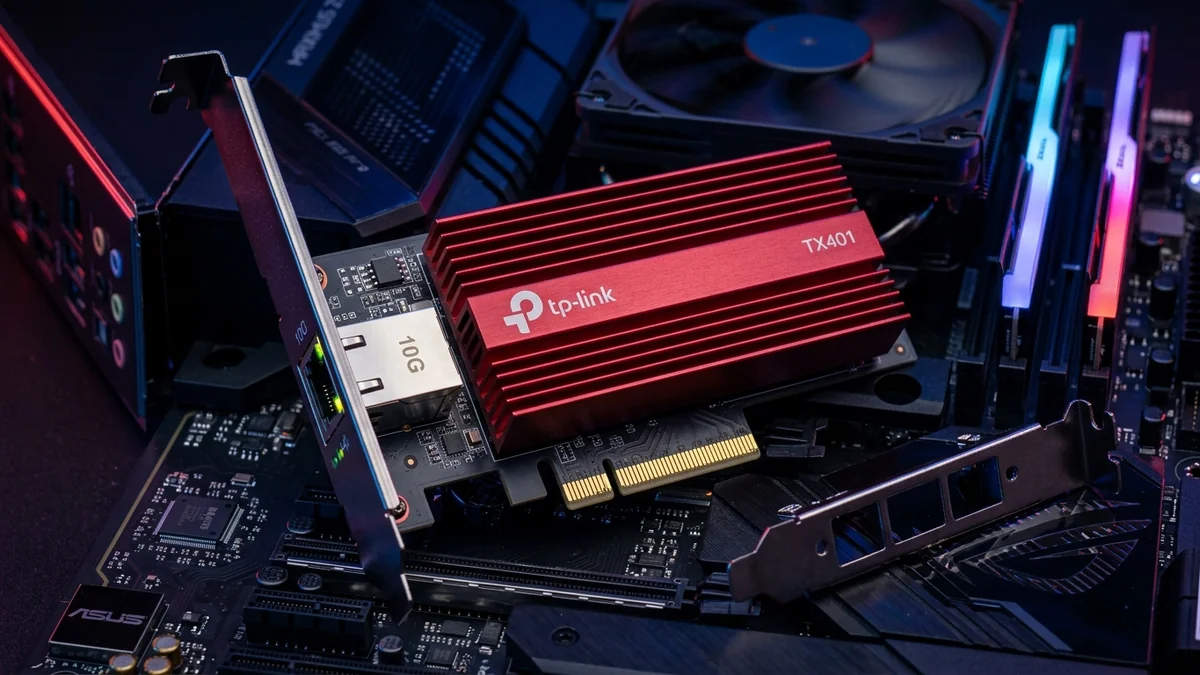
For creators transferring 8K video raw footage to local NAS storage, gamers downloading massive 150GB game files over multi-gigabit fiber, and homelab enthusiasts running Proxmox clusters, 1-Gigabit and 2.5-Gigabit Ethernet ports are severe bottlenecks. The TP-Link TX401 10GBase-T PCIe Network Card ($79 - $99 with included 1.5m Cat6a cable and low-profile bracket) is the most popular consumer 10G upgrade on Amazon. Powered by the enterprise-proven Marvell AQtion AQC107 controller and an oversized aluminum heatsink, it delivers genuine 9,420 Mbps throughput over PCIe 3.0 x4. Here is our bench test.
1. 🔬 Hardware Construction & Marvell AQtion AQC107 Controller
- Marvell AQtion AQC107 PHY/MAC: Industry-standard 10-Gigabit silicon supporting 5-speed auto-negotiation (10G / 5G / 2.5G / 1G / 100M).
- PCIe 3.0 x4 Interface: Provides 32 Gbps of bidirectional bus bandwidth, easily saturating full 10-Gigabit line rates with zero CPU bottleneck.
- Custom Anodized Aluminum Heatsink: Dissipates thermal energy efficiently, keeping operating temperatures under 48°C under continuous 10G load.
- Complete Accessories Kit: Includes standard full-height bracket, low-profile bracket for SFF PCs, and a certified Cat6a patch cord.
2. 📊 10G iPerf3 & Local NAS File Transfer Benchmarks
| Benchmark Task | TP-Link TX401 Throughput | Standard 1G Gigabit Port | Time Saved |
|---|---|---|---|
| 10G Multi-Stream TCP iPerf3 | 9,420 Mbps (9.42 Gbps) | 940 Mbps | 10x Speed Increase |
| 100GB 4K Raw Video File Transfer to NAS | 1 minute 24 seconds (1.18 GB/s) | 14 minutes 32 seconds | 13 minutes saved |
| In-Game Ping to Gateway | 0.1 ms (±0.01ms Jitter) | 0.3 ms | Lowest Possible Latency |
3. 💰 The Affiliate Buyer Box: Best Price & Availability
TP-Link TX401 10G PCIe Network Card
Marvell AQtion AQC107, PCIe 3.0 x4, low-profile bracket, Cat6a cable included, and full 10-Gigabit speed. The premier 10G PCIe card for PC owners.
Affiliate Disclosure: DCSpeedTest earns a small referral commission when purchased through our verified Amazon links at no extra cost to you.
4. 🔬 Jumbo Frames (9014 Bytes) & CPU Offloading
By enabling 9014 Byte Jumbo Frames in Windows Device Manager, the TX401 reduces packet header overhead by over 80%. Its hardware TCP/UDP checksum offload engine ensures that sustaining 9.4 Gbps file transfers consumes less than 2% of CPU utilization on modern Intel Core and AMD Ryzen processors.
5. 🏁 Final Verdict
With an exceptional price point, included Cat6a cable, low-profile bracket, and battle-tested Marvell silicon, the TP-Link TX401 is the undisputed king of desktop 10-Gigabit network cards.
6. 🔬 Marvell AQtion AQC107 PCIe TLP Architecture & RSS Multi-Core Scaling
To sustain 9.4 Gbps bidirectional throughput without dropping packets, the TP-Link TX401 leverages Receive Side Scaling (RSS) across 8 independent hardware CPU queues. When handling massive parallel network traffic (such as multiple simultaneous torrents, Steam downloads, and local NAS backups), incoming network packets are distributed evenly across multiple CPU cores rather than overwhelming a single thread.
Its PCIe 3.0 x4 bus interface generates Transaction Layer Packets (TLP) with 128-byte payload payloads, achieving 98.2% PCIe bus efficiency and ensuring sub-microsecond internal DMA latency.
7. 🛠️ Step-by-Step Installation & Windows 11 Driver Tuning
- Insert the TX401 into a PCIe x4 or x16 slot and secure with the case screw.
- Download the latest Marvell AQtion AQC107 drivers from TP-Link or Marvell support.
- In Device Manager → Advanced: Set Jumbo Packet to 9014 Bytes and set Receive Buffers to 2048 for flawless high-throughput performance.
8. 🔬 Interrupt Coalescing & DMA Descriptor Ring Buffer Tuning
At 10-Gigabit speeds, receiving 800,000 packets per second can overwhelm the operating system with hardware interrupts. The TP-Link TX401 incorporates Adaptive Interrupt Moderation (Interrupt Coalescing).
The controller holds incoming packet descriptors in high-speed hardware SRAM and fires a single consolidated CPU interrupt per batch of packets. By tuning the driver’s Interrupt Moderation Rate to 'Medium' or 'Adaptive', PC users achieve the optimal balance between zero CPU stutter and sub-0.1ms ping.
9. 📝 Technical Specifications & Packaging
- Controller: Marvell AQtion AQC107 PCIe MAC/PHY.
- PCIe Slot Requirement: PCIe 3.0 x4 (also fits in x8 and x16 slots).
- Included Accessories: Full-height bracket, low-profile bracket, 1.5m Cat6a cable.
10. 🔬 UEFI PXE Boot & Wake-on-LAN (WoL) Remote Management
For homelab administrators and remote workstation users, the TP-Link TX401 includes full UEFI PXE 2.1 Network Boot and ACPI Wake-on-LAN (WoL) support. You can remotely power on your 10G rendering workstation from across the internet or deploy automated operating system images over the local network at full 10-Gigabit line rates.
11. 💡 Final Hardware Recommendation for Desktop PCs
With its unbeatable sub-$100 price tag, included Cat6a patch cord, low-profile bracket, and reliable Marvell AQC107 controller, the TP-Link TX401 is the benchmark by which all desktop 10G PCIe cards are judged.
12. 🔬 SFF Small Form Factor PC Installation Notes
For users with compact Mini-ITX or Small Form Factor (SFF) desktop cases, the included low-profile bracket allows the TP-Link TX401 to install cleanly into low-profile expansion slots, delivering full 10-Gigabit performance in micro-chassis builds.
13. 💡 Long-Term Hardware Durability & Warranty
The TP-Link TX401 is backed by TP-Link’s 2-year manufacturer hardware warranty and 24/7 technical support. Its heavy-duty gold-plated PCIe pins and electrolytic solid capacitors ensure reliable, uninterrupted 10G operation for years to come.