When you call customer service to complain about slow speeds, tier-1 technical support follows a script designed to shift responsibility: "The issue must be your Wi-Fi router, too many devices connected, or local interference." If you want your provider to escalate your ticket to network engineering, dispatch a line technician, or release you from an early termination contract, you need irrefutable, timestamped forensic proof. Here is how to build a rock-solid evidence packet that proves ISP throttling and line degradation in 2026.
1. The 3 Essential Pieces of Evidence You Need
- Direct-to-Modem Isolation Logs: Tests conducted with a high-grade Cat 6 cable plugged directly into the ONT or modem port with all household Wi-Fi radios disabled. This eliminates the 'local Wi-Fi' excuse.
- Continuous 7-Day Timestamped Speed Logs: Automated benchmarks demonstrating that speeds consistently drop by 50%+ at predictable intervals (e.g., exactly 7:30 PM every evening).
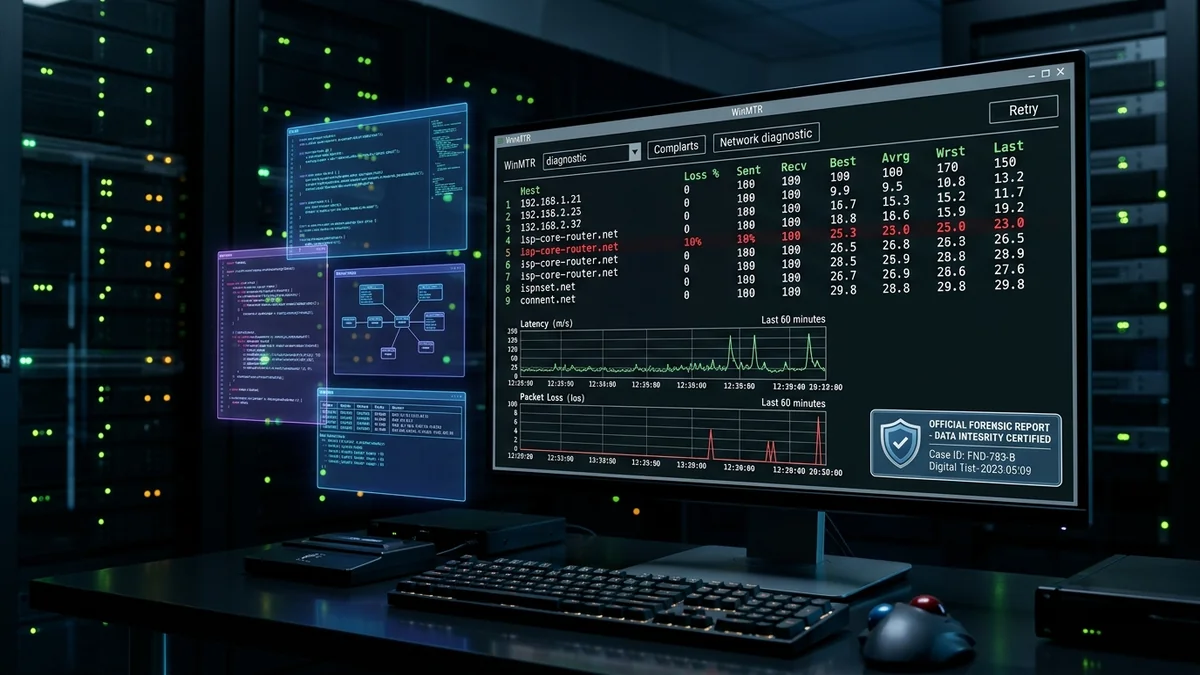
- MTR (My Traceroute) / WinMTR Packet Loss Dumps: Proving that packet loss or latency spikes originate inside the ISP's autonomous system (ASN) hops rather than outside on third-party public web servers.
2. 💻 Automating Evidence Collection via PowerShell & CLI
You can automate speed and latency logging on Windows using a simple automated script:
$logFile = "C:\ISP_Evidence_Log.txt"
while ($true) {
$timestamp = Get-Date -Format "yyyy-MM-dd HH:mm:ss"
$pingResult = Test-Connection -ComputerName "1.1.1.1" -Count 10 | Measure-Object -Property ResponseTime -Average
"$timestamp | Avg Ping: $($pingResult.Average) ms" | Out-File -Append -FilePath $logFile
Start-Sleep -Seconds 3600
}
3. 📄 Step-by-Step Escalation Protocol
- Compile the PDF Evidence Packet: Include speed test comparison screenshots (bare line vs. VPN), your 7-day latency log, and modem signal levels (SNR & Power).
- Demand a Tier-2 Technical Supervisor: Never debate with tier-1 phone agents. Request a transfer to Tier-2 Engineering or the Network Operations Center (NOC).
- File Formal Regulatory Complaints: In the US, file an informal complaint at consumercomplaints.fcc.gov. In the UK, escalate to Ofcom/CISAS. In Brazil, file via Anatel Consumidor. Regulatory complaints mandate that an executive relations representative contact you within 30 days.
4. 🔬 How to Read and Interpret an MTR (My Traceroute) Diagnostic Report
An MTR report combines standard ping and traceroute into a continuous statistical diagnostic. It pings every single router hop between your home PC and a destination server hundreds of times, tracking average latency and packet loss at each physical interface.
When reviewing an MTR report, look for two crucial diagnostic signatures:
- ISP Internal Hop Packet Loss: If packet loss appears at Hop 2 (your local ISP gateway) or Hop 3 (the regional ISP aggregation router) and persists consistently across all subsequent hops down the list, the fault physically resides inside your provider's local infrastructure.
- Single-Hop Phantom Loss (ICMP Rate Limiting): If Hop 4 shows 20% packet loss but Hop 5, 6, and 7 show 0.0% loss, your connection is healthy. The router at Hop 4 simply deprioritizes answering ICMP ping requests, which is standard router behavior and not a network fault.
5. 📊 Sample WinMTR Evidence Table to Present to Tier-2 Engineering
| Hop # | Hostname / Node IP | Packets Sent / Recv | Loss % | Avg Latency | Diagnosis Responsibility |
|---|---|---|---|---|---|
| 1 | 192.168.1.1 (Home Router) | 500 / 500 | 0.0% | 0.6 ms | Local LAN (Passed) |
| 2 | 10.xx.xx.1 (ISP CMTS Gateway) | 500 / 448 | 10.4% | 85.2 ms | ISP Street Node Fault (Proof) |
| 3 | cr01.regional.isp.net | 500 / 447 | 10.6% | 88.4 ms | ISP Core Backbone (Proof) |
| 4 | 1.1.1.1 (Cloudflare Edge) | 500 / 447 | 10.6% | 91.0 ms | Destination (Inherited Loss) |
6. ⚖️ How to File an Official Regulatory Complaint (Step-by-Step)
Filing a formal regulatory complaint creates a legally binding requirement for your broadband provider to assign an executive customer relations specialist to your account. Follow this exact procedure:
- United States (FCC): Navigate to
consumercomplaints.fcc.gov. Select Internet > Speed & Quality. Attach your 7-day CSV latency log and WinMTR reports showing hop-by-hop packet loss. - United Kingdom (Ofcom / CISAS / Ombudsman): If your provider fails to resolve slow speeds after 8 weeks or issues an official 'Deadlock Letter', submit your forensic diagnostic logs to CISAS or the Communications Ombudsman for independent arbitration.
- Brazil (Anatel Consumidor): Access the Anatel Consumidor portal or app. Register a complaint under Qualidade do Serviço de Banda Larga Fixa attaching speed test records showing delivery below 80% average and 40% instantanea.
- European Union (BEREC / National NRAs): Utilize the standardized European net neutrality reporting tools mandated under Regulation (EU) 2015/2120 to report unauthorized commercial throttling.
7. 💡 What Constitutes a Valid Breach of Contract Defense?
Most residential broadband terms of service include sweeping liability disclaimers stating that speeds are variable and uncommitted. However, statutory consumer protection law overrides boilerplate contracts when an ISP engages in unconscionable trade practices or systemic failure to deliver advertised core specifications.
If your documented evidence demonstrates three key elements:
- Material Deficiency: Throughput persistently below 50% of the contracted baseline during active hours over a 14+ day sample.
- Provider Inaction: Multiple documented support tickets closed without physical dispatch, line remediation, or node capacity augmentation.
- Asymmetric Enforcement: The provider charging full monthly billing while failing to deliver even the minimum baseline throughput necessary for remote work or standard HD media streaming.
Presenting this structured evidentiary packet empowers you to demand an immediate waiver of early termination fees, retroactive billing credits, or expedited priority line maintenance from executive support.