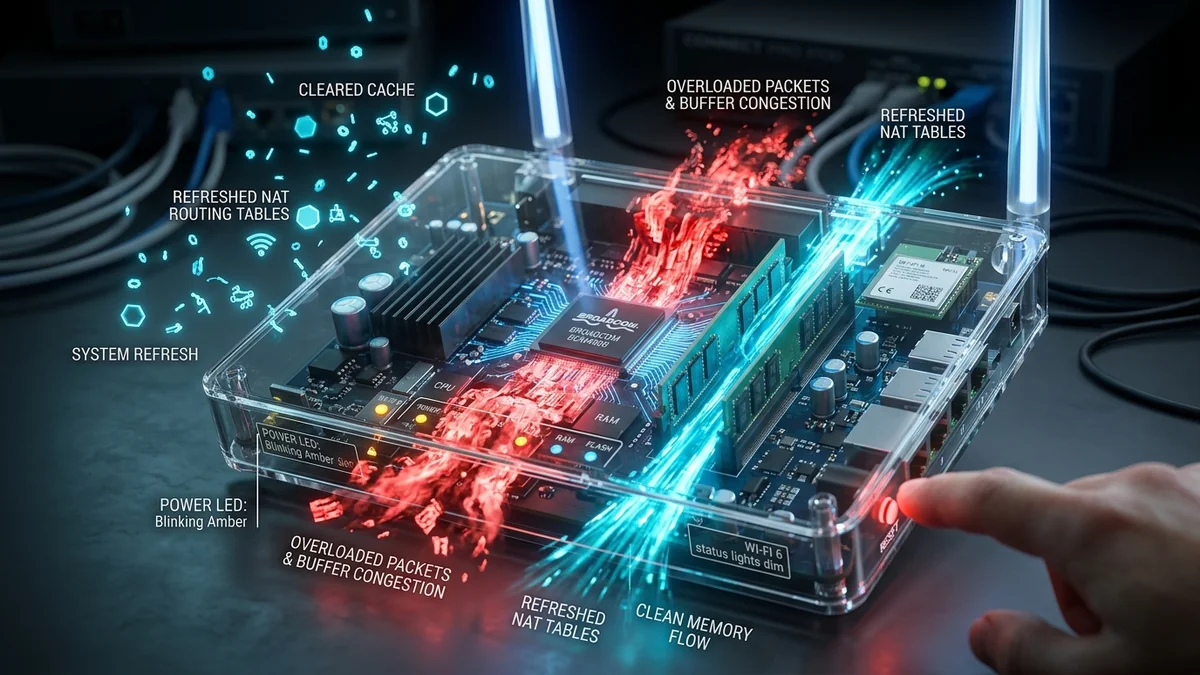
Whenever you call customer support for your broadband connection, the first instruction you receive is always identical: "Please unplug your router, wait 30 seconds, and plug it back in." While it sounds like a lazy brush-off, rebooting your modem and router is actually a legitimate, highly effective engineering solution. A modern home router is not a simple cable; it is a dedicated, low-power Linux computer running multiple background daemons under heavy 24/7 load. Here is what physically happens inside your router when you pull the power cord.
1. The 4 Technical Reasons a Power Cycle Restores Performance
1. Purging Overflowed NAT Translation Tables
Your router assigns private IP addresses (e.g., 192.168.1.50) to your home devices while translating all outgoing traffic through a single public IP via Network Address Translation (NAT). Every browser tab, background cloud sync, torrent stream, and smart home IoT ping opens a stateful tracking entry in the router's NAT table. After weeks of uptime, stale connections fill up this table, causing new connection attempts to time out or queue indefinitely.
2. Reclaiming Leaked RAM & Overheated SoC Registers
Most consumer routers operate with limited RAM (typically 256MB to 512MB) running embedded firmware with imperfect memory management. Long-running background processes (such as DHCP lease monitors, mini-UPnP daemons, and firewall state trackers) suffer from gradual memory leaks. When RAM usage hits 95%+, the kernel initiates aggressive packet dropping to prevent a complete crash. Power cycling resets volatile memory to 0% utilization.
3. Re-Negotiating Clean Wi-Fi Frequencies (Dynamic Frequency Selection - DFS)
When powered on, modern dual-band and tri-band routers scan the local radio spectrum for active overlapping interference from neighboring routers and radar signals (DFS). Over days and weeks, neighbors turn on new devices, causing channel congestion. Rebooting forces the router to perform a fresh spectral scan and select the least congested wireless channel.
4. DOCSIS / GPON Downstream & Upstream Channel Re-Locking
For cable and fiber modems, a power cycle forces the modem to re-register with the ISP's Cable Modem Termination System (CMTS) or Optical Line Terminal (OLT). This renegotiates signal-to-noise ratio (SNR) parameters, clearing accumulated uncorrectable codeword errors that degrade throughput.
2. 📊 Router Performance Degradation vs. Uptime Days
| Uptime Duration | Available RAM | NAT Table Load | Ping Jitter | System State |
|---|---|---|---|---|
| Day 1 (Fresh Reboot) | 78% Free | < 250 Active States | 0.8ms | Peak Performance / Zero Queuing |
| Day 14 (Normal Load) | 45% Free | 1,800 Active States | 3.2ms | Minor buffer accumulation |
| Day 45 (Accumulated Stale States) | 18% Free | 5,400+ Stale States | 14.5ms | DNS resolution latency increases |
| Day 90+ (Critical Saturation) | < 5% Free | Table Overflow / Collisions | 45ms – 200ms+ | Packet loss, dropped Wi-Fi clients |
3. 💡 Why the '30-Second Rule' Matters
When you unplug a router, electrical charge remains trapped inside the motherboard's capacitors for several seconds. If you plug the unit back in immediately after 2 seconds, the microchips may not lose power completely, preventing volatile memory registers and cached states from wiping clean. Waiting a full 30 seconds guarantees zero residual charge and a 100% clean hardware initialization.
4. ⚡ Thermal Throttling & Low-Profile Heat Sinks in Consumer Gateways
A frequently overlooked factor in router performance degradation is passive thermal accumulation. Consumer ISP combo units are engineered to minimal cost budgets, often housing high-frequency multi-core ARM or MIPS Network Processing Units (NPUs) enclosed in unventilated plastic casings with tiny stamped-aluminum heat sinks.
Operating continuously 24 hours a day under warm ambient conditions causes silicon junction temperatures to exceed 85°C. To protect the System-on-Chip (SoC) from permanent physical damage, the internal thermal management system down-clocks CPU clock frequencies (thermal throttling) and steps down packet-processing hardware accelerators. Powering down the device allows the internal thermal dissipation system to cool down, temporarily restoring maximum clock speeds and packet-routing throughput.
5. 📡 Radio Frequency (RF) Calibration & Baseband Drift
Wi-Fi radios operate via sophisticated Power Amplifiers (PAs) and Low-Noise Amplifiers (LNAs) designed to transmit radio signals at precise milliwatt power levels. Over extended periods of continuous operation, ambient temperature fluctuations and dielectric heating cause subtle oscillator frequency drift (carrier frequency offset).
This subtle drift degrades the receiver’s ability to decode complex high-density modulation constellations (such as 1024-QAM in Wi-Fi 6 or 4096-QAM in Wi-Fi 7), forcing the router to fall back to lower, slower modulation rates (like 256-QAM or 64-QAM). A complete reboot triggers a fresh hardware calibration sequence, realigning internal radio synthesizers to peak spectral purity.
6. 🛠️ Best Practices for Automating Router Maintenance
- Schedule Automated Nightly/Weekly Maintenance Reboots: In your router’s administrative portal under System > Administration > Auto-Reboot, set a recurring reboot schedule for 4:30 AM every Sunday. This purges stale NAT states without interrupting daytime workflows.
- Ensure Proper Hardware Ventilation: Never place your router inside an enclosed TV cabinet, behind a sofa, or stacked on top of a warm cable box. Elevate the unit in an open, well-ventilated area to prevent thermal throttling.
- Upgrade to Open-Source Firmware (OpenWrt / Asuswrt-Merlin): If your router hardware supports it, flashing open-source firmware provides advanced memory management, leak-free Linux kernels, and industrial-grade stability.