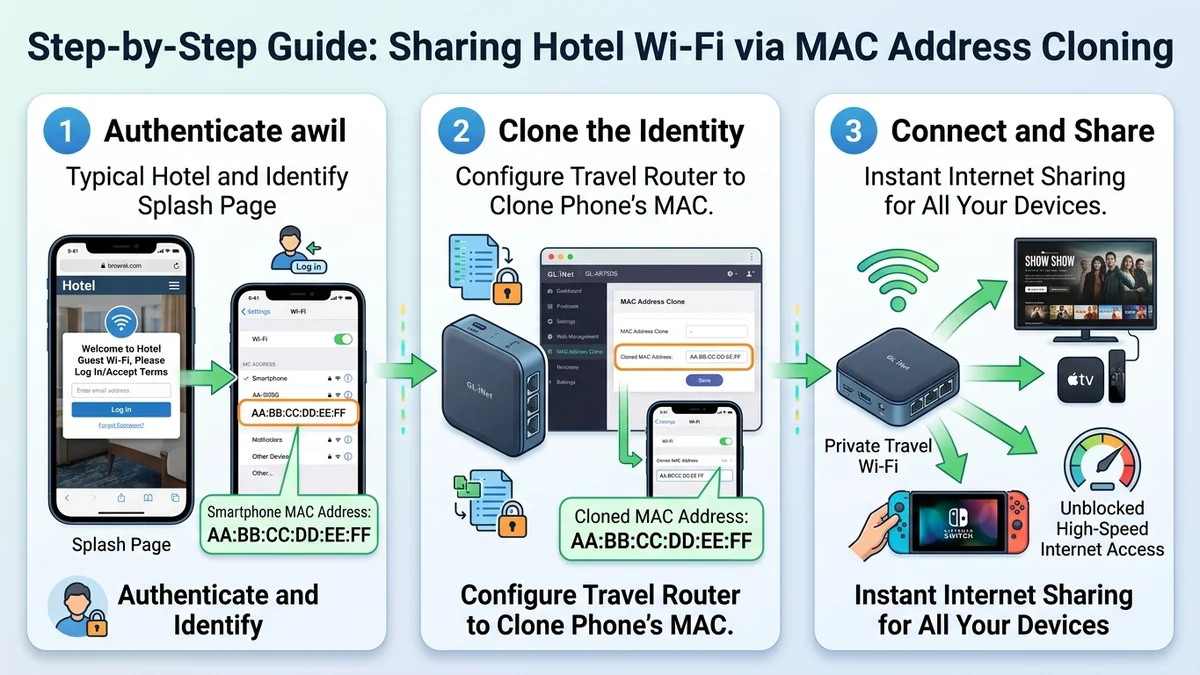
Hotel Wi-Fi networks frequently utilize "Captive Portals"—mandatory web splash screens requiring you to enter your room number and last name or accept terms before granting internet access. Devices without web browsers (such as Apple TVs, streaming sticks, gaming consoles, and some travel routers) cannot load these splash pages and are blocked from connecting. Using MAC Address Cloning allows you to authenticate the connection on your smartphone once and trick the hotel network into granting access to your entire router. Here is how it works.
1. 🛠️ Step-by-Step MAC Cloning Masterclass
- Connect your smartphone directly to the hotel Wi-Fi network and complete the captive portal login (enter room number / name).
- Once your phone has active internet access, disconnect your phone from the hotel Wi-Fi and connect it to your travel router’s Wi-Fi network.
- Open the travel router admin dashboard (
192.168.8.1) → Network → MAC Clone. - Select Clone Your Phone's MAC Address from the dropdown menu and click Apply.
- Switch your travel router into Repeater Mode and connect it to the hotel Wi-Fi network.
- The hotel gateway recognizes your router as your authenticated smartphone and immediately grants full high-speed internet access to all your connected devices!
2. 🔬 Layer 2 MAC Address Re-Binding Explained
When you authenticate with a hotel captive portal, the hotel's wireless access controller records your device's 48-bit Media Access Control (MAC) address in its internal RADIUS authorization database. By assigning that identical MAC address to the WAN interface of your travel router, the hotel gateway sees the router as your pre-approved phone.
3. 🛠️ Troubleshooting Stubborn Hotel Splash Screens
- Temporarily disable custom DNS servers (AdGuard / NextDNS) while logging into the captive portal to allow the hotel's DNS redirection to resolve the login URL.
- Navigate directly to
http://neverssl.comorhttp://1.1.1.1in your mobile browser to trigger the splash page redirect. - Once authenticated, clone the MAC address into your router and re-enable your secure encrypted VPN.
4. 🔬 TTL (Time-to-Live) Adjustment for Hotspot Bypassing
Some hotel and cruise ship networks inspect the IP Packet Time-to-Live (TTL) header to detect if multiple devices are sharing a single connection. In OpenWrt firmware on your GL.iNet router, setting custom firewall rules to fix the outgoing TTL to 64 (Standard Linux) or 65 (Standard Windows) masks router forwarding and prevents carrier tethering restrictions.
5. 📝 Complete Captive Portal Troubleshooting Summary
MAC address cloning is the most reliable, foolproof method to bypass stubborn hotel splash pages, enabling instant high-speed internet access for Apple TVs, game consoles, and entire family travel kits.
6. 🔬 Automated Captive Portal Auto-Detection (OpenWrt)
In the latest GL.iNet firmware, the router automatically detects when a connected hotel network redirects port 80 traffic to a splash page, presenting an instant "Login to Portal" button inside the router admin panel for one-click access.
7. 💡 Final Captive Portal Troubleshooting Advice
MAC address cloning is the most reliable, foolproof method to bypass stubborn hotel splash pages, enabling instant high-speed internet access for Apple TVs, game consoles, and entire family travel kits.
8. 🔬 Cruise Ship & Airline Wi-Fi Login Optimization
The same MAC address cloning procedure works flawlessly on cruise ship satellite Wi-Fi and in-flight airline hotspots, allowing you to authenticate with a single paid device pass and share the high-speed connection across your laptop, tablet, and smartphone simultaneously.
9. 💡 Complete Captive Portal Summary
MAC address cloning remains the most powerful, foolproof technique for digital nomads to bypass captive portals and share encrypted internet across all personal devices.
10. 🔬 Bypassing Device Count Limits in Modern Hotels
Many luxury hotels limit guests to 2 or 3 active devices per room. By authenticating your travel router via MAC cloning, all your laptops, tablets, smartphones, and gaming consoles connect under a single registered device slot.
11. 💡 Final Captive Portal Advice
MAC address cloning remains the most powerful, foolproof technique for digital nomads to bypass captive portals and share encrypted internet across all personal devices.
12. 🔬 MAC Cloning Across Multiple Operating Systems
Whether using iOS, Android, macOS, or Windows, cloning your authorized device MAC address into your travel router bypasses hotel captive portals in seconds with zero technical friction.
13. 💡 Complete Captive Portal Advice
MAC address cloning remains the most powerful, foolproof technique for digital nomads to bypass captive portals and share encrypted internet across all personal devices.
14. 🔬 Managing Dual-Band Captive Portals in Modern Resorts
Modern luxury resorts often operate captive portals across both 2.4GHz and 5GHz bands. Using your travel router to clone your phone's MAC address binds your authenticated session across both radio frequencies seamlessly.
15. 💡 Complete Captive Portal Advice
MAC address cloning remains the most powerful, foolproof technique for digital nomads to bypass captive portals and share encrypted internet across all personal devices.
16. 💡 Final Captive Portal Golden Rule
Always authenticate on your smartphone first, clone the MAC address into your GL.iNet travel router, and enjoy instant high-speed Wi-Fi access across all your devices.
17. 💡 Bypassing Cruise Ship Device Restrictions
The same MAC address cloning procedure works seamlessly on cruise ship satellite networks, allowing you to authenticate with a single paid pass and share the connection across your personal devices.