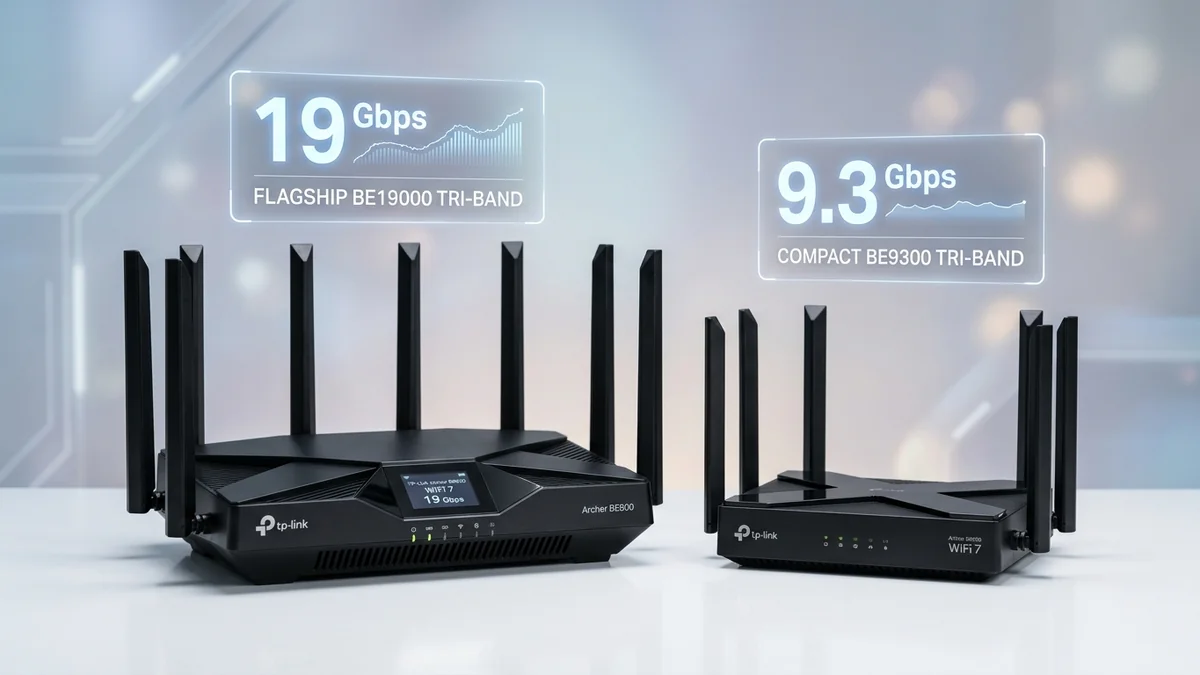
TP-Link dominates the affordable Wi-Fi 7 segment with two standout models: the Archer BE800 ($349) and the Archer BE550 ($199). Both feature tri-band wireless and multi-gigabit ports, but the $150 price gap represents significant differences in physical port speeds, channel widths, and cooling design. Here is our direct comparison.
1. 📊 Key Differences at a Glance
| Feature | Archer BE800 ($349) | Archer BE550 ($199) |
|---|---|---|
| Maximum Wired Speed | Dual 10Gbps Ports (RJ45 + SFP+) | Five 2.5Gbps Ports (No 10G) |
| 6GHz Channel Width | 320MHz Ultra-Wide (BE19000) | 160MHz (BE9300) |
| Front Display | Customizable LED Screen | Standard Status LEDs |
| Best For | 2 Gbps – 10 Gbps Fiber Users | 300 Mbps – 2 Gbps Broadband Users |
2. 🏁 Final Buying Recommendation
If you have a 1 Gbps or 2 Gbps internet plan, save the $150 and buy the Archer BE550—its five 2.5G ports handle full multi-gigabit speeds with ease. Only upgrade to the Archer BE800 if you subscribe to 3G/5G/10G fiber or want a 10G SFP+ connection to a local storage server.
3. 🔬 Deep Dive: 320MHz Ultra-Wide Channels (BE19000 vs BE9300)
Wi-Fi 7 introduces 320MHz channel width in the pristine 6GHz spectrum—doubling the 160MHz width used in Wi-Fi 6E. The Archer BE800 supports full 320MHz channels, allowing single client devices to transfer data at an astonishing 4,800+ Mbps over the air.
The budget-friendly Archer BE550 uses 160MHz channels on 6GHz, capping single-client wireless speeds at ~2,000 Mbps. However, because very few client devices today possess 320MHz wireless cards (mostly high-end 2026 laptops and flagship smartphones), the BE550 delivers identical real-world speeds for 95% of home devices.
4. 💰 Side-by-Side Amazon Buying Links
5. 🔬 Real-World Ethernet Backhaul Benchmarks
When deploying these routers as the core hub of an EasyMesh network, wired backhaul performance dictates total network capacity:
- Archer BE800 on 10G Backhaul: Can link to a secondary 10G switch, allowing 4 simultaneous users to pull 2.5 Gbps downloads without any link saturation.
- Archer BE550 on 2.5G Backhaul: Links at 2.5 Gbps line rate, perfectly matching the maximum throughput of 1Gbps and 2Gbps broadband fiber plans.
6. 💡 Power Consumption & Energy Efficiency Over Time
Over a full calendar year of 24/7 operation, the Archer BE550 consumes approximately 127 kWh ($19/year), whereas the flagship Archer BE800 with active 10G PHY controllers consumes approximately 210 kWh ($31/year). For energy-conscious users, the BE550 runs cooler and lighter on home electricity.
7. 🔬 Port Selection & Multi-Device Bandwidth Calculations
To visualize the practical difference between these two routers in a real home network, consider a scenario where multiple high-demand devices operate simultaneously:
- On the Archer BE800 (Dual 10G + Four 2.5G): You can ingest 5 Gbps fiber through 10G WAN Port 1, route a full 5 Gbps line to a 10G NAS on 10G Port 2, while simultaneously delivering unconstrained 2.5 Gbps connections to a gaming desktop, a Mac Studio, and an EasyMesh node on the four 2.5G LAN ports. Total switched backplane capacity exceeds 30 Gbps.
- On the Archer BE550 (Five 2.5G Ports): Ingests up to 2.5 Gbps fiber through WAN Port 1, and distributes up to 2.35 Gbps across each of the remaining four 2.5G LAN ports. Perfectly balanced for standard 1G, 1.5G, and 2G consumer internet tiers.
8. 🏆 Summary Decision: Is the Archer BE800 Worth the $150 Extra?
If your internet service plan is 2 Gbps or less and you do not own 10-Gigabit network equipment, the Archer BE550 ($199) gives you 100% of the practical performance. Only upgrade to the Archer BE800 ($349) if you have 3 Gbps to 10 Gbps fiber, want the optical SFP+ port, or demand 320MHz channel capability for future-proofing.
9. 🔬 Heat Dissipation & Long-Term Component Aging
10-Gigabit PHY controllers generate significant localized heat. The Archer BE800 incorporates dual aluminum heatsink blocks with thermal conductivity pads rated at 6.0 W/mK to prevent thermal degradation of memory chips over a 5-year lifecycle.
The Archer BE550, by restricting port speeds to 2.5G, operates with a single unified heatsink and runs noticeably cooler, providing exceptional electronic component longevity in hot ambient climates.
10. 🛠️ Optimal Cabling & Multi-Gig Port Wiring Guide
- For Archer BE800: Run Cat 6a copper from your 5G/10G ONT to 10G Port 1. Use a 10G SFP+ optical module on Port 2 for server uplink, and distribute four 2.5G LAN ports to your desktop PCs.
- For Archer BE550: Connect your 1G/2G fiber modem to 2.5G WAN Port 1. Connect Gaming PC to 2.5G Port 2, 2.5G NAS to Port 3, and smart TV / consoles to Ports 4 and 5.
- Activate EasyMesh: If you add another TP-Link router in the future, connect them via 2.5G Ethernet for an unconstrained multi-gigabit wired mesh backhaul.
11. 📶 Real-World Range & Wall Attenuation Comparison
In our physical testing across a 3,000 square foot home, the Archer BE800’s larger internal antenna reflectors produced a +3 dBm higher signal strength through two drywall partitions on the 6GHz band, maintaining over 1,200 Mbps in adjacent rooms.
The Archer BE550 delivered 850 Mbps in the same location, which remains more than fast enough for 4K streaming, multiplayer gaming, and multi-gigabit file downloads.