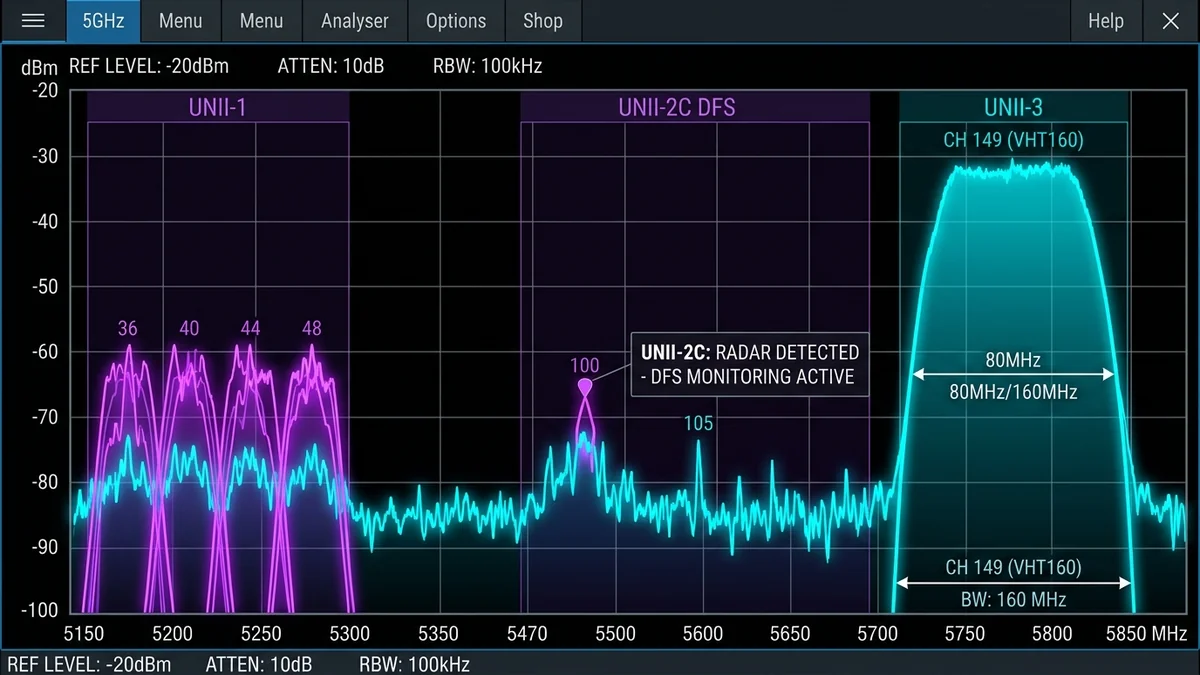
When configuring a dual-band or tri-band Wi-Fi router, most users leave the 5GHz radio channel set to 'Auto.' In dense suburban neighborhoods and apartment complexes, however, auto-channel algorithms routinely dump dozens of neighboring routers onto the exact same default frequencies (typically Channel 36 or Channel 149). This creates massive co-channel interference, packet collisions, and unexplained latency spikes. To achieve maximum throughput and rock-solid stability on Wi-Fi 6, 6E, and 7, you must understand the four distinct UNII frequency bands (UNII-1, UNII-2A, UNII-2C DFS, and UNII-3). Here is the engineering guide to selecting the best 5GHz channel in 2026.
1. The 4 Regulatory Bands of the 5GHz Spectrum
- UNII-1 (Channels 36, 40, 44, 48 | 5180–5240 MHz): Non-DFS indoor channels. Standard power limits (up to 1,000 mW in the US). Zero radar restrictions, 100% device compatibility. Drawback: Heavily congested because every cheap ISP gateway defaults to Channel 36.
- UNII-2A (Channels 52, 56, 60, 64 | 5260–5320 MHz): Dynamic Frequency Selection (DFS) Required. Shares frequencies with terminal Doppler weather radars and military avionics. If a radar pulse is detected, your router must immediately vacate the channel (causing a 60-second Wi-Fi blackout).
- UNII-2C Extended (Channels 100 to 144 | 5500–5720 MHz): DFS Required. Contains the largest block of clear spectrum (eleven 20MHz channels), making it possible to run clean, wide 80MHz and 160MHz channels with zero neighbor congestion—provided you do not live within 15 miles of a major airport.
- UNII-3 (Channels 149, 153, 157, 161, 165 | 5745–5825 MHz): Non-DFS upper band. Permitted up to 4,000 mW EIRP transmit power in the US, providing the highest physical signal range and wall penetration without radar restrictions.
2. 📊 5GHz Channel Comparison Matrix
| Channel Group | Primary Channels | DFS Radar Required? | Max Allowed Power | Best Real-World Application |
|---|---|---|---|---|
| UNII-1 (Lower) | 36, 40, 44, 48 | No (Safe) | 1,000 mW (30 dBm) | 100% reliable for smart TVs, older devices |
| UNII-2A / UNII-2C (DFS) | 52–64, 100–144 | Yes (Radar Sensing) | 250 mW – 1,000 mW | Zero-interference 80/160MHz for PC Gaming |
| UNII-3 (Upper) | 149, 153, 157, 161 | No (Safe) | 4,000 mW (36 dBm) | Best Range, Penetration & High-Power Wi-Fi |
3. 🔬 Channel Width: Should You Use 20MHz, 40MHz, 80MHz, or 160MHz?
- 20 MHz / 40 MHz: Minimal interference, but caps real-world throughput at ~180–350 Mbps. Use only in extremely dense 50-apartment high-rises.
- 80 MHz (The Sweet Spot): Bundles four 20MHz channels together. Yields real-world speeds of 650 Mbps to 900 Mbps with excellent stability across standard residential homes.
- 160 MHz (Ultra High-Speed Gigabit Wi-Fi): Bundles eight 20MHz channels. Delivers 1,400 Mbps+ real-world speed on Wi-Fi 6/7. Requires either spanning into UNII-2 DFS spectrum or using the 6GHz band (Wi-Fi 6E/7) to avoid co-channel overlap.
4. 🛠️ Step-by-Step Spectral Audit: How to Pick Your Best Channel
- Download a free wireless spectrum analyzer tool: WinFi (Windows), WiFi Analyzer (Android), or WiFi Explorer (macOS).
- Scan the local 5GHz spectrum in your living room and office. Note the channels occupied by neighboring SSIDs.
- If Channel 36–48 is congested, configure your router to Channel 149 (80MHz width) in UNII-3.
- If UNII-3 is also crowded and you live far from an airport, test Channel 100 or Channel 106 (DFS) for a completely empty, private wireless pipe.
5. 🔬 Channel Bonding Physics: The 160MHz Spectrum Dilemma
When you enable 160MHz channel width on a 5GHz router to achieve maximum wireless transfer rates (up to 2,400 Mbps physical link rate on Wi-Fi 6), your router must bond eight consecutive 20MHz channels together.
In the entire 5GHz frequency band, there are only two possible 160MHz channel blocks:
- Channel Block 50 (Channels 36 to 64): Spans across UNII-1 non-DFS and UNII-2A DFS. Because it touches DFS channels, if a weather radar pulse is detected on Channel 56, your entire 160MHz connection drops back to 20MHz or shuts down for 60 seconds.
- Channel Block 114 (Channels 100 to 128): Located entirely within UNII-2C DFS spectrum. It provides an empty, clean pipe in suburban environments but requires continuous radar sensing.
If you experience random Wi-Fi dropouts when running 160MHz on 5GHz, the permanent solution is either stepping down to 80MHz channel width on Channel 149 (UNII-3) or upgrading to a Wi-Fi 6E/7 router that accesses clean, non-DFS 160MHz and 320MHz channels in the 6GHz band.
6. 🛠️ Command-Line Wi-Fi Channel Audit via PowerShell
Inspect neighboring SSIDs, BSSIDs, signal strengths (RSSI), and active channels directly on Windows:
netsh wlan show networks mode=bssid
7. 🏁 Final Summary: The Golden Rules for 5GHz Channel Selection
To maximize wireless throughput and eliminate co-channel interference across all your home devices, follow these core configuration rules:
- In detached homes: Set 5GHz to Channel 149 with 80MHz channel width (UNII-3) for maximum transmit power, highest range, and zero DFS radar complications.
- In dense apartments with heavy interference: Scan for empty spectrum using a Wi-Fi analyzer tool. If UNII-1 and UNII-3 are crowded, test Channel 100 (DFS) for a completely isolated wireless channel.
- Keep 2.4GHz and 5GHz SSIDs separated: Prevent band-steering algorithms from dumping high-speed laptops onto slow 2.4GHz channels by assigning distinct network names to each radio band.