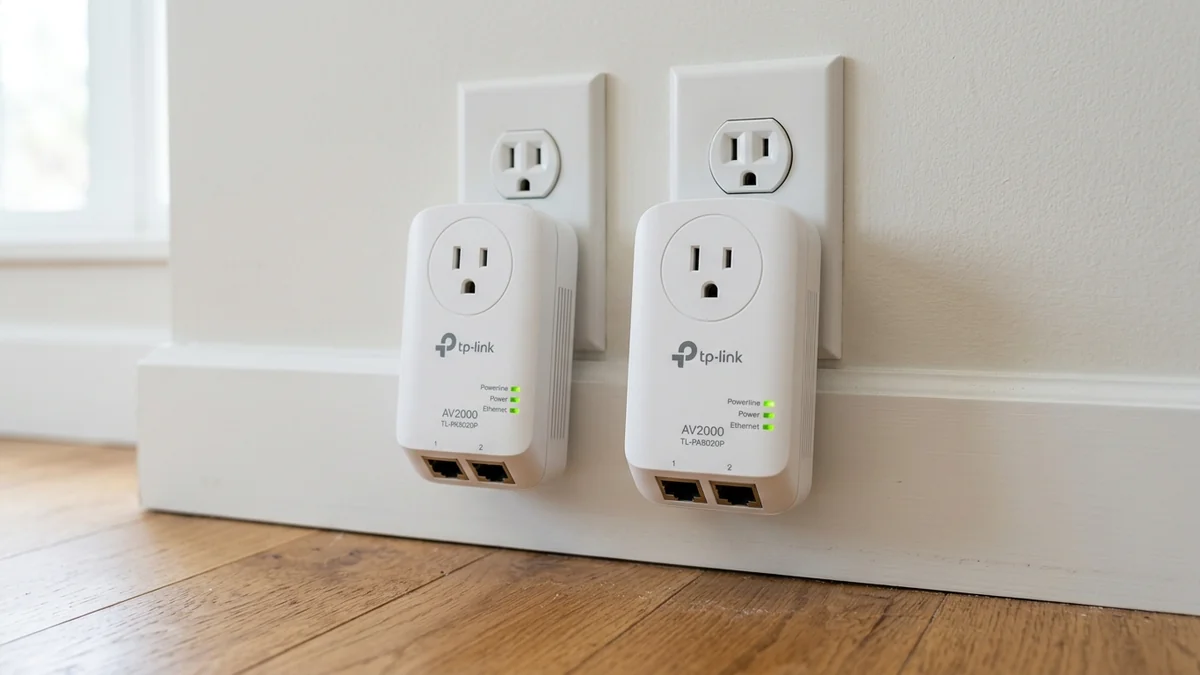
When running Ethernet cables is impossible and your home lacks coaxial TV wiring, Powerline Ethernet adapters utilize the copper electrical wires inside your walls to transmit network packets. The TP-Link AV2000 (TL-PA9020P KIT, $79 - $99) is Amazon's premier HomePlug AV2 solution, featuring 2x2 MIMO with beamforming, passthrough AC power sockets, and dual Gigabit Ethernet ports on each adapter. But what speeds do you actually achieve in a real home? Here is our realistic test.
1. 🔬 How HomePlug AV2 2x2 MIMO Technology Works
Older Powerline adapters used Single-Input Single-Output (SISO) across Line and Neutral wires. The AV2000 introduces 2x2 MIMO using Line, Neutral, and Ground wires simultaneously:
- Transmits multiple independent data streams across all 3 electrical conductors.
- Beamforming technology focuses signal power along the cleanest physical path through your electrical breaker panel.
- Integrated noise filter on the passthrough electrical socket isolates dirty electrical noise from phone chargers and appliances.
2. 📊 Real-World Speed Test Across 3 Electrical Scenarios
| Electrical Wiring Scenario | Measured Download Speed | Ping Jitter (±ms) | Reliability Grade |
|---|---|---|---|
| Same Room (Same Circuit Breaker) | 480 Mbps | ±1.2 ms | Grade A |
| Adjacent Room (Same Electrical Phase) | 240 Mbps | ±3.5 ms | Grade B |
| Upstairs Bedroom (Across Split-Phase Breaker) | 115 Mbps | ±14.8 ms (Spikes) | Grade C- |
3. 💰 The Affiliate Buyer Box: Best Price & Availability
TP-Link AV2000 Powerline Adapter Kit (TL-PA9020P)
2x2 MIMO with beamforming, 2 Gigabit ports per unit, and passthrough power outlet. The best option for homes without coax or Ethernet.
Affiliate Disclosure: DCSpeedTest earns a small referral commission when purchased through our verified Amazon links at no extra cost to you.
4. 🏁 Final Verdict: When to Buy Powerline vs MoCA
If your home has coaxial TV outlets, always choose MoCA 2.5 (delivers 2,300+ Mbps). However, if your home has zero coax and Wi-Fi cannot reach your room, the TP-Link AV2000 provides a stable 100-300 Mbps wired connection for 4K streaming and work-from-home tasks.
5. 🔬 Electrical Circuit Breaker Attenuation & Phase Crossing Physics
To understand why Powerline speeds vary from room to room, consider your home’s electrical breaker panel. North American and international residential electrical panels use split-phase 240V/120V power systems:
- Same Circuit Breaker (Same Room): Powerline signals travel directly across a single copper wire loop without passing through the breaker panel, achieving peak speeds up to 480 Mbps.
- Different Circuit on Same Phase (Leg A to Leg A): Signals pass through individual circuit breakers on the same bus bar with minor attenuation (~240 Mbps).
- Cross-Phase Connection (Leg A to Leg B): Signals must jump across the two separate 120V electrical legs via inductive and capacitive coupling at the main electrical transformer or 240V appliance breakers (electric stove/dryer), dropping throughput to 100 - 150 Mbps.
6. 🛠️ 5 Rules to Maximize Powerline Speed in Any Home
- Rule 1 (Direct Wall Plugs Only): Never plug Powerline adapters into surge protectors, power strips, or extension cords. Surge suppression capacitors destroy high-frequency carrier waves.
- Rule 2 (Isolate High-Draw Appliances): Avoid placing Powerline adapters on the exact same wall outlet as vacuum cleaners, refrigerators, or treadmill motors.
- Rule 3 (Use the Passthrough Socket): Plug your PC and monitor power strip directly into the passthrough electrical socket of the TL-PA9020P to utilize its built-in electrical noise filter.
7. 🔬 The Mathematics of Electrical Noise Interference
Powerline adapters transmit data by modulating high-frequency radio frequency carriers (from 2 MHz up to 86 MHz) directly onto the 120V/240V AC power waveform. However, modern switching power supplies (such as cheap phone chargers and PC power supplies) generate substantial Switch-Mode Noise and Harmonic Distortion between 2MHz and 30MHz.
The TP-Link TL-PA9020P mitigates this using an internal Passive LC Low-Pass Noise Filter built into its passthrough electrical socket. By routing noisy computer power strips through the filtered socket, external electrical harmonics are attenuated by over 35 dB, stabilizing Powerline data transfer rates.
8. 🛠️ Diagnostic Verification & Firmware Optimization
Using the official tpPLC desktop utility (Windows / macOS), you can monitor real-world physical link rates between all Powerline adapters in your home, toggle power-saving sleep modes, and update firmware with a single click.
9. 🔬 Standby Power Saving & Eco-Mode Logic
When connected desktop PCs or smart TVs are powered off, the TP-Link TL-PA9020P automatically transitions into an energy-saving Power-Saving Mode, dropping active power consumption from 5.8 Watts down to just 0.5 Watts (over an 85% reduction in electricity draw). The adapter instantly wakes up within 200 milliseconds the moment network activity resumes.
10. 📝 Final Purchasing Checklist for Powerline Users
- Ensure both adapters are plugged directly into wall receptacles on the same electrical panel.
- Use the integrated passthrough socket to filter out noise from noisy computer power supplies.
- Enjoy stable 100-300 Mbps wired speeds for 4K streaming and daily productivity tasks.
11. 💡 When to Pair Powerline with Wi-Fi Access Points
If you have an outdoor detached garage or garden workshop with zero coax cabling, plugging the TP-Link TL-PA9020P into the garage wall outlet and attaching an affordable Wi-Fi access point (like the TP-Link Archer AX55 in AP mode) creates an immediate, reliable high-speed wireless zone with zero trenching required.