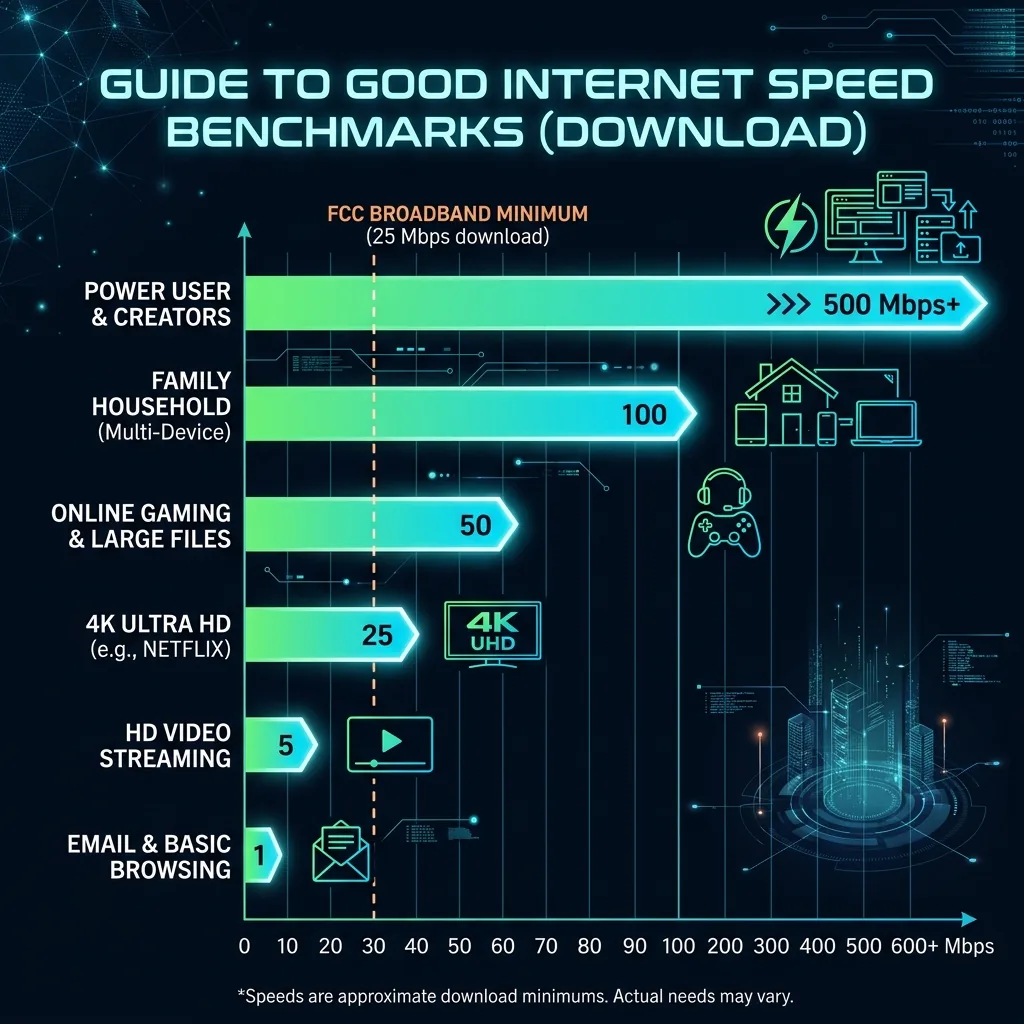
There Is No Single "Good" Speed
For Gaming — Speed Matters Less Than You Think
- Speed: Only 3–15 Mbps required
- Ping: Under 20ms competitive, under 50ms casual
- Jitter: Under 5ms
- Packet Loss: 0%
A 50 Mbps fiber at 5ms ping beats a 1 Gbps cable at 40ms ping. Latency wins games, not speed.
For 4K Streaming
Netflix 4K HDR requires 25 Mbps. YouTube 4K needs ~20 Mbps. 100 Mbps handles 4 simultaneous 4K streams.
For Remote Work
- Single WFH user: 100 Mbps / 20 Mbps minimum
- Multiple WFH users: 300 Mbps / 50 Mbps recommended
- Ping under 50ms for comfortable video calls
For Streaming Content Creation
- Twitch 1080p60: 10+ Mbps upload
- YouTube 4K: 60+ Mbps upload consistently
For a 4+ Device Family
2× 4K Netflix + gaming + YouTube + background sync = 100 Mbps minimum, 250+ Mbps recommended.
Global Averages (Q1 2026)
- Global avg download: 89.4 Mbps
- Global avg upload: 43.7 Mbps
- Global avg ping: 28.3ms
- Top countries: Singapore, South Korea, UAE, Denmark
Beyond Download Speed: The Four Numbers That Matter
A complete speed test measures four values, not one. Download determines how fast you receive data (streaming, browsing, gaming). Upload determines how fast you send data (video calls, cloud backups, streaming). Ping determines real-time responsiveness (gaming, video calls). Jitter determines consistency of that responsiveness. A "good" score on all four: download matching your plan's advertised speed (within 80%), upload at least 10 Mbps for most households, ping under 30ms for gaming or under 50ms for video calls, and jitter under 10ms. Missing on any one of these four creates a specific, identifiable problem in your daily internet use.
Frequently Asked Questions
Is 100 Mbps a good internet speed in 2026?
Yes, for 1-2 person households. 100 Mbps comfortably supports 4K streaming (15-25 Mbps), video calls (3-8 Mbps), gaming (3-8 Mbps), and general browsing simultaneously. For households of 3-4 people all doing bandwidth-intensive tasks at once, 200-500 Mbps becomes the more comfortable range. Speed alone doesn't tell the whole story — a 100 Mbps connection with low jitter and good ping will feel better for real-time applications than 500 Mbps with inconsistent latency.
What is a good ping score on a speed test?
Under 20ms is excellent (fiber or close cable), 20-50ms is good (typical cable or 5G), 50-100ms is acceptable for casual use but noticeable in competitive gaming, and above 100ms is poor for real-time applications. Satellite internet (Starlink V3 aside) typically runs 600ms+, which makes gaming essentially unplayable. For reference: a fiber connection in a major city to a nearby server commonly achieves 5-10ms.