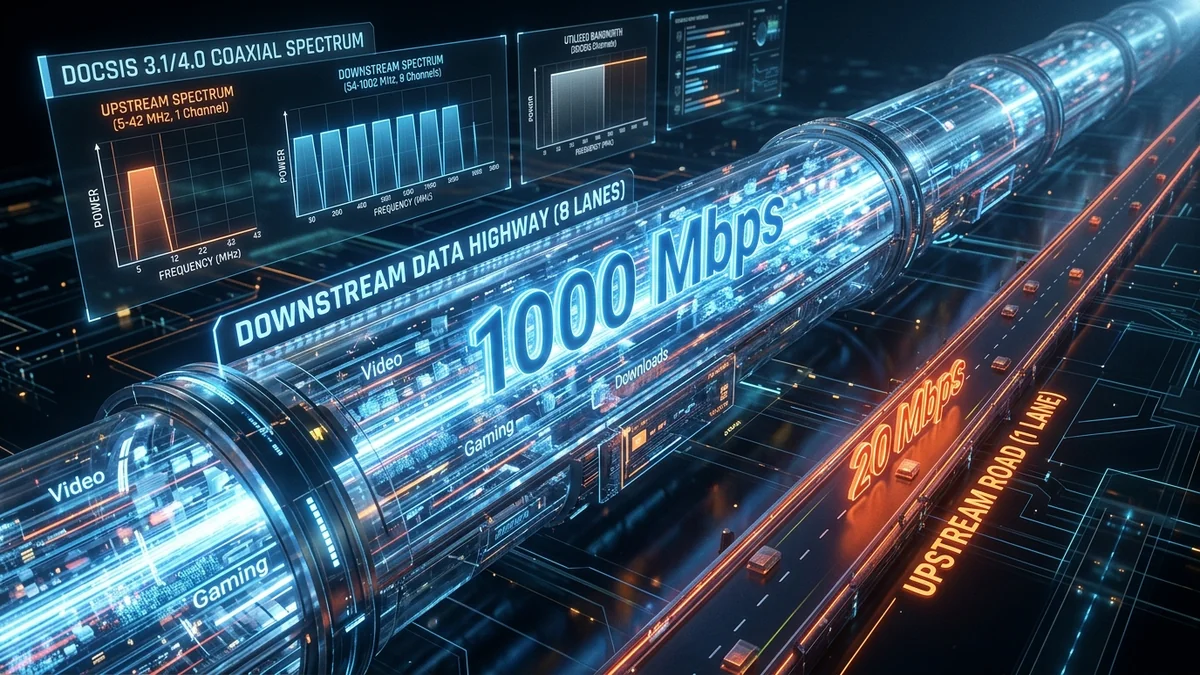
You run a speed test and observe a massive disparity: Download Speed hits 500 Mbps, but Upload Speed crawls at just 20 Mbps. In our modern digital world where remote workers upload high-definition video feeds, stream on Twitch, and sync gigabytes of cloud storage daily, why are residential internet plans engineered with such extreme asymmetry? The answer lies in legacy telecom consumer usage statistics, physical coaxial RF frequency split limitations (Low-Split DOCSIS), and optical GPON framing standards. Here is the engineering truth behind asymmetric broadband in 2026.
1. The Historical Consumption Ratio: 90/10 Rule
When residential broadband networks were originally architected in the late 1990s and early 2000s, consumer behavior was almost exclusively consumption-oriented. Users downloaded web pages, images, MP3 music files, and video streams, while uploading only tiny mouse clicks, form submissions, and TCP Acknowledgement (ACK) packets. Network planners allocated over 90% of available physical frequency spectrum to downstream traffic and less than 10% to upstream traffic.
2. 📡 The Physical Coaxial Spectrum Barrier (DOCSIS Low-Split)
In Hybrid Fiber-Coaxial (HFC) cable networks, data travels over a copper coaxial cable with a total frequency spectrum limited to 750 MHz or 1000 MHz (1 GHz):
- Low-Split Architecture (Legacy Standard): Upstream traffic is confined strictly to 5 MHz – 42 MHz (a tiny 37 MHz sliver). Downstream traffic occupies 54 MHz to 1000 MHz. Because bandwidth is directly proportional to frequency width, upload speeds are physically capped at 20 Mbps to 35 Mbps.
- Mid-Split & High-Split (DOCSIS 3.1 / 4.0 Upgrades): Expands upstream frequency up to 85 MHz (Mid-Split) or 204 MHz (High-Split), enabling 100 Mbps to 500 Mbps upload over copper.
- Pure Fiber (FTTH Symmetrical Architecture): Fiber-optic glass uses completely separate laser light wavelengths (e.g. 1490nm downstream and 1310nm upstream), delivering true symmetrical 1,000 Mbps down AND 1,000 Mbps up.
3. 📊 Asymmetric Cable vs. Symmetrical Fiber Comparison
| Broadband Architecture | Typical Download | Typical Upload | Symmetry Ratio | Bufferbloat Risk |
|---|---|---|---|---|
| Legacy Cable (DOCSIS Low-Split) | 300 – 1,000 Mbps | 10 – 35 Mbps | 30:1 Asymmetric | High (Upload chokes easily) |
| High-Split Cable (DOCSIS 4.0) | 1,000 – 2,000 Mbps | 100 – 300 Mbps | 5:1 Asymmetric | Moderate |
| Pure Fiber (FTTH XGS-PON) | 1,000 – 5,000 Mbps | 1,000 – 5,000 Mbps | 1:1 Fully Symmetric | Near Zero (Immense Headroom) |
4. 🔬 DOCSIS 4.0: The Future of Symmetrical Cable Broadband
To eliminate the asymmetric upload bottleneck and compete directly with pure fiber optics, cable broadband operators are deploying DOCSIS 4.0 utilizing two advanced architectural upgrades:
- Full Duplex DOCSIS (FDX): Enables simultaneous upstream and downstream transmission over the exact same frequency spectrum (108 MHz to 684 MHz) using advanced echo cancellation, providing symmetrical 10 Gbps down / 6 Gbps up over existing coaxial copper.
- Extended Spectrum DOCSIS (ESD): Expands total coaxial frequency spectrum up to 1.8 GHz (1800 MHz), reserving up to 684 MHz for upstream channels to deliver multi-gigabit upload speeds without replacing in-ground street cables.
5. 💡 How to Mitigate Asymmetric Upload Choking Today
If you are stuck on an asymmetric cable plan (e.g. 500 Mbps down / 20 Mbps up), configure CAKE SQM Quality of Service on your router and set your upload shaper to 18 Mbps (90% of maximum). This reserves a dedicated 2 Mbps buffer lane that prevents your upload from saturating, keeping download speeds and video calls running at peak efficiency.
6. 📊 Downstream vs. Upstream Bandwidth Requirements by Workload
| Digital Activity | Download Bandwidth Needed | Upload Bandwidth Needed | Most Critical Performance Metric |
|---|---|---|---|
| 4K HDR Streaming (Netflix/YouTube) | 25 – 40 Mbps | < 0.5 Mbps (ACKs) | Sustained Downstream Throughput |
| Twitch / YouTube 1080p 60FPS Live Broadcast | < 5 Mbps | 8 – 15 Mbps Stable | Zero Upstream Packet Loss |
| Competitive Online Multiplayer Gaming | < 0.2 Mbps | < 0.2 Mbps | Sub-20ms Ping & <1ms Jitter |
| Cloud Backup (Google Drive / OneDrive) | < 2 Mbps | 50 – 500+ Mbps | High Upstream Throughput |
7. 🏁 The Bottom Line: Moving Toward Symmetrical Fiber
As modern internet consumption becomes increasingly interactive with cloud computing, two-way 4K video conferencing, remote backup systems, and live streaming, the limitations of asymmetric broadband are more apparent than ever. While Smart Queue Management (SQM) can prevent narrow upload pipes from choking your download speeds today, switching to a pure Fiber-to-the-Home (FTTH) provider remains the permanent solution for true, unconstrained symmetrical broadband performance.
8. 💡 How to Check Your Neighborhood Cable Upstream SNR
On cable broadband connections (Comcast, Spectrum, Cox), log into your cable modem's internal diagnostic page at http://192.168.100.1. Verify that your Upstream Transmit Power is between +38 dBmV and +48 dBmV across all bonded SC-QAM and OFDMA upstream channels. If upstream power exceeds +51 dBmV, contact your provider to inspect street-level line amplifiers and clean up RF ingress noise.
Understanding the engineering history of asymmetric broadband empowers you to manage household bandwidth intelligently, configure effective router queue disciplines, and select the optimal broadband provider for your remote work, gaming, and streaming needs.
As next-generation multi-gigabit DOCSIS 4.0 and XGS-PON fiber networks continue to deploy globally, the era of severe asymmetric bandwidth restrictions will gradually come to an end, paving the way for seamless, high-throughput cloud computing and spatial telepresence applications.