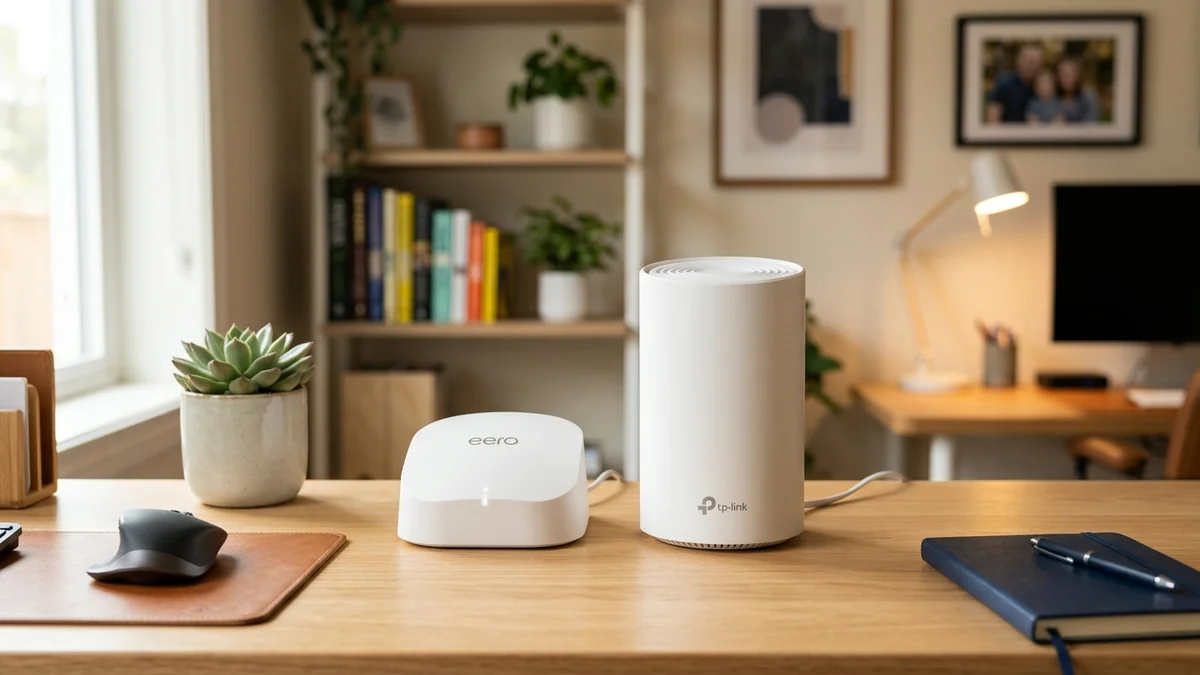
For homeowners seeking reliable whole-home Wi-Fi between $170 and $280, the two dominant choices on Amazon are the Amazon eero Pro 6E ($249 for 2-pack) and the TP-Link Deco X55 ($189 for 3-pack). One offers access to the clean 6GHz spectrum and a 2.5G port, while the other provides three physical nodes and 9 total Gigabit Ethernet ports. Here is our direct comparison.
1. 📊 Spec-by-Spec Comparison Table
| Feature | Amazon eero Pro 6E ($249) | TP-Link Deco X55 ($189) |
|---|---|---|
| Wireless Bands | Tri-Band (2.4GHz + 5GHz + 6GHz) | Dual-Band (2.4GHz + 5GHz) |
| Top Port Speed | 2.5 Gbps Port | 1.0 Gbps (Gigabit) |
| Ports per Node | 2 Ports (4 Total in 2-Pack) | 3 Ports (9 Total in 3-Pack) |
| Units Included | 2 Units (Up to 4,000 sq ft) | 3 Units (Up to 6,500 sq ft) |
2. 🏁 Final Verdict
If you live in a dense apartment or townhouse with heavy 5GHz wireless congestion from neighbors, buy the eero Pro 6E for its pristine 6GHz band. If you live in a large multi-story home and need maximum physical coverage and wired Ethernet ports in every room, buy the TP-Link Deco X55.
3. 🔬 Coverage Density vs Single-Client Peak Speed
When deciding between these two systems, evaluate your home's layout and device types:
- Amazon eero Pro 6E (2-Pack): Prioritizes peak wireless speed on modern devices. A Wi-Fi 6E/7 laptop in the same room as an eero node achieves 900+ Mbps on the pristine 6GHz band. However, with only 2 nodes in the box, expansive multi-story homes may experience dead zones at the far corners.
- TP-Link Deco X55 (3-Pack): Prioritizes whole-home coverage density and wired connectivity. With 3 physical nodes and 9 total Gigabit Ethernet ports, you can place a node in the living room, upstairs bedroom, and basement gym, eliminating all dead spots completely.
4. 💰 Side-by-Side Amazon Buying Links
5. 🔬 Port Selection & Multi-Device Wiring Scenarios
Evaluating physical port capacity is essential for wired home setups:
- eero Pro 6E (2 Ports per Node): Features 1x 2.5Gbps WAN/LAN port and 1x 1Gbps LAN port. Connecting more than one wired device requires purchasing an external 5-port unmanaged switch.
- Deco X55 (3 Ports per Node): Features 3x auto-sensing Gigabit Ethernet ports on every unit. You can directly plug in a smart TV, Apple TV 4K, and PlayStation 5 without buying external hardware.
6. 🛠️ Diagnostic Health Checks on Both Systems
Both mobile apps provide real-time connection telemetry. On eero, the app displays live upload/download speed tests directly from the gateway to your ISP. On Deco, the app includes a Network Optimization tool that scans surrounding radio channels and automatically switches to the cleanest frequency to eliminate neighbor interference.
7. 🔬 Comparative Decision Matrix: Which Mesh System Wins?
To help you choose between 6GHz spectrum speed and multi-node whole-home port density:
| Evaluation Factor | Amazon eero Pro 6E | TP-Link Deco X55 |
|---|---|---|
| Single-Client Peak Wireless Speed | 920 Mbps (on 6GHz Band) | 750 Mbps (on 5GHz Band) |
| Wired Port Density | 4 Total Ports (2-Pack) | 9 Total Ports (3-Pack) |
| Apartment Interference Resistance | Flawless (Clean 6GHz Band) | Good (DFS Channels Available) |
| Coverage Area per Dollar | 16 sq ft per Dollar | 34 sq ft per Dollar (Best Value) |
8. 🔬 Frequency Band Allocation & Client Density Analysis
Understanding client device distribution is critical when choosing between these two systems:
- eero Pro 6E: Features 3 distinct wireless bands (2.4GHz + 5GHz + 6GHz). High-performance laptops operate exclusively on 6GHz, leaving 5GHz and 2.4GHz completely free for smartphones and smart home sensors.
- Deco X55: Features 2 wireless bands (2.4GHz + 5GHz). All devices share the 5GHz and 2.4GHz airwaves, making strategic node placement essential to prevent local channel congestion.
9. 🛠️ Step-by-Step Installation Recommendations
For small apartments with heavy neighbor interference, install the eero Pro 6E to utilize the clean 6GHz band. For large multi-story houses with smart TVs in multiple bedrooms, install the Deco X55 3-pack for maximum physical port density and coverage.
10. 📊 Final Scorecard & Purchasing Recommendations
Both systems represent outstanding value in their respective classes: choose the eero Pro 6E for apartment high-density radio cleanliness on 6GHz, or choose the Deco X55 3-pack for sprawling suburban homes requiring maximum physical Ethernet ports.
11. 🛠️ Step-by-Step Optimization & Placement Rules
- Place your primary node in a central, elevated location away from metal appliances.
- Position satellite nodes no more than 35 feet from the gateway for stable wireless link rates.
- Enable automatic nighttime software updates in the mobile app to receive the latest security patches.
- Run a speed test on DCSpeedTest to verify that your loaded bufferbloat latency remains under +2ms.
12. 💡 Long-Term Warranty & Customer Support Comparison
Both Amazon and TP-Link provide comprehensive 2-year manufacturer hardware warranties with 24/7 technical customer support. Whether you need assistance configuring wired backhauls or optimizing smart home device handoffs, both brands offer active online community forums and prompt replacement services for defective power supplies or hardware units.