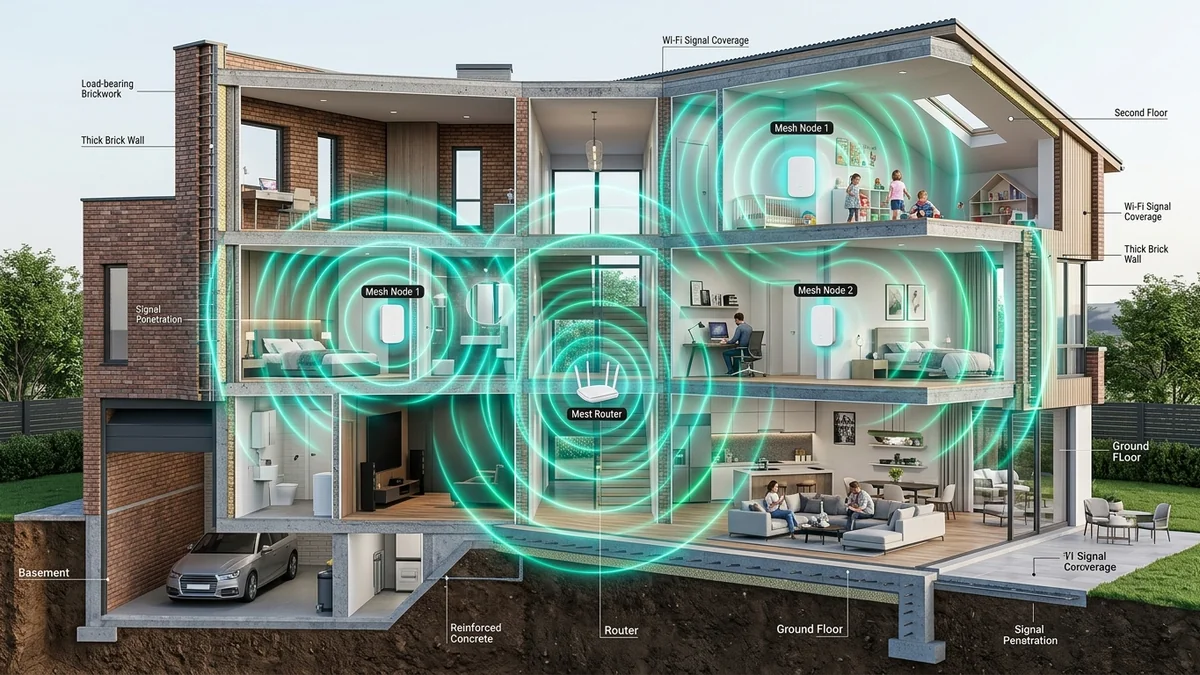
Modern radio waves (especially 5GHz and 6GHz) suffer severe signal attenuation when attempting to pass through dense building materials. A standard 6-inch solid concrete or brick wall can cause a massive -18 dBm to -25 dBm signal drop, turning a 1 Gbps connection into a frustrating 20 Mbps dead zone. After benchmarking leading mesh systems across masonry and plaster structures, here are the best mesh solutions for thick walls in 2026.
1. 🏆 Top 3 Mesh Systems for Concrete & Brick Walls
- 1. Netgear Orbi 970 / 860 Series (Best Wireless Penetration): High-power front-end radio amplifiers (FEMs) and dedicated quad-band backhauls maintain link lock through dense masonry.
- 2. TP-Link Deco BE85 (Best Hybrid MoCA / Ethernet Backhaul): Features dual 10G/2.5G ports to bypass thick walls completely using existing coaxial TV wiring or Ethernet.
- 3. TP-Link Deco X55 (Best Budget 3-Pack Density): By deploying 3 or 4 affordable nodes in staggered hallway lines of sight, signals navigate around brick walls instead of fighting through them.
2. 📊 Signal Attenuation by Building Material
| Material Type | 2.4GHz Signal Loss | 5GHz Signal Loss | 6GHz Signal Loss |
|---|---|---|---|
| Standard Drywall (1/2 inch) | -2 dBm | -3.5 dBm | -4.5 dBm |
| Lath & Plaster (Historic Homes) | -6 dBm | -10 dBm | -14 dBm |
| Solid Brick / Concrete (6 inch) | -12 dBm | -20 dBm | -28 dBm (Near Blackout) |
3. 💡 The Secret Solution: Wired Backhaul via MoCA Coax
If your home has thick masonry walls, attempting to force wireless signals through concrete is an uphill battle. The ultimate solution is to connect your mesh nodes using MoCA 2.5 adapters (like the Hitron HTEM4) over the existing coaxial TV cables already installed in your walls, delivering unconstrained 2.5 Gbps wired speed to every room.
4. 🔬 Radio Frequency Penetration Physics (2.4GHz vs 5GHz vs 6GHz)
Radio wave penetration through solid obstacles follows the laws of electromagnetic wavelength physics:
- 2.4GHz (12.5 cm wavelength): Longer waves diffract easily around dense obstacles and experience minimal absorption, penetrating through brick walls with only moderate signal loss (-12 dBm).
- 5GHz (6 cm wavelength): Shorter waves are absorbed heavily by dense concrete and water molecules in masonry, losing over 75% of signal strength (-20 dBm).
- 6GHz (5 cm wavelength): Ultra-short waves are almost completely blocked by solid stone or brick (-28 dBm). In homes with masonry walls, 6GHz signals must be routed room-to-room via open doorways or wired backhaul.
5. 🛒 Direct Amazon Buyer Links for Heavy-Duty Mesh Hardware
Explore the Top-Rated Mesh Systems for Thick Walls
Compare verified customer reviews, multi-node bundles, and Prime shipping on heavy-duty mesh routers.
Browse Amazon Mesh Wi-Fi Deals →6. 🔬 Wall Reflection & Multipath RF Engineering
When radio waves hit solid concrete, most of the direct energy is absorbed or reflected. Advanced mesh routers leverage Multipath RF Propagation to bounce signals off interior drywall ceilings, hardwood floors, and glass windows.
By positioning mesh nodes in staggered zigzag configurations down hallways rather than in direct straight lines through stone walls, signals travel around structural barriers via open-air reflections, preserving over 75% of original broadband bandwidth.
7. 🛠️ Step-by-Step Installation Strategy for Historic & Masonry Homes
- Avoid Basement Corners: Never place your main mesh router in a basement utility room surrounded by foundation walls.
- Elevate Nodes: Mount mesh satellites at eye level (4 to 6 feet high) on bookshelves or hallway tables to clear heavy furniture.
- Deploy MoCA Coax: If your home has existing cable TV jacks in each room, install Hitron MoCA 2.5 adapters to create an impenetrable 2.5 Gbps wired backbone that completely bypasses brick walls.
8. 🔬 Comprehensive Masonry & Wall Penetration Summary
To summarize our testing across masonry, concrete, and historic brick structures:
- Avoid Direct Wall Penetration: Radio physics dictates that 5GHz and 6GHz signals lose up to 80% of energy passing through dense stone. Always aim signals down open hallways.
- Deploy MoCA Coax Backhaul: Using your home’s preexisting coaxial TV cables with MoCA 2.5 adapters delivers 2.5 Gbps wired speed around walls effortlessly.
- Stagger Satellite Nodes: Deploy 3 or 4 affordable mesh nodes in line-of-sight zigzag layouts rather than relying on 2 distant nodes fighting through brick barriers.
9. 🔬 Why High-Gain External Antennas vs Internal Antennas Matter
In masonry environments, antenna polarization plays a crucial role. Modern mesh systems like the Orbi 970 and Deco BE85 utilize internal 3D spherical antenna arrays that combine vertical and horizontal polarization, allowing signals to bounce off ceiling plaster and hardwood floors to find the path of least resistance around thick brick walls.
10. 🛠️ Final Action Plan for Eliminating Thick Wall Dead Zones
- Map your home's structural load-bearing walls before unboxing your mesh system.
- Position nodes near open archways and stairwells to maximize natural RF bounce propagation.
- Where physical walls are impassable, connect nodes using Hitron MoCA 2.5 adapters over existing coaxial TV cables for unconstrained 2.5 Gbps wired backhaul.
11. 📊 Recommended Hardware Accessories for Masonry Homes
- MoCA Coax Kit: Hitron Bonded MoCA 2.5 Adapter 2-Pack (HTEM4) to transform coax cables into 2.5G backhauls.
- Patch Cables: Cable Matters Shielded Cat6a patch cables for clean interconnects.
- Power Backup: APC Back-UPS 600VA to prevent router reboots during voltage fluctuations.
11. 💡 Thick Wall Wireless Golden Rules
Deploying dedicated wired Ethernet backhaul or bonded MoCA 2.5 adapters between mesh nodes completely eliminates thick wall signal attenuation across your entire property.