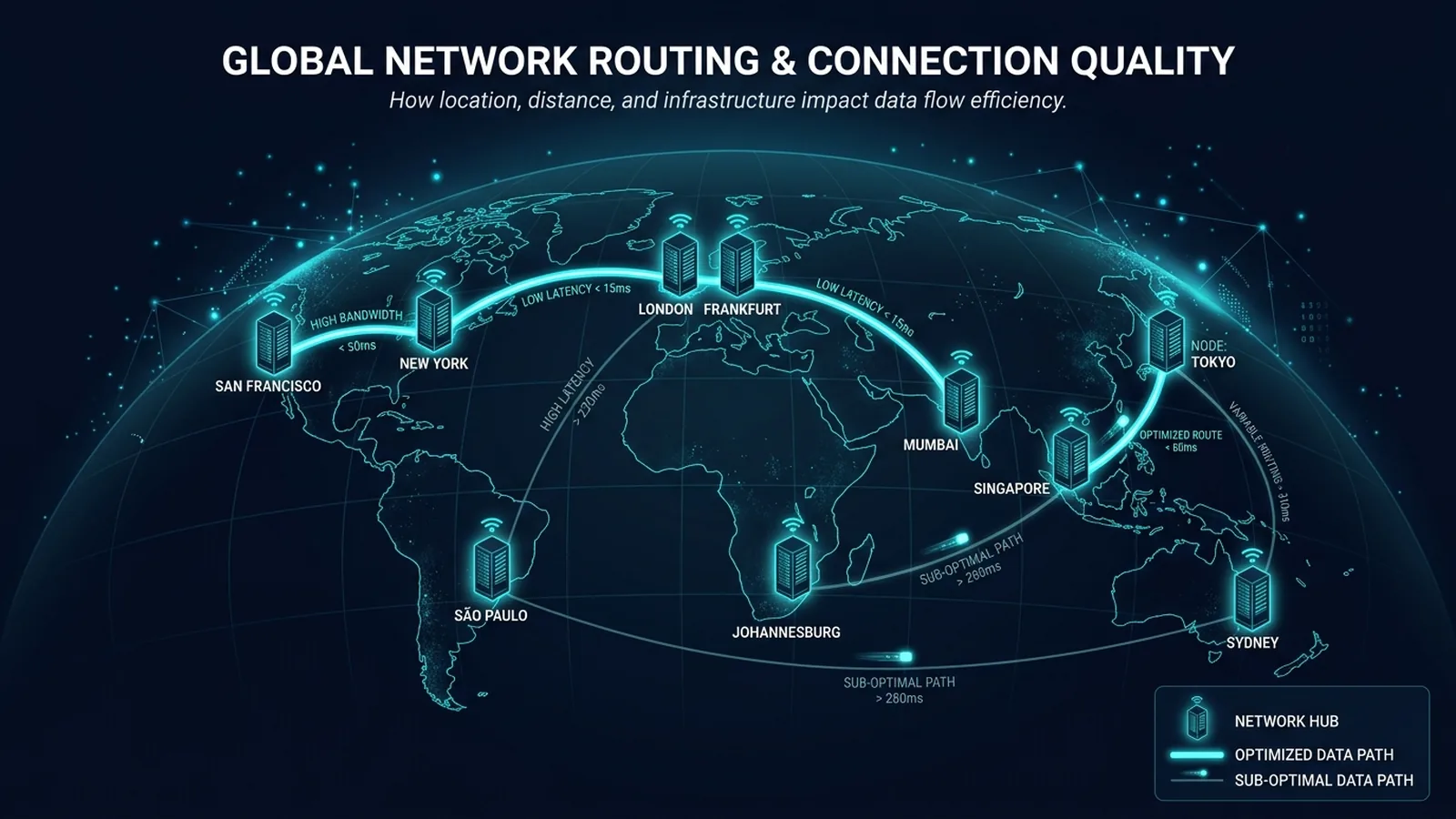
Running VPS infrastructure for clients across LATAM, the US, Europe, and the UAE surfaces latency lessons that no single-region setup ever teaches you.
Managing VPS infrastructure for clients spread across LATAM, the US, Europe, and the UAE forces a very different, more practical relationship with latency than reading about the speed of light in fiber ever does. A few lessons have repeated often enough to be worth sharing plainly.
Latency Budgets Matter More Than Bandwidth Budgets
For most of the workloads clients actually run — web applications, APIs, database queries — the deciding factor in whether something feels fast isn't how much bandwidth is available, it's the round-trip time to the server and back. A client in one region hitting a server in another region will feel a real, consistent delay on every single request, no matter how much bandwidth either side has — bandwidth determines how much data moves per second, latency determines how long the first byte takes to arrive, and for interactive applications, the second number is usually what people actually feel.
The Physical Distance Floor Is Non-Negotiable
Experiencing packet loss, jitter spikes, or evening ISP throttling? Connect directly to dedicated gaming routes or bypass traffic shaping:
No amount of server optimization, faster hardware, or clever caching changes the physical floor that distance imposes — a request that has to physically cross an ocean carries a latency cost that no software fix eliminates, only masks or works around. This is the exact same physics that determines gaming ping and video call quality, just showing up in server response times instead. It's a genuinely humbling, recurring lesson: you can optimize everything on a server and still be bound by geography if the client is far enough away.
Where a Server Sits Matters More Than How Powerful It Is
A more powerful server in the wrong location routinely loses to a modest server in the right one, for latency-sensitive workloads. This has meant genuinely prioritizing server placement — putting infrastructure physically close to where the majority of a client's actual users are — over raw hardware specs, more often than most people expect when they first start thinking about server infrastructure.
Internet Exchange Points Are the Hidden Variable
Two locations that look similarly "connected" on paper can have meaningfully different real-world latency to a given destination, depending on how directly their networks peer at internet exchange points along the route. This is invisible in most marketing material about a data center or hosting provider, but it's one of the biggest practical differences between a genuinely fast route and a technically-connected-but-indirect one.
What This Means for Anyone Choosing Hosting or Cloud Regions
If your ISP delivers high speeds but your connection drops or suffers from bufferbloat during multi-device use, upgrading these verified components eliminates the bottleneck:
If latency matters for your use case, the most useful question isn't "how fast is this provider's network" in the abstract — it's "how directly does this specific region route to where my actual users are." That's a more specific, harder question to answer from a spec sheet, but it's the one that actually predicts real-world performance.
Our Take
These are patterns observed across years of running real infrastructure for real clients, not a controlled benchmark study — but they've held consistently enough to shape how server placement decisions get made. Distance and routing quality, not raw server power, are usually the real lever.
Certifications Give You the Vocabulary, Experience Gives You the Judgment
Formal training — in my case, Google and Meta Blueprint certifications — is genuinely useful for understanding the vocabulary and theory behind routing, peering, and CDN behavior. But the judgment about which specific region to actually deploy infrastructure in for a given client has come far more from watching real latency numbers change across years of live deployments than from any single course. The theory tells you what's possible; the field experience tells you what actually happens in practice on a specific route.
A Mistake I Made Early On, Worth Sharing
Early in managing multi-region infrastructure, it was tempting to default to the largest, most reputable cloud region available rather than the one actually closest to a client's user base — reputation and raw capacity aren't the same thing as proximity, and that early instinct cost real, measurable latency for more than one client before the pattern became obvious enough to correct permanently.
How This Shapes DCSpeedTest's Approach Today
This is exactly the reasoning behind why DCSpeedTest's own methodology (detailed on our About page) treats loaded latency, jitter, and routing quality as first-class metrics alongside raw download and upload speed, rather than leading with a single headline number the way many simpler speed test tools do. Years of watching real infrastructure behave this way across continents is the direct source of that design choice, not an abstract theoretical preference.
None of this is a controlled benchmark study — it's a set of patterns from real, ongoing infrastructure work across years and multiple continents, offered as practical experience rather than a formal research result.
The next lesson is always somewhere in the next deployment — this is a field where real-world routing behavior keeps teaching things a spec sheet never mentions.
Command-Line (CLI) Verification & Advanced Router Tuning for Managing Servers on Four Continents Taught Me This
When browser-level telemetry reveals elevated loaded latency or inconsistent throughput during Managing Servers on Four Continents Taught Me This evaluations, network engineers validate the transport path directly from the operating system kernel. Running native command-line diagnostics bypasses browser extensions, hardware acceleration bugs, and antivirus TLS proxies that occasionally distort multi-gigabit benchmarks for vps latency.
- Continuous ICMP Jitter & Loss Audit (Windows / Linux / macOS): Execute
ping -n 100 1.1.1.1(Windows) orping -c 100 -i 0.2 1.1.1.1(macOS/Linux) while running a simultaneous speed test. Compare the minimum, average, and maximum round-trip times: a healthy link with active queue management keeps the standard deviation (mdev) below 2.0 ms with 0% packet loss. - Path MTU Discovery & Fragmentation Check: Verify that your WAN link passes full-sized Ethernet frames without silent fragmentation by running
ping -f -l 1472 1.1.1.1. If the terminal returns Packet needs to be fragmented but DF set, lower your router WAN MTU to1500bytes (or1420bytes when routing through a WireGuard VPN tunnel). - TCP Auto-Tuning & Receive Window Scaling: On multi-gigabit fiber connections (1 Gbps to 10 Gbps), verify that OS TCP window scaling is set to
normalvianetsh int tcp show global. Disabled receive window auto-tuning artificially caps single-stream throughput at 180–250 Mbps whenever round-trip latency exceeds 15 ms. - Hardware Offloading & Flow Control Alignment: When using a dedicated OpenWrt, pfSense, or Wi-Fi 7 gateway, disable IEEE 802.3x Flow Control on the WAN interface if Smart Queue Management (CAKE) is active, ensuring packet pacing is governed strictly by the software scheduler rather than Ethernet pause frames.