You pay for a blazing-fast 500 Mbps or 1 Gbps fiber optic internet connection at home. Speed tests show 950 Mbps download with 2ms ping. Yet the instant you launch your company's corporate VPN (Cisco AnyConnect, Palo Alto GlobalProtect, Fortinet FortiClient, Zscaler, or OpenVPN), your internet crawls down to 20 to 35 Mbps, files take forever to download from internal SharePoint servers, and video calls begin to stutter. Why are corporate VPNs so excruciatingly slow at home, and how can you fix it?
1. The #1 Reason: Full Tunneling vs. Split Tunneling (Hair-pinning)
Corporate VPN configurations fall into two distinct routing architectures:
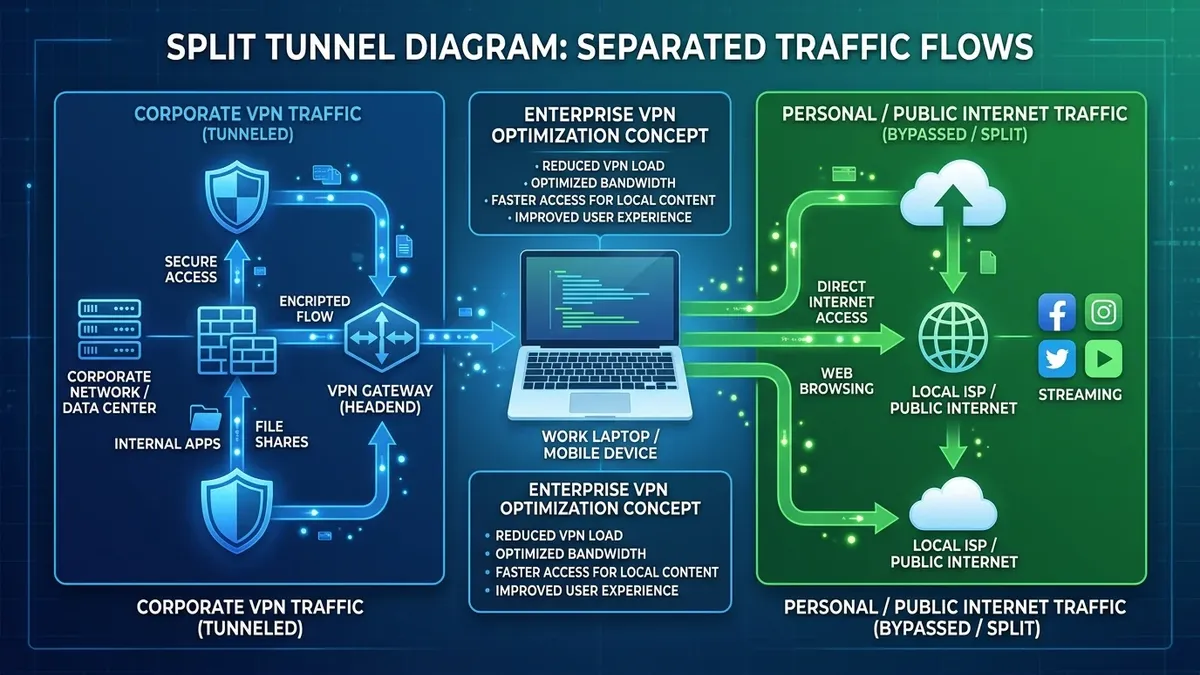
- Full Tunneling (The Performance Killer): 100% of your computer's internet traffic—including Spotify, YouTube, web browsing, and Zoom calls—is encrypted and routed through your company's headquarters or central datacenter firewall before heading out to the public internet.
- Split Tunneling (The Fast Solution): Only traffic destined for internal corporate resources (internal servers, intranet, database clusters) routes through the encrypted VPN tunnel. All general public internet traffic (Google, SaaS tools, streaming) routes directly out of your fast home broadband line.
| VPN Architecture | Routing Path | Typical Speed Impact | Latency Impact |
|---|---|---|---|
| Full Tunneling | Home → Corporate Gateway → Public Internet → Home | 70% – 90% Speed Reduction | +40ms to +120ms added ping |
| Split Tunneling | Corporate traffic → VPN; Public traffic → Direct ISP | 0% impact on public web | Zero added ping for everyday web |
When Full Tunneling is enforced, your connection speed is capped not by your 500 Mbps home fiber, but by your company's VPN concentrator bandwidth shared across thousands of simultaneous remote employees.
2. 📦 MTU Packet Fragmentation & Encapsulation Overhead
Standard Ethernet networks use a **Maximum Transmission Unit (MTU) of 1500 bytes**. However, VPN protocols (IPsec, TLS, WireGuard) wrap each original data packet with additional security headers (ESP headers, IV vectors, HMAC authentication tags), adding 60 to 88 bytes of overhead.
If your VPN client attempts to send a 1500-byte packet over a connection with an effective VPN MTU of 1420 bytes, the packet must be split into two separate fragments (Packet Fragmentation). Fragmenting packets doubles the number of packets your router and CPU must process, causing severe throughput collapse and TCP retransmissions.
3. 🔐 Encryption & Decryption CPU Bottlenecks
Every single packet sent over a corporate VPN must be encrypted with heavy cryptographic ciphers (such as **AES-256-GCM or ChaCha20-Poly1305**). While modern processors feature hardware-accelerated AES-NI instruction sets, if your corporate laptop is already running heavy background security software (CrowdStrike, Microsoft Defender for Endpoint, Tanium), the CPU can become a bottleneck during multi-gigabit file transfers.
4. 🛠️ 4 Steps to Speed Up Your Corporate VPN at Home
- Request Split Tunneling from Corporate IT: Submit a formal helpdesk ticket requesting Split Tunneling for video conferencing (Zoom, Teams) and general web browsing under corporate acceptable use policy.
- Optimize Local MTU Size: Manually adjust your network adapter's MTU to
1400or1420to eliminate packet fragmentation:netsh interface ipv4 set subinterface "Ethernet" mtu=1420 store=persistent - Switch to the Nearest Geographic VPN Gateway: In your VPN client (Cisco AnyConnect / GlobalProtect), ensure you connect to the regional gateway physically closest to your home city rather than the corporate headquarters in another country.
- Use Wired Ethernet Over Wi-Fi: Wi-Fi packet drops combined with VPN encapsulation cause aggressive TCP exponential backoff, reducing speeds far more drastically than on non-VPN connections.
5. 🔄 The "TCP-over-TCP Meltdown" in SSL-VPNs
Many corporate VPNs default to **SSL/TLS VPN mode over TCP Port 443** to easily bypass strict hotel and airport firewalls. However, running TCP traffic (such as file downloads or web browsing) inside a TCP-based VPN tunnel triggers a well-known networking flaw called TCP-over-TCP Meltdown.
When a single packet is lost on your home Wi-Fi, both the inner application TCP stack and the outer VPN TCP tunnel initiate simultaneous retransmissions and exponential timer backoffs. This double-backoff causes throughput to collapse from 100 Mbps down to less than 5 Mbps until the connection is manually reset. Switching your corporate VPN client to IPsec / IKEv2 or WireGuard over UDP eliminates TCP meltdown entirely.
6. 🛡️ Next-Gen Firewall (NGFW) Deep Packet Inspection Throttling
Corporate VPN concentrators do not just route traffic—they pass every data byte through enterprise **Next-Generation Firewalls (Palo Alto, Fortinet, Check Point)** performing real-time Deep Packet Inspection (DPI), antivirus scanning, SSL decryption, and data loss prevention (DLP). During corporate working hours (9 AM to 5 PM), firewall CPU utilization frequently hits 90%+, introducing significant queuing delay for remote workers.
7. 🔍 DNS Resolution Latency & Disabling NetBIOS over TCP/IP
When connected to a corporate VPN, your computer frequently sends DNS queries over the slow encrypted tunnel for local web requests. Disabling NetBIOS over TCP/IP in your network adapter properties prevents Windows from broadcasting legacy NetBIOS name queries over the VPN tunnel, cutting internal domain resolution delays by up to 70%.
⚡ Test Your Speed With & Without VPN
Run a benchmark before and after launching your corporate VPN to calculate your exact tunnel throughput loss:
🚀 Run VPN Speed Test Now →