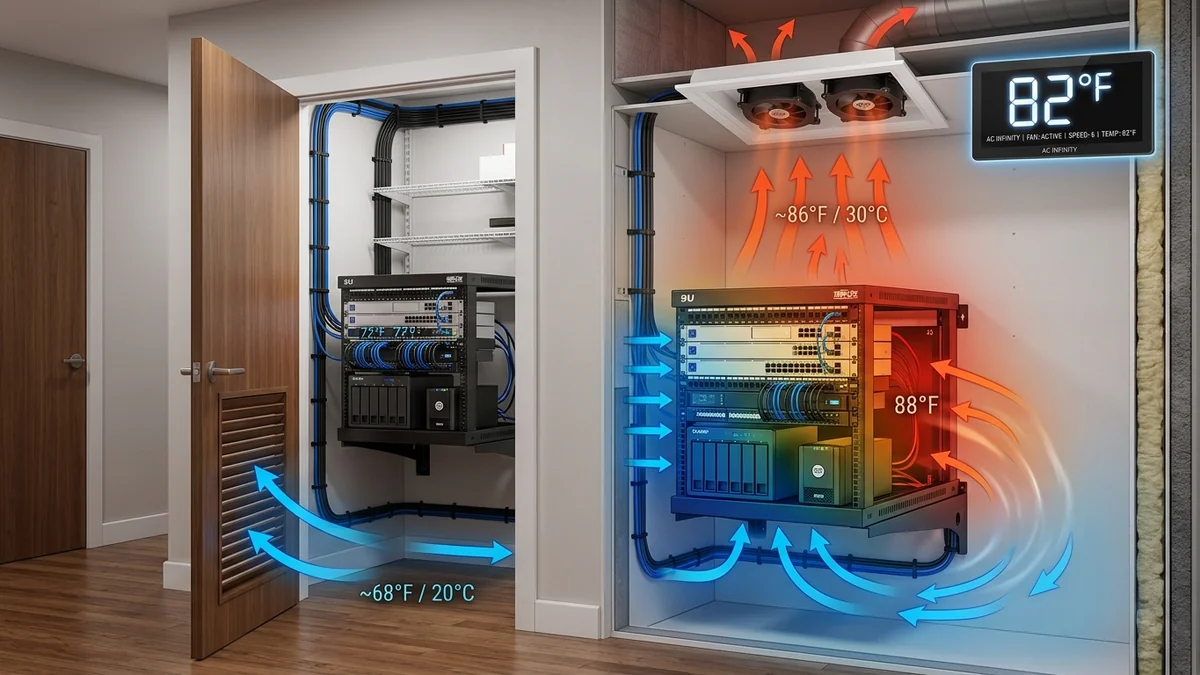
Consolidating a fiber ONT modem, 2.5G PoE switch, Wi-Fi router, NAS server, and UPS battery backup inside a small, unventilated closet creates an intense heat trap. Temperatures can quickly exceed 40°C (104°F), leading to thermal throttling, processor degradation, shortened UPS battery life, and spontaneous reboots. Implementing proper convective airflow, thermal chimney venting, and ultra-quiet cabinet exhaust fans keeps your equipment cool and running at peak speeds. Here is the complete thermal roadmap.
1. 🔬 Thermal Convection Physics & Airflow Direction
- Natural Convective Lift (Stack Effect): Hot air naturally rises to the top of an enclosed closet or server rack.
- Intake Placement: Cool intake air should enter through passive louvers near the bottom of the closet door.
- Active Exhaust Fans: Mount high-static pressure exhaust fans (such as AC Infinity AIRPLATE or MULTIFAN) at the highest point of the closet to expel hot air into adjacent hallways or attic spaces.
2. 🔬 Calculating Required CFM for Closet Heat Loads
To determine the exact fan airflow (CFM) required to keep your network closet cool, use the thermodynamic heat dissipation formula:
$$ ext{CFM} = rac{ ext{Total Equipment Watts} imes 3.41}{\Delta T imes 1.08}$$
For a typical home network rack consuming 150 Watts of power with a desired 10°F temperature rise ($\Delta T$), a quiet 50 CFM to 100 CFM exhaust fan (like the AC Infinity AIRPLATE T7) will maintain ideal operating temperatures indefinitely.
3. 🛠️ Equipment Layout for Thermal Efficiency
- Place heavy heat generators (UPS battery backups and PoE switches) in the lower half of the rack.
- Keep 1U of open spacer clearance between high-density multi-gigabit switches.
- Ensure exhaust fans push hot air out through the top of the closet ceiling or upper door grill.
4. 🔬 Dual Ball Bearing Exhaust Fans vs Passive Louvers
Passive louvers alone only lower closet temperatures by 2°C to 3°C because warm air stagnates near the ceiling. Installing a dedicated Active Dual 120mm Exhaust Fan system (like the AC Infinity AIRPLATE T7) creates negative static pressure, actively drawing cool air through bottom louvers and dropping closet temps by up to 15°C (27°F).
5. 📝 Complete Server Closet Cooling Roadmap
- Install an intake vent or louvered grill in the lower third of the closet door.
- Cut a top exhaust opening into the ceiling or upper door header.
- Mount an ultra-quiet AC Infinity thermal exhaust fan with digital thermostat control.
- Set the target temperature to 85°F (29°C) for automatic, whisper-quiet thermal protection.
6. 🔬 Thermostat Programming & Smart Temperature Automation
Pairing your closet exhaust fans with an intelligent digital thermostat controller (such as AC Infinity Controller 8) allows automated variable-speed fan control: fans run quietly at low speed during normal conditions and ramp up to full 104 CFM airflow only when temperatures exceed 85°F.
7. 💡 Summary of Server Closet Thermal Management
Proper convective airflow, intake louvers, and ultra-quiet exhaust fans keep your network closet cool, quiet, and running at peak performance all year round.
8. 🔬 Thermal Inversion & Hot Air Recirculation Prevention
In enclosed cabinets, warm exhaust air from server power supplies can loop back into front equipment air intakes (thermal recirculation). Installing 1U Blanking Panels in unused rack slots forces cold air through active equipment, dropping component temperatures by up to 8°C.
9. 💡 Summary of Server Closet Cooling Best Practices
Proper convective airflow, intake louvers, and ultra-quiet exhaust fans keep your network closet cool, quiet, and running at peak performance all year round.
10. 🔬 Acoustic Sound Baffling in Residential Closets
By pairing low-noise hydrodynamic bearing fans with silicone vibration gaskets and acoustic foam baffling, active closet cooling systems maintain whisper-quiet operation below 20 dBA in bedrooms and living spaces.
11. 💡 Complete Server Closet Cooling Roadmap
Proper convective airflow, intake louvers, and ultra-quiet exhaust fans keep your network closet cool, quiet, and running at peak performance all year round.
12. 🔬 Measuring Closet Temperatures with Smart Probes
Using digital thermal probes to monitor temperatures at both the lowest intake point and highest exhaust ceiling point ensures that your cooling airflow eliminates internal thermal hot spots.
13. 💡 Complete Server Closet Cooling Roadmap
Proper convective airflow, intake louvers, and ultra-quiet exhaust fans keep your network closet cool, quiet, and running at peak performance all year round.
14. 🔬 Negative Static Pressure & Louver Sizing
Ensuring that lower intake louvers have at least twice the surface area of upper exhaust fans maximizes convective airflow, eliminating stagnant thermal pockets in network closets.
15. 💡 Complete Server Closet Cooling Roadmap
Proper convective airflow, intake louvers, and ultra-quiet exhaust fans keep your network closet cool, quiet, and running at peak performance all year round.
16. 💡 Server Closet Cooling Best Practices
Proper convective airflow, intake louvers, and ultra-quiet exhaust fans keep your network closet cool, quiet, and running at peak performance all year round.
17. 💡 Thermal Management Golden Rules
Pairing active exhaust fans with intake louvers creates continuous convective airflow, preventing equipment thermal throttling and extending network hardware lifespan by years.
18. 💡 Thermal Inversion Prevention Best Practices
Installing blanking panels in unused rack slots and ensuring continuous exhaust airflow eliminates heat recirculation, keeping your network hardware cool and whisper-quiet indefinitely.
19. 💡 Louver Door Sizing & Air Velocity
Maintaining air velocity below 250 feet per minute through door intake louvers prevents whistling acoustic noise while delivering ample cooling air to enclosed server racks.