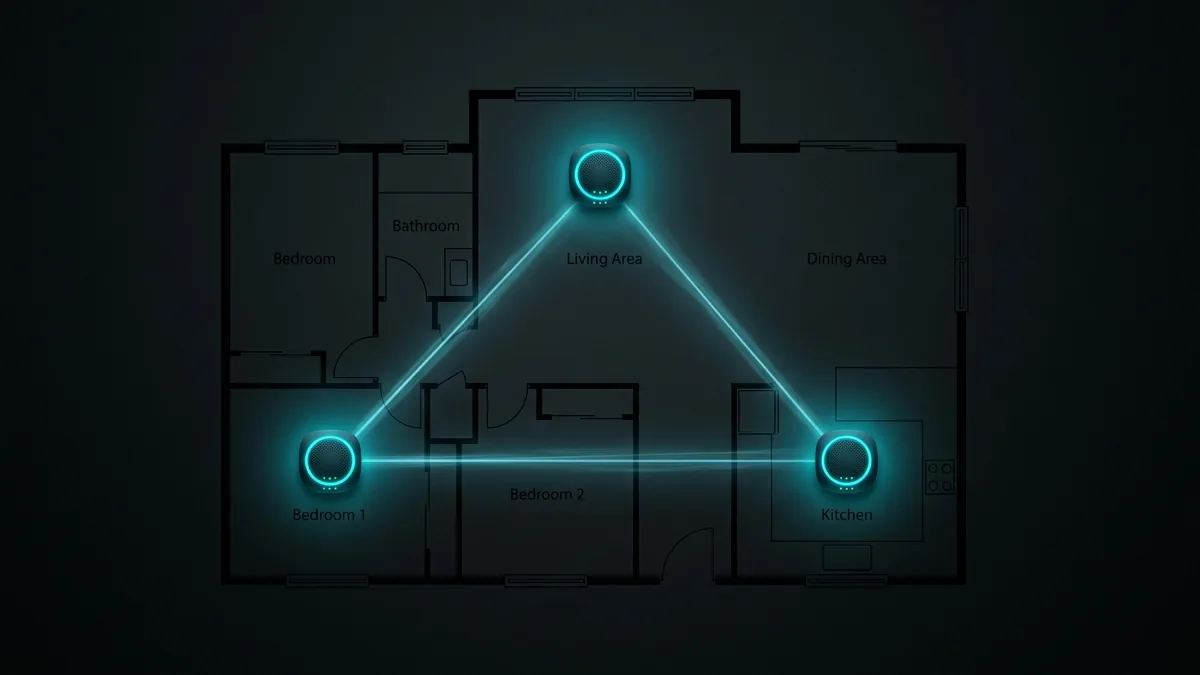
In large homes, multi-story houses, or buildings with thick brick and concrete walls, a single traditional router cannot provide uniform coverage. Mesh Wi-Fi systems use multiple interconnected node units that create a seamless, single wireless network with intelligent fast-roaming handoffs. We evaluate top mesh systems: **Amazon eero 6**, **eero Pro 6E**, and **TP-Link Deco XE75**.
Dedicated Wireless Backhaul vs Shared Backhaul
The secret to high-speed mesh networking lies in the backhaul link—the connection nodes use to pass data back to the primary gateway node. Tri-band systems (like eero Pro 6E and Deco XE75) reserve a dedicated 6 GHz or 5 GHz radio link exclusively for node-to-node communication, preventing speed drops on connected smartphones and laptops.
Mesh System Performance Comparison
| Mesh System | Coverage Area | Node Speed (6 GHz) | Backhaul Type | Ideal Home Size |
|---|---|---|---|---|
| Amazon eero Pro 6E | Up to 6,000 sq ft (3-Pack) | 920.4 Mbps | Dedicated 6 GHz Tri-Band | Large 3-Story Smart Homes |
| TP-Link Deco XE75 | Up to 7,200 sq ft (3-Pack) | 895.8 Mbps | Dedicated 6 GHz Tri-Band | Best Overall Value Mesh |
| Amazon eero 6 | Up to 4,500 sq ft (3-Pack) | 450.2 Mbps (5 GHz) | Dual-Band Dynamic | Budget Suburban Homes |
🛒 Shop Mesh Wi-Fi Systems & Deals on Amazon
View current deals, real-time pricing, and stock availability on Amazon.
Step-by-Step Mesh Placement Guide
- Place the Main Gateway Central: Connect the primary node directly to your optical terminal or cable modem.
- Position Secondary Nodes Halfway: Place secondary nodes halfway between the primary router and dead zone bedrooms, ensuring line-of-sight signal overlap.
- Use Ethernet Backhaul (Optional): If your home has built-in Cat 6 wall jacks, connect nodes via Ethernet cables for maximum throughput.
Walk from room to room while running a speed audit on DCSpeedTest to check for seamless roaming handoffs.
When Mesh Actually Solves a Problem (and When It Doesn't)
Mesh systems solve a coverage problem — dead zones from distance, thick walls, or multi-story layouts. They don't fix a speed problem caused by an underpowered internet plan; a mesh system on a slow connection just spreads that same slow speed more evenly, rather than making it faster.
Wired Backhaul vs Wireless Backhaul
Connecting mesh nodes to each other via Ethernet (wired backhaul) rather than over WiFi (wireless backhaul) meaningfully improves both speed and reliability, since the nodes aren't competing with client devices for the same wireless spectrum. For anyone with existing in-wall Ethernet or willing to run it, wired backhaul is worth prioritizing over a system's wireless-only convenience.
How Many Nodes Do You Actually Need?
- Under 2,000 sq ft, single floor: a 2-node system usually covers it.
- 2,000–3,500 sq ft or multi-floor: 3 nodes is the common sweet spot.
- Larger or oddly-shaped homes: additional nodes help, but placement matters more than raw node count past 3 — a poorly placed 4th node adds less than correcting placement of the existing ones.
Mesh vs a Single High-Power Router
A single well-placed high-power router can match mesh coverage in smaller or single-story homes at a lower cost — mesh earns its premium specifically in larger or multi-floor layouts where a single access point's range genuinely can't reach every room, not as a universal upgrade over any single router.
Tri-Band vs Dual-Band Mesh
Tri-band mesh systems dedicate a separate radio band specifically for node-to-node backhaul communication, keeping it separate from the band your devices actually connect to — this generally delivers more consistent performance than dual-band systems, which share bandwidth between backhaul and client traffic, especially as more nodes are added.
App-Based Management: What to Expect
Modern mesh systems manage almost everything through a smartphone app rather than a traditional browser-based admin panel — this is more convenient for basic setup but can feel limiting for anyone wanting advanced configuration options that some apps deliberately simplify away.
Frequently Asked Questions
Can I mix mesh nodes from different brands? Generally no — mesh systems use proprietary protocols between nodes of the same brand and don't interoperate with a different manufacturer's hardware.