How I Ended Up Running Five VPN Apps and Still Feeling Unsafe
For a while I was doing what most people do: running a VPN app on my laptop when I remembered to, on my phone sometimes, and on pretty much nothing else. My smart TV was streaming content unprotected. My kids' tablets were on the raw ISP connection. My NAS was sitting exposed. Every device was its own decision — and I kept forgetting.
A friend who works in network security looked at my setup and said something that stuck: "You don't need better VPN discipline, you need a VPN that runs at the router level so there's no discipline required." That's what a VPN router does. Here's what that actually means in practice, without the marketing noise.
How a Standard VPN App Works
When you install a VPN app on your laptop (NordVPN, ExpressVPN, Mullvad, whatever), the app creates an encrypted tunnel from that specific device to a VPN server. Your traffic exits to the internet through that server's IP address instead of your ISP's. Everything is encrypted between your device and the VPN server. Anyone snooping on your network sees encrypted data, not your actual traffic.
The limitation: it only protects the device the app is running on. Your phone, your TV, your game console, your smart home devices — all unprotected unless you separately install and run a VPN app on each one. Many devices (smart TVs, IoT sensors, game consoles) don't support VPN apps at all.
How a VPN Router Works
A VPN router runs the VPN client (or server) in the router firmware itself, not on any individual device. Because all your home network traffic flows through the router, every device on your network — whether it's a laptop, a TV, a smart speaker, or a game console — gets routed through the VPN automatically. No app required on any device. No forgetting to turn it on.
Most VPN routers let you configure this at the network level with fine-grained control: you can route all traffic through the VPN, or only specific devices, or only specific types of traffic. You can have one network that goes through the VPN and a guest network that doesn't. You can run WireGuard (fast, modern) or OpenVPN (slower but widely compatible).
VPN App vs VPN Router: The Honest Comparison
| Consideration | VPN App | VPN Router |
|---|---|---|
| Setup complexity | Very easy — install app, log in | Moderate — router config required |
| Devices covered | One device per app | Every device on your network |
| Works on smart TVs / consoles | No (usually) | Yes — transparent to all devices |
| Speed impact | Minimal — uses device CPU | Depends on router's VPN throughput |
| Cost | $5–15/month subscription | $150–250 hardware (one-time) |
| Works away from home | Yes — anywhere | Home only (unless you also run router as VPN server) |
| Forgetting to enable | Common — requires discipline | Never — always-on by design |
When a VPN Router Makes Sense
The calculus shifts toward a VPN router when you have multiple devices or devices that can't run VPN apps themselves. If you have 10+ devices on your home network and only two of them support VPN apps, you're leaving 8 devices unprotected with the app-only approach. A router-level solution covers all of them without any per-device configuration.
It also makes sense when you're running your own VPN server — meaning you want to connect securely to your home network from outside (useful for accessing home NAS storage or local services remotely). A VPN router acts as the server that your phone connects to when you're out, giving you access to home resources over an encrypted tunnel. This is a genuinely useful capability for home office setups.
When a VPN Router Doesn't Make Sense
If you mainly need a VPN for one specific use case — changing your apparent location for streaming services while traveling, for example — a VPN app on one device is simpler and cheaper. VPN subscription services also give you access to servers in many countries, which a self-hosted VPN router solution doesn't easily provide.
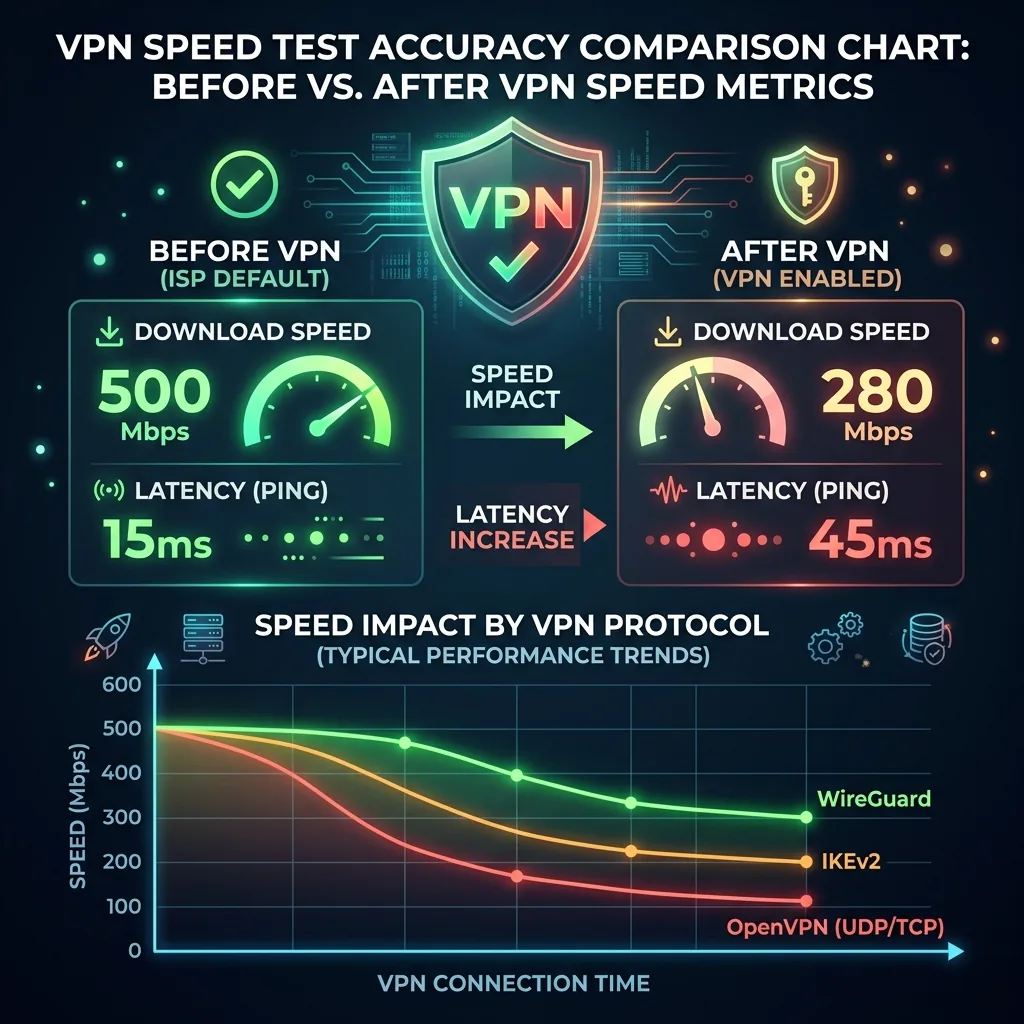
Also: some older or budget routers "support" VPN but have so little processing power dedicated to cryptography that VPN speeds are cripplingly slow (I've seen routers rated for 600 Mbps WiFi that could only push 15 Mbps over VPN). If you're going to run VPN at the router level, the hardware matters significantly. This is why purpose-built VPN routers like the GL.iNet Flint 2 exist — they're built with dedicated hardware for cryptographic processing.
WireGuard vs OpenVPN: Which Protocol to Use
If you're setting up a VPN router, you'll likely choose between WireGuard and OpenVPN. The short version: use WireGuard. It's faster, more modern, uses less power, and is easier to configure. OpenVPN has been around longer and is more universally supported across different platforms and services, but WireGuard's performance advantage at the router level is significant enough that it's almost always the better choice for home use.
A router that can push 800 Mbps over WireGuard means your VPN connection is faster than most home internet connections — the VPN overhead essentially disappears from a practical standpoint. The same router might only push 100 Mbps over OpenVPN. That gap is why protocol choice matters.
Frequently Asked Questions
Can I use my existing router and add VPN to it?
Possibly, if your router supports third-party firmware like OpenWrt or DD-WRT. However, most consumer routers lack the processing power for useful VPN speeds even if the firmware supports it. The better path for most people is a purpose-built VPN router.
Do I still need a VPN subscription with a VPN router?
It depends on what you're trying to accomplish. If you want to run your own VPN server so you can connect to your home network from outside — no subscription needed. If you want to route all your traffic through an external VPN service for privacy from your ISP or for accessing different regions' content — yes, you'll still need a subscription to a VPN service. The router acts as the client connecting to that service.
Does a VPN router slow down my internet?
With a capable router and WireGuard protocol, the speed reduction is minimal — often under 10% on connections up to 500 Mbps. With OpenVPN or a weaker router, the slowdown can be severe. This is why hardware specs matter if VPN throughput is important to you.