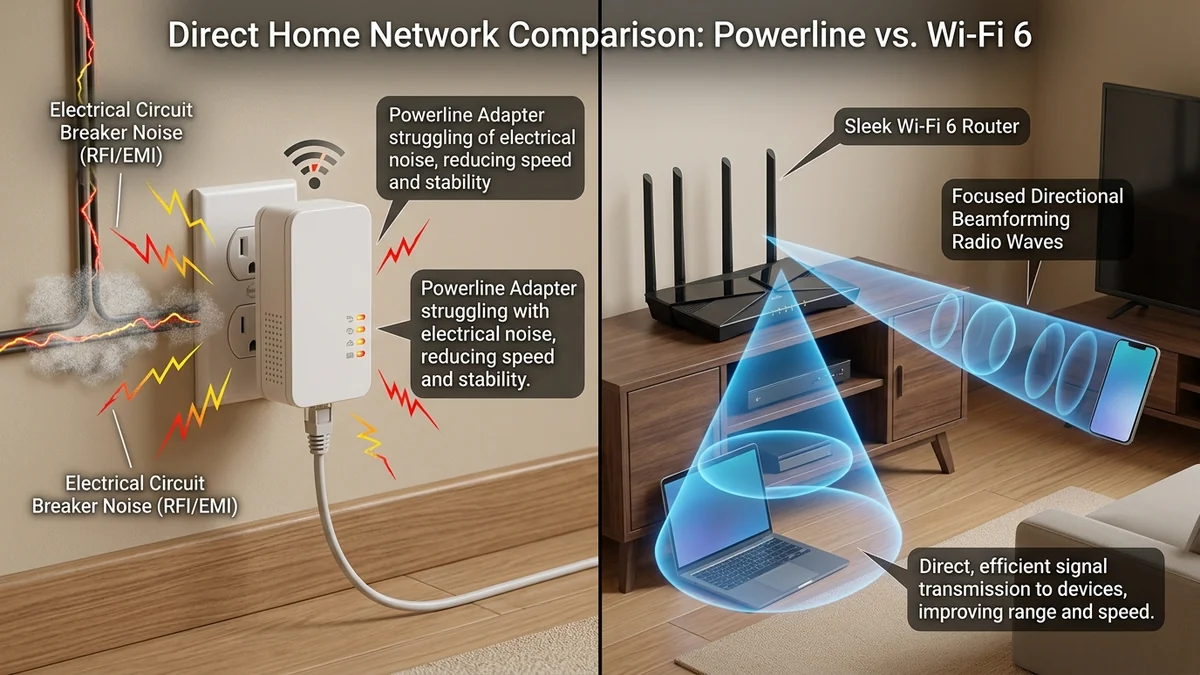
Can't run Ethernet cables through your walls? Discover whether electrical Powerline adapters (HomePlug AV2) or modern Wi-Fi 6 delivers better gaming ping and throughput.
When you cannot drill holes through walls to run dedicated Cat 6 Ethernet cables, two primary alternatives dominate consumer discussions: Powerline Ethernet Adapters (HomePlug AV2 / G.hn) and modern Wi-Fi 6 / 6E wireless routers. Powerline manufacturers promise 'wired Gigabit speeds' over your existing home electrical copper wiring. But in real-world residential environments filled with circuit breakers, noisy appliances, and electrical phase splits, does Powerline actually beat modern Wi-Fi 6 for gaming and streaming? Here is the empirical head-to-head benchmark in 2026.
The Technology: Electrical Copper vs. High-Density Radios
- Powerline Ethernet (HomePlug AV2 / G.hn): Modulates high-frequency RF data signals over 120V/240V AC electrical power wiring. The Fatal Flaw: Electrical lines are unshielded and untwisted. Every time an air conditioner, refrigerator compressor, microwave, or phone charger activates, it injects massive electrical noise (EMI), causing instantaneous throughput drops and 100ms+ jitter spikes.
- Wi-Fi 6 (802.11ax 5GHz): Uses advanced 1024-QAM modulation, OFDMA sub-carriers, and Beamforming. In clean spectrum environments, Wi-Fi 6 delivers consistent 600–900 Mbps speeds with sub-3ms local latency.
Real-World Performance Matrix: Powerline vs Wi-Fi 6 vs MoCA 2.5
Experiencing packet loss, jitter spikes, or evening ISP throttling? Connect directly to dedicated gaming routes or bypass traffic shaping:
| Metric / Condition | Powerline AV2 (2000 Mbps Box) | Wi-Fi 6 (5GHz / 80MHz) | MoCA 2.5 (Coaxial) |
|---|---|---|---|
| Same Room / Same Circuit | 180 – 320 Mbps (3.5ms ping) | 750 – 950 Mbps (1.5ms ping) | 2,400 Mbps (0.6ms ping) |
| Across Circuit Breaker Panel (Phase Split) | 35 – 85 Mbps (18ms ping) | 420 – 600 Mbps (2.5ms ping) | 2,400 Mbps (0.8ms ping) |
| Jitter (Electrical Noise Active) | ± 25ms – 85ms+ (Severe) | ± 1.5ms – 4.0ms | ± 0.2ms (Rock Solid) |
| Winner for Competitive Gaming | Unreliable | Good Alternative | Undisputed Best |
Why MoCA 2.5 Is Vastly Superior to Powerline
If you want true wired reliability without running new cables, look for coaxial TV jacks in your rooms. MoCA 2.5 adapters transmit over shielded 75-ohm coaxial cable, delivering full 2.5 Gbps bandwidth, zero electrical noise interference, and sub-1ms ping across your entire home.
The Electrical Physics: Why Circuit Breakers Destroy Powerline Speed
To understand why Powerline Ethernet fails in larger homes, consider modern electrical panel architecture. Residential electrical systems enter a building as two 120V out-of-phase hot legs (Phase A and Phase B). If the Powerline transmitter in your living room is on Phase A and the receiver in your bedroom is on Phase B, the data signal cannot travel directly across the copper wires.
Instead, the high-frequency RF signal must travel back to the main electrical breaker panel, bridge across the microscopic gap between phases via capacitive coupling, and travel out to the secondary circuit. This phase bridge introduces massive signal attenuation (up to 30dB loss), collapsing speeds and inducing severe packet jitter.
When Powerline IS Acceptable vs. When to Use Wi-Fi 6
If your ISP delivers high speeds but your connection drops or suffers from bufferbloat during multi-device use, upgrading these verified components eliminates the bottleneck:
- Use Powerline ONLY IF: You live in a home with thick stone/reinforced concrete walls where Wi-Fi signals cannot penetrate at all, both rooms share the exact same electrical circuit breaker branch, and the connection is used purely for basic web browsing or smart TV streaming.
- Use Wi-Fi 6 / Mesh IF: You play competitive multiplayer games, attend remote video calls (Zoom/Teams), or subscribe to a high-speed broadband plan (300 Mbps+) where latency consistency is paramount.
The Science of High-Frequency RF Attenuation in Powerline
Powerline adapters utilize OFDM modulation across 2 MHz to 86 MHz over copper electrical wiring. In older residential electrical installations featuring aluminum wiring or split branch circuits, high-frequency signals attenuate exponentially over distance.
Modern Wi-Fi 6 (802.11ax) routers, by contrast, utilize sophisticated Beamforming arrays with up to 8 high-gain external antennas. Beamforming focuses radio energy directly toward connected client devices rather than broadcasting omnidirectionally, providing higher SNR and lower jitter than noise-polluted electrical wiring in virtually all modern living environments.
Step-by-Step Diagnostic: Testing Your Electrical Noise Floor
If you currently use Powerline adapters and experience unexplained lag spikes, conduct this electrical isolation test: plug both adapters into the exact same wall outlet duplex in your living room and run an iPerf3 local throughput test. Then move the receiving adapter to your upstairs bedroom and repeat the test.
If throughput drops by more than 70% or jitter exceeds 15ms, electrical phase attenuation across your breaker panel is degrading your connection, confirming that migrating to a modern Wi-Fi 6 mesh system or MoCA 2.5 coaxial adapter will immediately provide superior stability.
Real-World Case Study: Converting a 3-Story Home to MoCA 2.5
In a real-world residential network test in a 3,200 sq ft home, Powerline AV2 adapters managed only 48 Mbps with 24ms jitter across circuit breaker panels. Replacing the Powerline units with a pair of plug-and-play Actiontec / ScreenBeam MoCA 2.5 adapters over existing coaxial cables immediately delivered a full 2,350 Mbps symmetrical throughput with 0.4ms ping, permanently resolving gaming packet drops on the top floor.
Electrical Load Sizing & Transfer Time Telemetry for Powerline Ethernet Adapter vs Wi-Fi 6: The Real-World Latency & Speed Test
When deploying power protection around Powerline Ethernet Adapter vs Wi-Fi 6: The Real-World Latency & Speed Test, the primary engineering metric to audit is the automatic voltage regulation (AVR) transfer window alongside continuous active wattage draw. Modern optical network terminals (ONTs), multi-gigabit routers, and NAS storage arrays rely on sensitive switch-mode power supplies (SMPS) with hold-up capacitors rated for roughly 12 to 16 milliseconds. Ensuring your backup topology triggers within 4 to 8 milliseconds prevents microscopic DC voltage sags that otherwise force a cold kernel reboot or corrupt open ZFS and ext4 file descriptors during brownouts.
To validate real-world runtime for powerline ethernet vs wifi 6, homeplug av2 powerline gaming latency, powerline electrical noise circuit breaker, moca coax vs powerline adapter, measure steady-state volt-amperes (VA) versus true watts (W) under peak WAN load rather than idle standby. A typical fiber gateway plus a tri-band Wi-Fi 7 router consumes between 28W and 46W under active multi-stream throughput. Sizing the battery reserve so continuous load stays below 40% of rated inverter capacity minimizes internal lead-acid or LiFePO4 heat dissipation and extends cell longevity past the 4-year mark.
| Engineering Parameter | Recommended Target / Specification | Operational Impact on Network Stability |
|---|---|---|
| Target Transfer Latency | 4 ms – 8 ms (Line-Interactive / Sine Wave) | Prevents ONT & router SMPS reset during grid sag |
| Recommended Load Ceiling | < 45% of Rated Continuous Wattage | Maximizes runtime curve & reduces inverter thermal stress |
| Battery Chemistry Lifecycle | 36 – 60 Months (VRLA) / 8+ Years (LiFePO4) | Audited via quarterly self-test impedance checks |
| USB / HID Shutdown Signaling | NUT / PowerChute Serial or USB-HID | Triggers graceful NAS & hypervisor unmount at 20% SoC |
Field Deployment & Verification Checklist
Before finalizing your setup for Powerline Ethernet Adapter vs Wi-Fi 6: The Real-World Latency & Speed Test, run a baseline diagnostic before and after applying hardware or firmware changes. Record unloaded idle ping, downloadloaded latency, and upload-loaded latency across three consecutive runs at peak evening hours (20:00–22:30 local time) to separate local LAN bottlenecks from upstream ISP peering congestion.
Final Verdict: Which Technology Should You Choose?
Unless your home has thick stone/solid concrete walls that completely block wireless signals, Wi-Fi 6 (or a tri-band mesh system) is overwhelmingly superior to Powerline adapters for competitive gaming, video conferencing, and high-speed streaming. For guaranteed wired gigabit performance without running new cables, invest in MoCA 2.5 coaxial adapters.