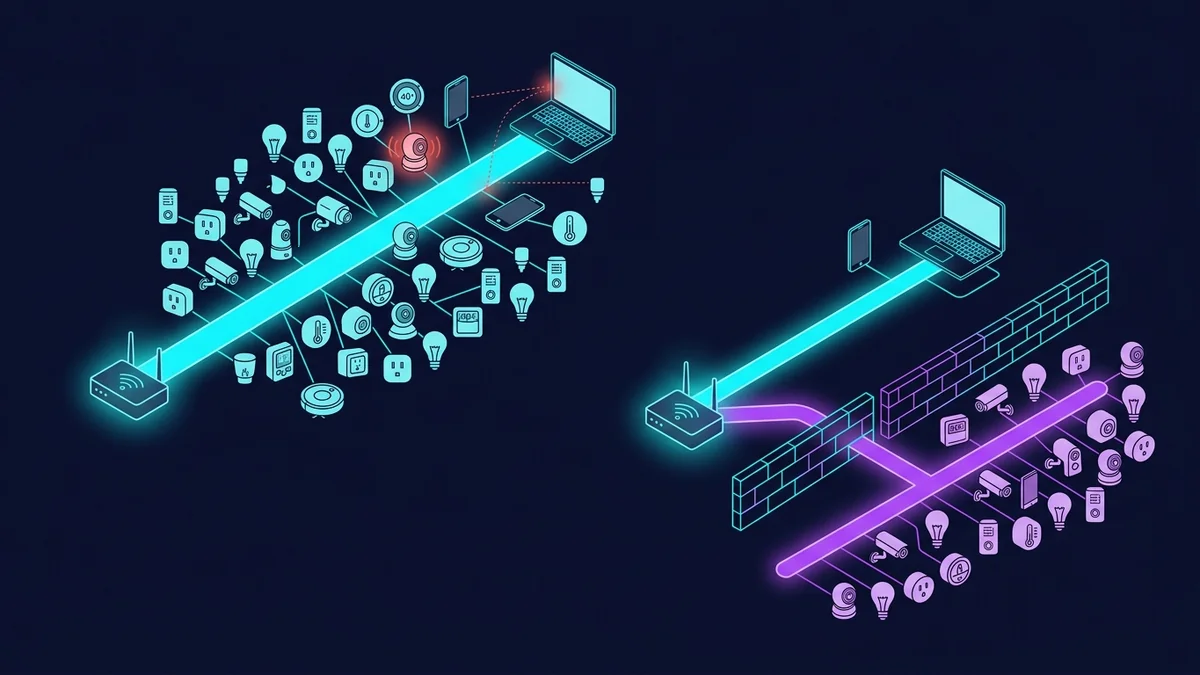
The IoT Security Problem Nobody Talks About
Your cheap smart plug from an unfamiliar brand has internet access and runs undocumented firmware that may or may not be receiving security updates. It's on the same network as your laptop, your home server, and every other device in your house. If it's compromised — and cheap IoT devices are frequently found in botnets — an attacker inside its network context can attempt to communicate with your other devices.
This isn't a theoretical concern. I'm not suggesting the probability is high. But the mitigation is simple and free, so there's no reason not to do it: put IoT devices on a separate network that can reach the internet but cannot reach your personal devices. The technical term is "network segmentation." The practical implementation takes about 20 minutes.
The Two-Network Architecture for Smart Homes
Network 1: Personal devices. Laptops, phones, tablets, smart TVs (that you actually control), NAS, gaming consoles. Full access to each other and the internet. Strong password. You and trusted people know this password.
Network 2: IoT devices. Smart plugs, bulbs, cameras, thermostats, doorbells, voice assistants, sensors. Internet access (they need it for cloud functionality). No access to personal device network. Completely isolated from Network 1.
Devices on Network 2 can reach the internet for their cloud services but cannot initiate any connections to devices on Network 1. If any IoT device is compromised, the attacker is contained within the IoT network — they can't reach your laptop or home server from there.
How to Implement This With Each Product
GL.iNet Flint 2 ($170) — Most Flexible
The Flint 2's OpenWrt base supports proper VLAN-based network segmentation. You can create a dedicated IoT VLAN with firewall rules that permit outbound internet traffic (for cloud functionality) but block traffic from the IoT VLAN toward the personal device LAN. Devices on the IoT VLAN see the internet; they cannot see or reach anything on the personal device VLAN.
This is the most technically complete implementation. It took me about 30 minutes to configure following the GL.iNet documentation. The result: 41 IoT devices on their own isolated segment, 8 personal devices on the main network, clean firewall separation between them.
NETGEAR Orbi RBK752 ($479) — Simpler Implementation
The Orbi has a guest network feature that provides basic IoT isolation without VLAN configuration. Put all IoT devices on the guest network. The guest network has internet access and is isolated from the main network — devices on it cannot see or communicate with devices on the primary network.
The limitation: the Orbi's guest network isolation is simpler than a properly configured VLAN. It prevents direct device-to-device communication but doesn't provide the same level of firewall rule granularity as the Flint 2's VLAN setup. For most home users, this is sufficient. For people managing sensitive data or running a home server, the Flint 2's VLAN approach is better.
WiFi 6 and IoT: The Target Wake Time Advantage
One practical benefit of running IoT devices on a WiFi 6 network: Target Wake Time (TWT). Battery-powered IoT devices (sensors, door contacts, water leak detectors) can negotiate with a WiFi 6 router to only wake up and check in at specific intervals, sleeping in between. This extends battery life on battery-powered sensors significantly — I've seen sensors rated for 1 year on WiFi 5 networks lasting 2+ years on WiFi 6 with TWT enabled.
Both the GL.iNet Flint 2 (AX6000) and the Orbi RBK752 (AX4200) support TWT for compatible devices. Not all IoT devices implement TWT yet, but it's becoming more common as devices refresh.
Coverage for IoT Devices Throughout the Home
IoT devices have different coverage needs than laptops: they're fixed in place, transmit small amounts of data, and prioritize connectivity over speed. A thermostat doesn't need 500 Mbps — it needs a stable 2 Mbps connection that it can maintain 24/7 without drops. The 2.4GHz band is actually better than 5GHz for IoT: longer range, better wall penetration, lower power requirements for the device radio.
The Orbi RBK752's whole-home mesh coverage means IoT devices in every room — even the far bedrooms, the utility room, and the garage — can connect reliably to the 2.4GHz network. I had three sensors in the back of the house that would periodically disconnect from the ISP gateway's 2.4GHz signal. After the Orbi, they've been continuously connected for months.
FAQ
Do I need to reconfigure every IoT device if I create a separate IoT network?
Yes — moving a device to a new network requires connecting it to that network, which usually means going through the device's setup process again. For devices that use apps (most smart home devices), this typically means: factory reset the device, open the app, add device again, connect to the IoT WiFi network instead of the main network. Time-consuming for 40 devices, but a one-time task.
Will my smart home voice assistant work if it's on the IoT network?
Yes — voice assistants (Alexa, Google Home) need internet access for their cloud services, which they have on the IoT network. They also need to discover and control other smart home devices — and since those are also on the IoT network, local device discovery still works. The isolation only prevents them from reaching your personal laptop or home server, which they don't need to do anyway.
My smart home devices use 2.4GHz. Does my router need a separate 2.4GHz IoT SSID?
You can run the IoT SSID on 2.4GHz only — which most IoT devices require anyway (many IoT devices don't support 5GHz). This naturally separates them from your 5GHz personal device network. Both the Orbi and the Flint 2 support creating SSIDs tied to specific bands, which makes this straightforward to configure.