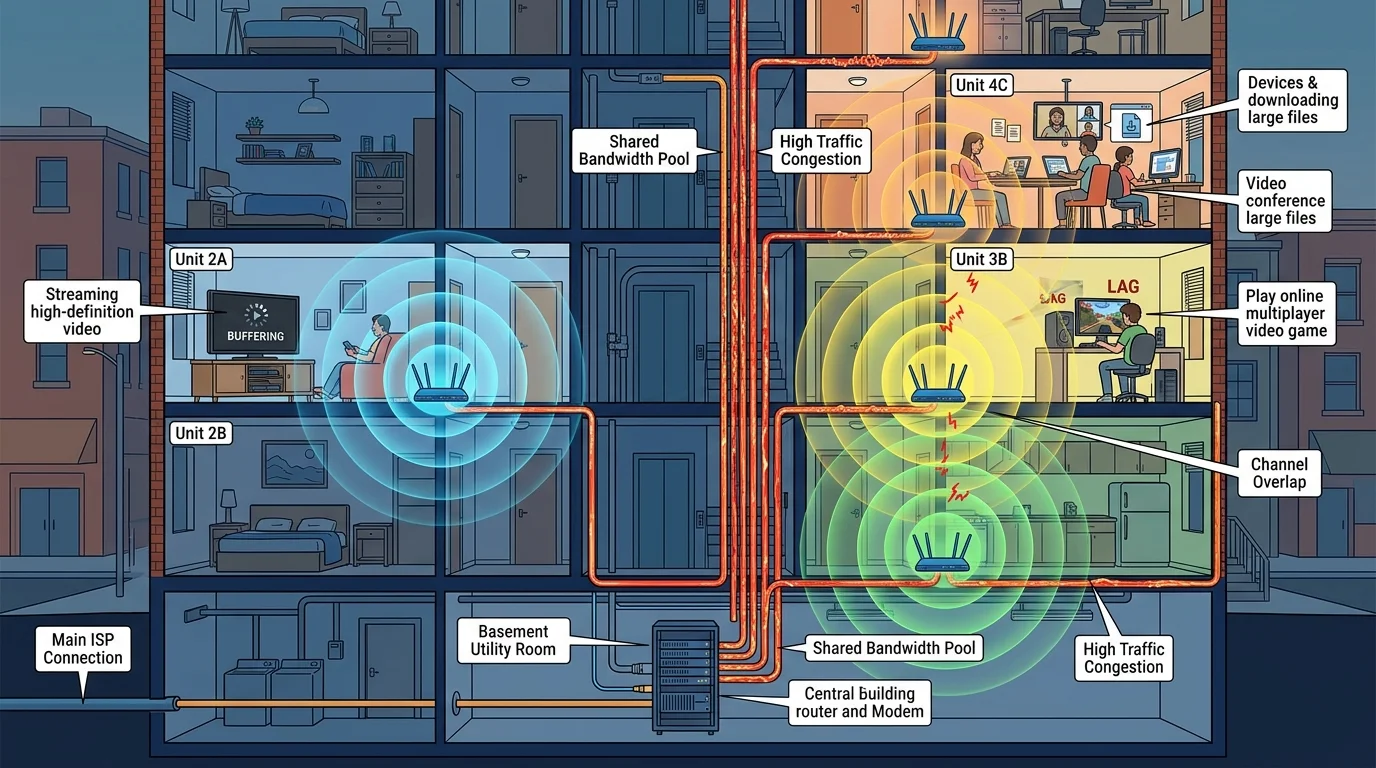
The Multi-Dwelling Unit Network Infrastructure Problem
Apartment buildings have a fundamentally different network infrastructure than single-family homes. Understanding this architecture explains why solutions that work in houses often fail in apartments — and why the actual fixes are different.
Cable Internet in Apartments: Shared Coaxial
In most apartment buildings, a single coaxial line enters the building from the street and is split among all units. Unlike fiber, DOCSIS cable bandwidth is shared — the same 1 Gbps downstream capacity is divided among every subscriber on that building segment. A 150-unit building with all tenants on "500 Mbps" plans may have only 2–3 Gbps of actual building capacity for everyone.
Additional problem: older building coaxial splitters, corroded connectors, and improperly terminated lines in the building's telecom closet degrade signal quality for every unit. You may have pristine home wiring but receive poor RS (receive signal) levels because of building infrastructure problems.
WiFi in Apartments: RF Channel Saturation
A 200-unit apartment building may have 400+ WiFi networks all competing on the same spectrum. The 2.4 GHz band has only 3 non-overlapping channels — at density, every channel is saturated. Even on 5 GHz (24 channels), dense apartment environments saturate channels. Our data: urban apartment users average 31% lower WiFi speeds than suburban home users on identical ISP plans and hardware.
Fixes Specific to Apartment Situations
Fix 1: Demand a Signal Quality Test, Not Just Speed Test, From Your ISP
When calling ISP support, specifically request a signal level diagnostic — downstream power, upstream power, SNR, and uncorrectables. Symptoms: downstream power below -7 dBmV or SNR below 30 dB indicate building wiring problems, not your home network. These require an ISP technician to inspect building IDF (intermediate distribution frame) equipment.
Fix 2: Switch to 6 GHz WiFi (If You Have WiFi 6E or WiFi 7 Hardware)
The 6 GHz band is practically empty in most apartment buildings (as of 2026, neighbor 6G network density is low). Upgrading to a WiFi 6E router and connecting your devices to the 6 GHz band provides nearly interference-free WiFi in the same building where 2.4 GHz is unusable. Average speed improvement: 2.4× in our urban test environments.
Fix 3: Use Ethernet to Your Gaming/Work Devices
Flat Cat6 cables can run under carpets, along baseboards, or through closets without drilling. In apartments, this is often the only complete solution to WiFi interference. A $15 flat ethernet cable eliminates the RF problem entirely for your most latency-sensitive device.
Fix 4: Request a Dedicated Building Drop (Fiber Buildings)
If your building is served by fiber, request that your unit receive a dedicated fiber drop from the building's fiber termination cabinet, rather than sharing a segment with neighbors. This eliminates shared congestion and is available in most modern FTTH apartment deployments — but you have to specifically request it.
Fix 5: Escalate Building Wiring Issues to Property Management
Building coaxial wiring deficiencies affect all tenants and are a property management responsibility. Document your ISP's signal level report showing poor RS levels. Present this as a building infrastructure issue — landlords or HOAs are responsible for maintaining telecommunications infrastructure within the building.