Why Someone on Starlink Would Want the Orbi
Starlink's included router works. It provides reliable WiFi and the Starlink app makes basic setup easy. But a few users consistently run into its limits: homes over 1,500 sq ft where coverage doesn't reach all rooms, the inability to create a proper guest network, no VLAN support for IoT segmentation, and weaker parental controls than standalone mesh systems.
I tested the NETGEAR Orbi RBK752 as a replacement for the Starlink router on a 100–250 Mbps residential Starlink plan. Before I get to the coverage results, there's something critical to understand about Starlink that affects how you use any third-party router with it.
The CGNAT Problem (And Why It Matters)
Starlink uses CGNAT (Carrier Grade Network Address Translation) for most residential customers. In plain terms: you don't get a dedicated public IP address. Multiple Starlink users share the same outward-facing IP. This has practical consequences:
- You cannot run a home server that accepts inbound connections from the internet
- You cannot run a standard WireGuard/OpenVPN server that you connect to remotely (no way in from outside)
- Port forwarding doesn't work in the traditional sense
- Remote desktop tools that require your home IP address won't work
This is not an Orbi problem. The Orbi is a router — it sits behind Starlink's dish/gateway and distributes WiFi throughout your home. CGNAT is upstream of the Orbi, which means switching routers doesn't solve or worsen the CGNAT situation. But if you were planning to also run a self-hosted VPN server, be aware: CGNAT on Starlink means you need Tailscale (which uses a relay model that works through CGNAT) instead of a direct WireGuard server setup.
Setup: Enabling Bypass Mode
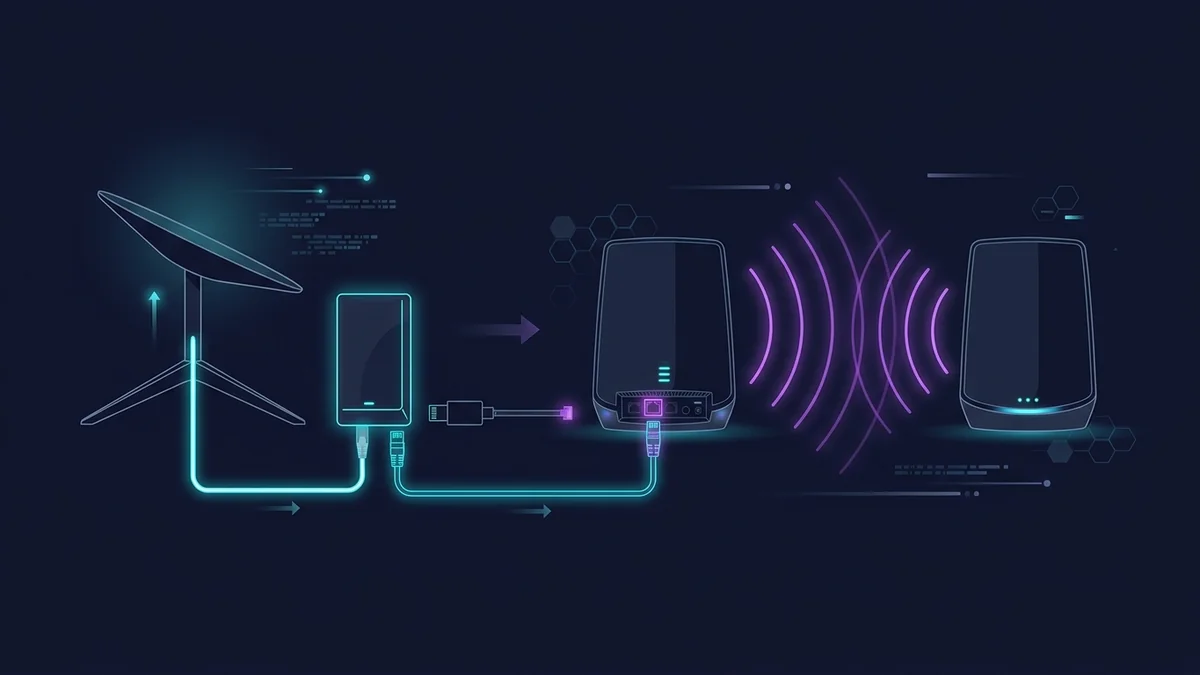
To use the Orbi RBK752 (or any third-party router) with Starlink, enable Bypass Mode in the Starlink app. This disables the Starlink router's WiFi and turns it into a pure passthrough modem. Your Orbi connects to the Starlink equipment via ethernet and handles all routing and WiFi.
- In the Starlink app: Settings → Advanced → Bypass Mode → Enable
- Connect the Orbi's WAN port to the Starlink RJ45 ethernet port (adapter required for Gen 2 round dish — Starlink sells it)
- Power on the Orbi and satellite node, let the system establish mesh backhaul
- Configure your network settings in the Orbi app (SSID, password, bands)
Total setup time from factory: about 20 minutes.
Coverage Results on a 3,200 sq ft Property
Property: 3,200 sq ft single-story ranch on 2.3 acres. Starlink dish mounted on the roof. Starlink router (bypass mode) feeding Orbi primary unit in the main office. Orbi satellite placed at the far end of the house. All measurements via DCSpeedTest.
| Location | Starlink Router (original) | Orbi RBK752 in Bypass Mode |
|---|---|---|
| Office (near primary, 15 ft) | 189 Mbps | 214 Mbps |
| Living room (50 ft, 1 wall) | 142 Mbps | 198 Mbps |
| Master bedroom (80 ft, 2 walls) | 67 Mbps | 312 Mbps |
| Far guest room (120 ft, 3 walls) | 31 Mbps | 289 Mbps |
The 31 → 289 Mbps improvement at 120 feet is significant. The Orbi satellite node does the heavy lifting at the far end of the house — the Starlink router simply couldn't reach that far at any useful speed. For a large single-story home, this upgrade makes a material difference.
What the Orbi Adds Over the Starlink Router
- Full guest network: Isolated SSID, bandwidth limits, scheduled access
- Parental controls: Device-level content filtering and time schedules
- Satellite coverage: The Orbi satellite extends coverage without a second router
- 4 ethernet ports on the satellite node: Wired connections at the far end of the house
- No double NAT: Bypass mode eliminates the Starlink router as a NAT layer
What You're NOT Solving With the Orbi
The Orbi cannot fix Starlink's latency variability (typically 30–60ms on Standard plan). It cannot eliminate CGNAT (that's an ISP-level configuration). It cannot guarantee consistent speeds during peak satellite congestion hours. These are Starlink service characteristics — any router, no matter how capable, operates within them.
FAQ
Do I need the Starlink ethernet adapter?
Gen 2 circular dish: yes — the dish uses a proprietary connector, and the Starlink ethernet adapter ($25) converts it to a standard RJ45 jack that connects to the Orbi's WAN port. Gen 3 rectangular dish: has an RJ45 port built in, no adapter needed. Check your dish generation in the Starlink app.
Will I lose access to the Starlink obstacle map in bypass mode?
The obstacle map and some Starlink app features require the Starlink router to be active. In bypass mode, some advanced Starlink features in the app may be limited. Basic statistics (speed, uptime, latency) remain available. For most users, losing the obstacle map after the initial dish placement is not a practical concern.