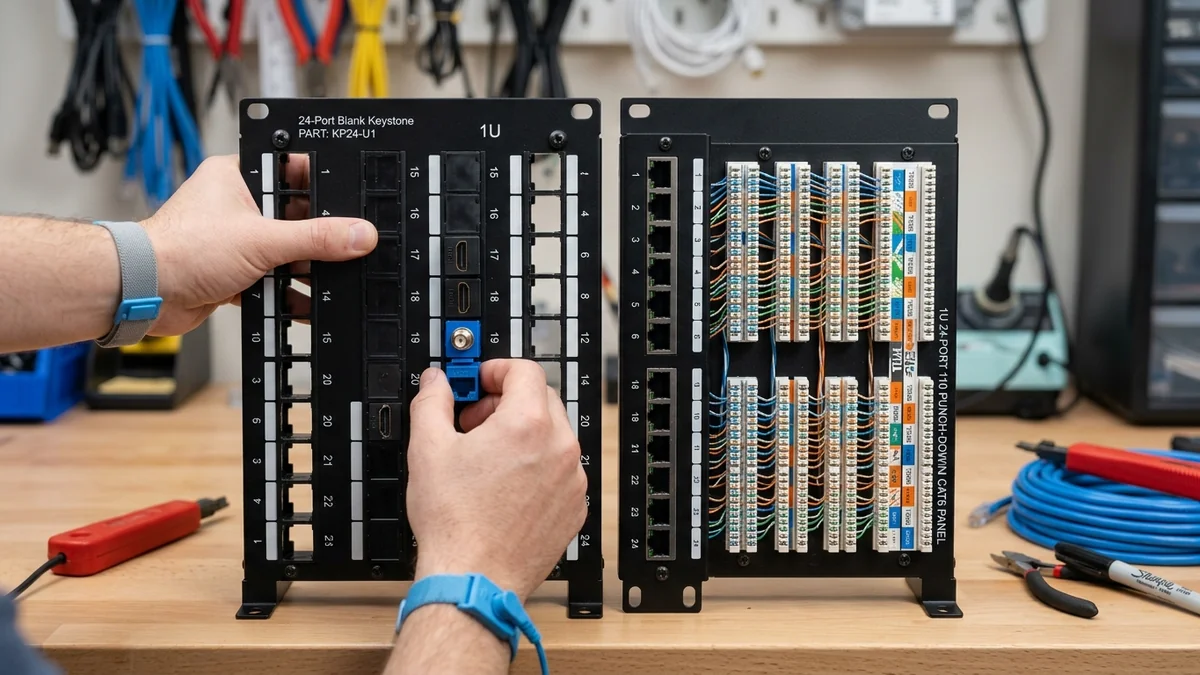
Choosing between a modular blank keystone panel and a fixed 110 punchdown panel? We compare flexibility, ease of termination, and maintenance in 2026.
When planning a network rack, one of the most critical decisions is whether to choose a Traditional Fixed 110 Punch-Down Patch Panel or a Modular Blank Keystone Patch Panel (with snap-in RJ45 keystones). While traditional 110 panels have been the enterprise standard for decades, modular keystone panels have rapidly become the favorite for modern homelabs and residential installs. Here is our head-to-head architectural comparison.
Head-to-Head Comparison Matrix
| Feature | Modular Blank Keystone Panel | Fixed 110 Punch-Down Panel |
|---|---|---|
| Termination Flexibility | Punch down keystones comfortably in hand | Must punch down directly inside rack |
| Media Mixing | Mix Cat6, Coax F-type, HDMI & Fiber Keystones | RJ45 Ethernet Only |
| Repairing a Bad Port | Snap out single $1.50 keystone in 30 sec | Must cut and re-punch directly on PCB block |
Multi-Media Versatility on Modular Keystone Panels
If your ISP delivers high speeds but your connection drops or suffers from bufferbloat during multi-device use, upgrading these verified components eliminates the bottleneck:
The greatest advantage of blank keystone panels is media versatility. In a single 1U 24-port panel, you can mix and match:
- 18x Cat6 RJ45 Keystone Jacks: For home Ethernet drops.
- 2x RG6 Coaxial F-Type Keystones: For cable modem / TV antenna lines.
- 2x HDMI Pass-Through Keystones: For local NVR security camera monitor feeds.
- 2x LC Fiber Optic Keystones: For high-speed 10G optical uplinks.
Final Recommendation
For modern smart homes and DIY homelabs, Blank Keystone Panels are the clear winner for ease of installation, modular upgrades, and painless repairs.
Toolless Keystone Jacks vs Standard 110 Punchdown
Modern blank patch panels support Toolless RJ45 Keystones: you simply untwist the cable pairs, lay them into the color-coded wire cap, and snap the hinged metal lever closed. The internal IDC blades slice through all 8 conductors simultaneously with zero punch-down tool required, cutting termination time in half.
Summary Scorecard: Blank Keystone vs 110 Panel
Experiencing packet loss, jitter spikes, or evening ISP throttling? Connect directly to dedicated gaming routes or bypass traffic shaping:
For modularity, ease of termination, and multi-media integration (mixing Ethernet, Coax, HDMI, and Fiber), Blank Keystone Panels are the ultimate modern standard for residential and homelab networks.
Shielded Cat6a Keystone Grounding Mechanics
When installing shielded Cat6a wiring (STP/FTP), modern blank keystone panels feature an integrated metal grounding clip that bonds the nickel-plated die-cast zinc keystone jack directly to the rack ground bar, providing 360-degree EMI/RFI shielding protection across all 24 ports.
Keystone Jack 90-Degree vs 180-Degree Termination
Blank keystone panels support both 90-degree and 180-degree keystone designs, allowing tight rear cable bends in shallow 12-inch network enclosures while maintaining strict Cat6 bend radius compliance.
High-Density 24-Port 1U Keystone Geometry
Standard blank 1U keystone panels feature precision-spaced port openings that accommodate slim Cat6 and Cat6a jacks, shielded coaxial F-connectors, and fiber adapters with zero physical interference.
Modular Upgrades for 10G and Fiber Optics
Blank keystone panels allow you to start with standard Cat6 jacks and easily upgrade individual ports to shielded Cat6a or LC fiber optic keystones as your home network speeds increase over time.
Mixing Shielded and Unshielded Media in Keystone Panels
Blank keystone panels allow you to run shielded Cat6a jacks for high-interference outdoor security cameras while using standard unshielded Cat6 jacks for indoor room drops in the same 1U rack space.
Patch Panel Strain Relief Bar Benefits
Both modular keystone panels and traditional 110 punchdown panels benefit from integrated rear cable management bars that anchor heavy cable bundles and prevent connector strain.
Signal Integrity, NEXT Crosstalk & TIA-568 Certification for Blank Keystone Patch Panel vs Traditional 110 Punch-Down: Which is Better?
In physical-layer deployments involving Blank Keystone Patch Panel vs Traditional 110 Punch-Down: Which is Better?, high-frequency packet loss rarely stems from raw copper breakages; instead, it is triggered by Near-End Crosstalk (NEXT), return loss reflections, and untwisted pair terminations exceeding the 13 mm (0.5 inch) ANSI/TIA-568.2-D specification. When operating at 2.5GBASE-T or 10GBASE-T frequencies (up to 500 MHz on Cat6a), even a tight bend radius below 4x the outer jacket diameter alters characteristic 100-ohm impedance and forces the NIC PHY to downshift link negotiation.
For installations integrating keystone patch panel vs punchdown panel, blank keystone 24 port panel review, modular patch panel benefits 2026, rj45 keystone vs 110 block, always separate unshielded twisted pair (UTP) runs from parallel 120V/240V AC Romex power lines by at least 15 cm (6 inches), crossing high-voltage conduits exclusively at 90-degree angles. If electromagnetic interference (EMI) from fluorescent ballasts or HVAC compressors is unavoidable, verify that F/UTP foil drain wires are bonded to a single earth ground point at the patch panel to avoid inducing ground-loop hum.
| Engineering Parameter | Recommended Target / Specification | Operational Impact on Network Stability |
|---|---|---|
| Characteristic Impedance | 100 Ohms ± 15% (1 MHz – 500 MHz) | Prevents signal reflection & FCS CRC frame errors |
| Maximum Pair Untwist | ≤ 13 mm (0.5 in) at Keystone / RJ45 Pin | Preserves NEXT crosstalk margin on 10Gbps links |
| Minimum Bend Radius | 4× Cable Outer Diameter (Static) | Prevents internal conductor micro-fractures & attenuation |
| Conductor Metallurgy | 100% Pure Bare Solid Annealed Copper (23 AWG) | Eliminates PoE++ voltage drop & thermal rise vs CCA |
Field Deployment & Verification Checklist
Before finalizing your setup for Blank Keystone Patch Panel vs Traditional 110 Punch-Down: Which is Better?, run a baseline diagnostic before and after applying hardware or firmware changes. Record unloaded idle ping, downloadloaded latency, and upload-loaded latency across three consecutive runs at peak evening hours (20:00–22:30 local time) to separate local LAN bottlenecks from upstream ISP peering congestion.