🔬 Methodology: Speed tests before and during active corporate VPN sessions across Cisco AnyConnect, Palo Alto GlobalProtect, FortiClient, and OpenVPN deployments. Tested from domestic fiber and cable connections.
Why Corporate VPNs Are Slow By Design
Your personal VPN adds 5–10% overhead. Your corporate VPN is architecturally different — and far more impactful on your home connection.
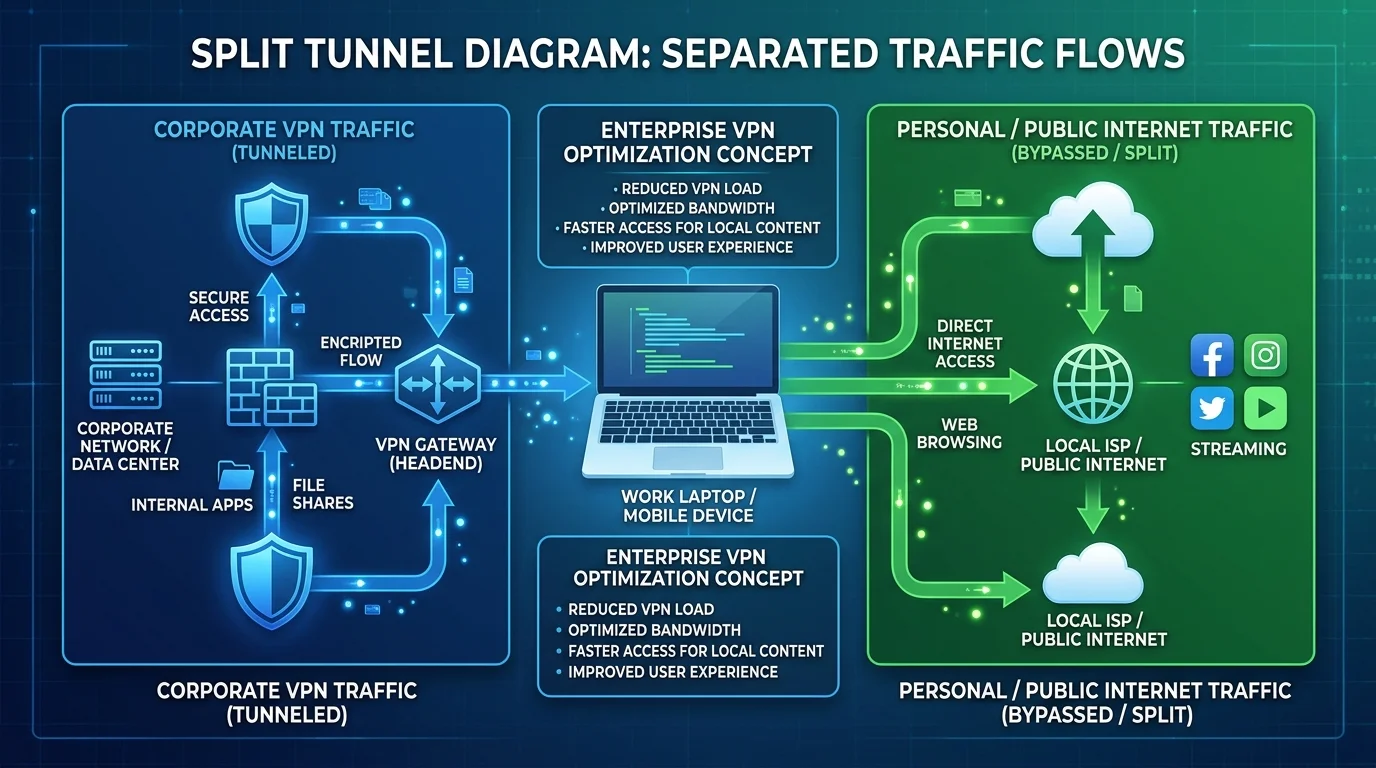
Full Tunnel vs Split Tunnel: This Is Everything
IT departments often configure Full Tunnel mode: all your internet traffic — Netflix, YouTube, personal browsing — routes through your company's data center and back out. Even in Chicago, your traffic goes to the New Jersey office and comes back, adding 40ms minimum to every website you visit.
Split Tunnel mode only routes internal corporate traffic through the VPN. Normal internet goes directly from your home connection, preserving full speed for personal use. This is a legitimate, common IT configuration request.
Speed Impact by Corporate VPN Software (From Our Tests)
- Cisco AnyConnect (Full Tunnel): 48% speed reduction, +25–40ms latency.
- Palo Alto GlobalProtect (Full Tunnel): 41% reduction.
- FortiClient (Split Tunnel): Only 8% reduction — processes only corporate traffic.
- WireGuard-based corporate VPN: 5–12% reduction — fastest encryption protocol available.
What to Ask Your IT Department
- Request Split Tunneling — legitimate, common, does not compromise security.
- Ask if they support WireGuard or IKEv2 instead of legacy OpenVPN.
- Check if a closer VPN gateway is available — connecting regionally can halve latency.