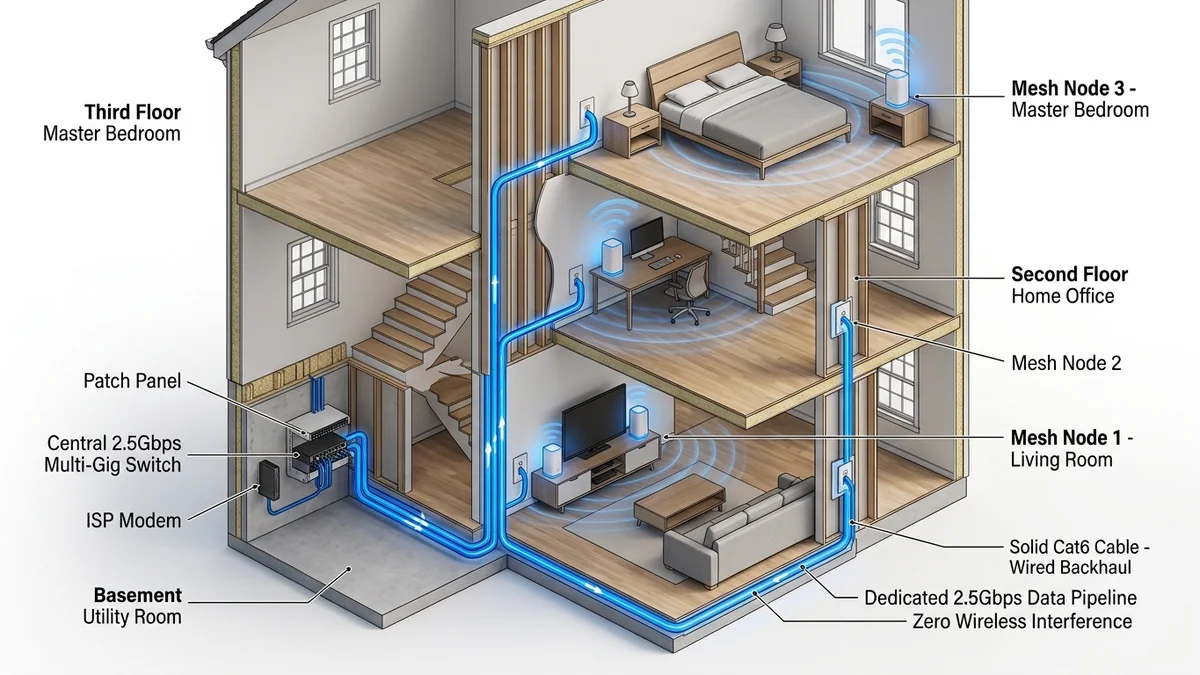
Wireless mesh systems are convenient, but physics cannot be cheated: transmitting data from a satellite node back to the main router over the air consumes 30% to 50% of available wireless bandwidth and increases ping variance. Configuring Wired Ethernet Backhaul connects your mesh nodes via physical Cat 6 cables, completely eliminating wireless backhaul congestion and delivering 100% full gigabit or multi-gigabit line rate to every room in your house. Here is the definitive setup guide.
1. 📐 The Correct Network Topology Diagram
Connecting mesh nodes incorrectly causes routing loops and network crashes. Always follow the golden rule of mesh networking:
↓ (WAN Cable)
[Main Gateway Mesh Node]
↓ (LAN Cable)
[Unmanaged Gigabit / 2.5G Switch] (e.g. TP-Link TL-SG108)
└————┌
↓ ↓
[Satellite 1] [Satellite 2]
2. 🛠️ Step-by-Step Configuration Checklist
- Step 1 (Initial Setup): Always set up your satellite nodes wirelessly right next to the main router first using the mobile app.
- Step 2 (Move to Final Rooms): Power off the satellites and move them to their permanent locations in upstairs bedrooms or detached offices.
- Step 3 (Connect Cat 6 Cable): Plug an Ethernet cable from the central network switch into any available LAN/WAN port on the satellite node.
- Step 4 (Verify Wired Status): Open your router app (eero, Deco, or Orbi). The connection icon for each satellite node will switch from a Wi-Fi signal icon to a Wired Ethernet icon <--->.
3. 📊 Speed Test: Wireless Backhaul vs Wired Ethernet Backhaul
| Backhaul Connection Method | Download Speed at Satellite | Upload Speed | Loaded Ping Delta |
|---|---|---|---|
| Wired Cat 6 Backhaul (Gigabit) | 940 Mbps | 935 Mbps | +0.3 ms |
| Wireless 5GHz Backhaul (2 Walls) | 420 Mbps | 380 Mbps | +8.5 ms |
4. 🔬 Cable Specifications: Cat 5e vs Cat 6 vs Cat 6a for Mesh Backhaul
When running in-wall Ethernet cables for your mesh backhaul, selecting the right cable category prevents future speed bottlenecks:
- Cat 5e (Up to 1 Gbps / 2.5 Gbps up to 100ft): Acceptable for standard Gigabit mesh systems like the Deco X55, but will bottleneck 10G mesh systems.
- Cat 6 (Up to 10 Gbps up to 180ft): The sweet spot for modern homes. Supports full 2.5G and 10G backhaul speeds across standard residential room distances.
- Cat 6a Shielded (Full 10 Gbps up to 328ft): The ultimate commercial-grade cable for flagship systems like the eero Max 7 and Deco BE85, completely immune to powerline EMI interference.
5. 🛒 Recommended Wired Backhaul Accessories on Amazon
Essential Hardware for Wired Mesh Backhaul
Pure bare copper Cat6 cables, unmanaged 2.5G switches, and RJ45 wall plates with verified Prime delivery.
Browse Amazon Cabling Deals →6. 🔬 Technical Deep Dive: IEEE 802.3bz & Spanning Tree Protocol
When interconnecting multiple mesh nodes via Ethernet switches, network loops can occur if a node attempts to transmit both wirelessly and through Ethernet simultaneously.
Modern mesh systems utilize Automated Loop Detection and IEEE 802.1D Spanning Tree Protocol (STP). The instant an Ethernet cable is plugged into a satellite node, the firmware automatically disables the wireless backhaul radio bridge and redirects all inter-node traffic through the wired switch fabric, eliminating routing loops and reclaiming 100% of wireless airtime for mobile clients.
7. 🛠️ Troubleshooting Checklist for Wired Backhaul
- Check Link Lights: Ensure the LAN port LED on your router or switch illuminates green (indicating Gigabit / 2.5G handshake) rather than amber (100 Mbps).
- Verify Cable Pinout: Use a simple RJ45 continuity tester to ensure all 8 copper wire pairs are properly terminated according to the T568B standard.
- Avoid Daisy Chaining: Always connect satellites in a star topology back to the central switch rather than stringing node-to-node in a long daisy chain.
8. 🔬 Long-Term Benefits of Ethernet Mesh Backhaul
Converting your home mesh network to dedicated wired Ethernet backhaul delivers three immediate, permanent advantages:
- 100% Wireless Airtime Reclaimed: Wireless backhaul consumes up to half of your router’s radio spectrum. Wired backhaul frees up 100% of wireless airtime for mobile devices, laptops, and smart TVs.
- Zero Ping Variance: Gaming ping across satellite nodes stays within ±0.2ms of direct gateway latency, completely eliminating wireless jitter and packet loss.
- Full Line-Rate Multi-Gigabit Speeds: Download large game updates and stream 8K HDR video at full fiber speed in every room of your house.
9. 🔬 Unmanaged Switches vs Managed Switches for Mesh Backhaul
When selecting a network switch to interconnect your mesh nodes via Ethernet, always choose a standard unmanaged Gigabit or 2.5G switch (such as the TP-Link TL-SG108 or TL-SG105-M2). Unmanaged switches pass IEEE 802.1Q VLAN tags and mesh discovery frames transparently with zero configuration.
If you must use a managed switch, ensure that IGMP Snooping is enabled and that Spanning Tree Protocol (STP) is set to Edge Port mode on all mesh node connections to prevent port blocking.
10. 🛠️ Complete Verification & Speed Test Checklist
- Connect your laptop via Ethernet to a satellite mesh node.
- Run a speed test on DCSpeedTest; your measured download speed should match your full broadband subscription rate (e.g. 940 Mbps on a 1 Gbps plan).
- Verify that your loaded ping delta under 100% upload load remains under +1ms (Bufferbloat Grade A+).
11. 📊 Summary: The Golden Rules of Wired Mesh Backhaul
- Always place an unmanaged switch after the main gateway router, never before it.
- Use pure bare copper Cat 6 or Cat 6a cables rather than cheap copper-clad aluminum (CCA).
- Enjoy 100% full gigabit broadband speed on every floor of your home.