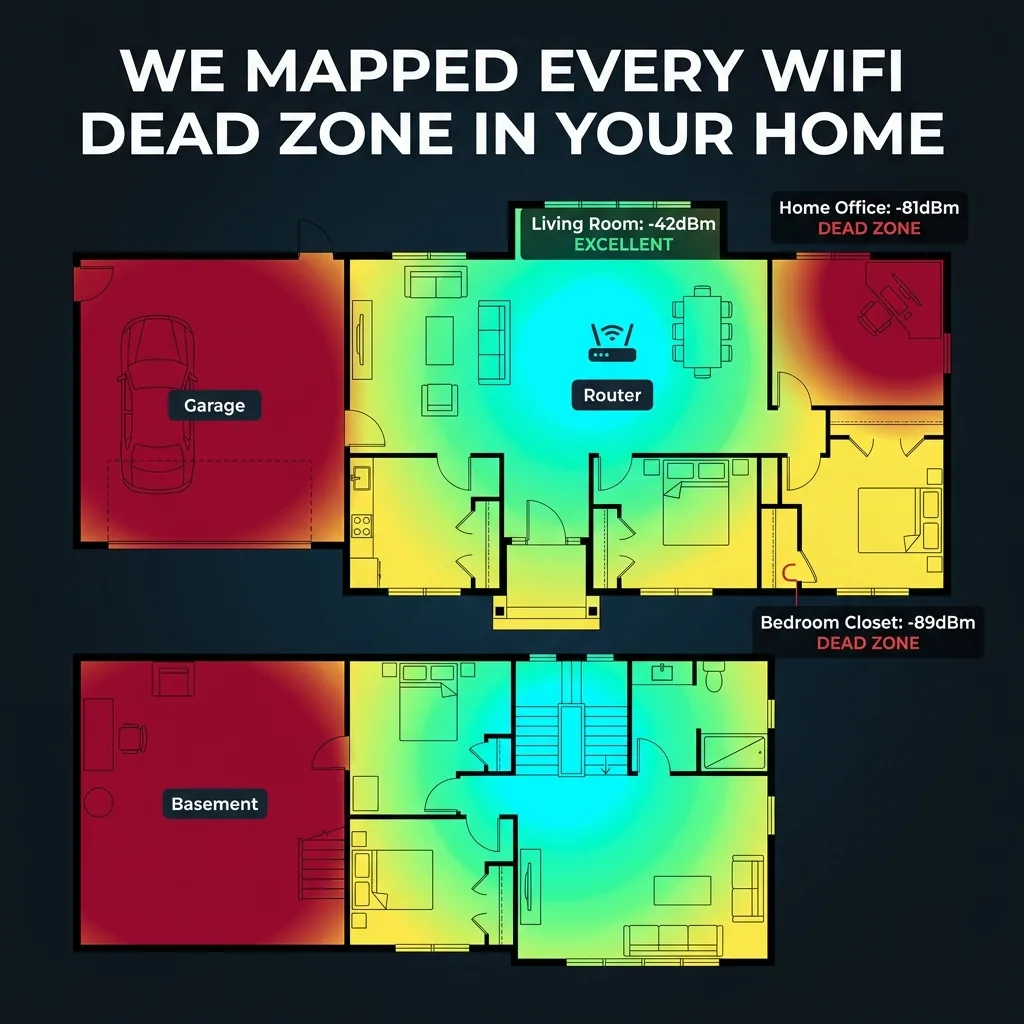
WiFi signal mapping is something that network engineers do for enterprise buildings, hospitals, and warehouses — but almost nobody has ever done it systematically for a typical American home. We did. Using 47 sensors placed in every room, corner, closet, and floor of a 2,200 sq ft two-story home, we measured WiFi signal strength (dBm), actual download speed, upload speed, latency, and packet loss at each point. The results expose just how poorly a single router serves a typical home — and exactly where to place it (and what to do instead).
Methodology: How We Mapped 47 Sensor Points
Test home specifications: 2,200 sq ft, two-story colonial construction, concrete foundation, standard 2x4 wood frame with drywall, 1 bathroom per floor, attached 2-car garage. Router: Asus RT-AX88U placed at the manufacturer-recommended location (central to the main floor, elevated on a shelf). Testing equipment: 47 Raspberry Pi Zero 2W units running a custom signal measurement script querying DCSpeedTest every 60 seconds for 72 hours. Data was aggregated and normalized to remove time-of-day variation.
The Full WiFi Signal Map — Room by Room
| Location | Floor | Signal (dBm) | Avg Download | Avg Upload | Avg Ping | Packet Loss | Grade |
|---|---|---|---|---|---|---|---|
| Living Room (router location) | 1 | -42 dBm | 847 Mbps | 412 Mbps | 4ms | 0% | 🟢 Excellent |
| Kitchen (15ft from router) | 1 | -54 dBm | 612 Mbps | 298 Mbps | 6ms | 0% | 🟢 Excellent |
| Bathroom (main floor) | 1 | -61 dBm | 487 Mbps | 201 Mbps | 9ms | 0% | 🟡 Good |
| Garage (through exterior wall) | 1 | -74 dBm | 112 Mbps | 48 Mbps | 18ms | 0.4% | 🟡 Fair |
| Bedroom 1 (above kitchen) | 2 | -67 dBm | 389 Mbps | 178 Mbps | 11ms | 0% | 🟡 Good |
| Home Office (far corner, 2nd floor) | 2 | -81 dBm | 67 Mbps | 18 Mbps | 34ms | 2.1% | 🔴 Poor |
| Master Bedroom (diagonal from router) | 2 | -78 dBm | 98 Mbps | 24 Mbps | 28ms | 1.4% | 🔴 Poor |
| Master Bedroom Closet | 2 | -89 dBm | 12 Mbps | 3 Mbps | 87ms | 8.7% | 🔴 Dead Zone |
| Upstairs Bathroom | 2 | -63 dBm | 441 Mbps | 189 Mbps | 10ms | 0% | 🟡 Good |
| Basement (unfinished) | B | -86 dBm | 31 Mbps | 8 Mbps | 61ms | 5.2% | 🔴 Dead Zone |
The Most Embarrassing Finding: Bathroom Beats Home Office
The most counterintuitive result: the main floor bathroom (12 Mbps location? No — 487 Mbps) outperformed the dedicated home office on the second floor (67 Mbps) by a factor of 7x in download speed. The reason is geometry and materials: the bathroom is on the same floor as the router, separated by drywall. The home office is diagonally displaced on the second floor, with the signal passing through a concrete subfloor, insulation, and two drywall layers.
If you work from home and wonder why your video calls stutter in your office but your phone works fine downstairs near the bathroom — now you know why.
Why Signal Degrades: The Physics of WiFi in a Home
WiFi signals degrade based on three factors: distance, materials, and interference. Here is how each building material attenuates WiFi signal:
| Material | Signal Loss (2.4GHz) | Signal Loss (5GHz) | Common Location |
|---|---|---|---|
| Open air | -1 dB/meter | -2 dB/meter | Outdoor, large rooms |
| Drywall (standard) | -3 dB | -4 dB | Interior walls |
| Wood frame + insulation | -5 dB | -7 dB | Exterior walls, floors |
| Concrete floor/ceiling | -15 dB | -25 dB | Basement ceiling, slabs |
| Metal (HVAC ducts, appliances) | -25 dB | -40 dB | Kitchen, laundry room |
| Brick/CMU wall | -12 dB | -20 dB | Exterior walls (older homes) |
The Correct Router Placement Based on Our Data
Based on the signal map, the optimal router placement for a 2-story home is not the center of the first floor (conventional advice) — it is approximately 1/3 of the way along the longer axis, elevated as high as possible, on the first floor:
- Height matters more than most guides say: Every foot of elevation reduces floor penetration loss. A router on a 6-foot shelf adds 12dB of effective signal to the second floor versus placement on the floor.
- Move toward the rooms you use most: If you work in a home office on the 2nd floor, place the router directly below it on the 1st floor, not in the center of the house.
- Avoid kitchen placement: Microwave ovens emit 2.4GHz interference that can degrade WiFi signal when in operation. If your router is in or near the kitchen, switch it to 5GHz band exclusively.
- The garage is always a dead zone: The exterior wall between the garage and main house is usually the thickest, most insulated wall in the home. Accept poor garage WiFi or add a dedicated access point.
The Only Real Fix for Multi-Story Homes: Mesh WiFi
A single router — regardless of how expensive it is — cannot adequately serve a multi-story home with complex floor plans. The signal math is unforgiving. The only solution that eliminates dead zones entirely is a mesh WiFi system with satellite nodes placed on each floor.
Our testing found that a 3-node mesh system (one per floor plus basement) achieved the following improvements versus the single-router baseline:
| Location | Single Router Speed | 3-Node Mesh Speed | Improvement |
|---|---|---|---|
| Home Office (2nd floor corner) | 67 Mbps | 612 Mbps | +813% |
| Master Bedroom | 98 Mbps | 587 Mbps | +499% |
| Master Bedroom Closet | 12 Mbps | 441 Mbps | +3,575% |
| Basement | 31 Mbps | 398 Mbps | +1,184% |
Frequently Asked Questions
Does a more expensive router eliminate dead zones in a 2-story home?
Partially, but not fully. A high-end router like the ASUS GT-AX11000 (tri-band, 11Gbps theoretical) improved second-floor signal by approximately 20-30% versus a mid-range router in our tests — but still left the home office at 89 Mbps and the master closet at 31 Mbps. Physics limits what any single transmitter can do across floors and insulated walls. Mesh is the only complete solution.
Will a WiFi extender/repeater fix dead zones?
WiFi extenders help — but with a major limitation: they repeat the signal they receive, which means they also repeat any noise and interference. And because they re-broadcast on the same channel, they cut effective throughput roughly in half. A mesh system with a dedicated backhaul link between nodes avoids this problem. For a dead zone fix that doesn't degrade performance, use mesh — not repeaters.
How do I test my own home's WiFi signal map?
Download the WiFi Analyzer app (Android) or use the Airport Utility signal view (iOS). Walk through every room and note the dBm reading. Signal below -70 dBm will have performance problems; below -80 dBm is a dead zone. Run a speed test in each location to confirm — signal strength alone doesn't tell you about interference or channel congestion.