The Invisible Traffic Highway
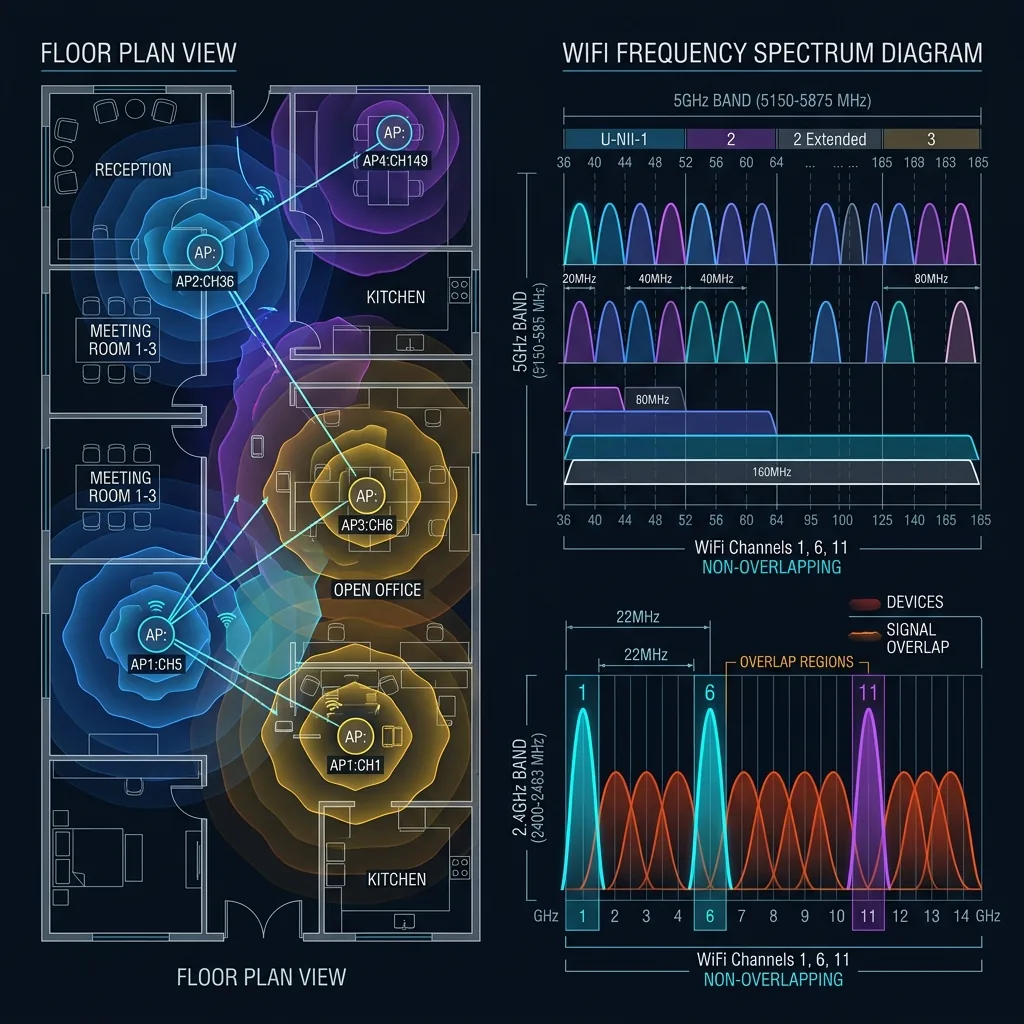
WiFi operates on channels, similar to lanes on a highway. If everyone in your apartment building is driving in "Lane 6" (Channel 6), traffic jams happen. Packets collide, re-transmissions occur, and your speed drops.
2.4 GHz vs 5 GHz Channels
- 2.4 GHz: Only has 3 non-overlapping channels: 1, 6, and 11. If you pick Channel 3, you interfere with BOTH neighbors on 1 and 6. Always stick to 1, 6, or 11.
- 5 GHz: Has many more channels (36, 40, 44... 149, 153, etc.). Interference is much rarer here due to the shorter range of the signal.
How to Find the Best One
Don't guess. Download a free "WiFi Analyzer" app on your Android phone (iOS blocks this feature). Walk around your house. Look for the channel with the fewest overlapping arcs. Login to your router and hard-set that channel instead of using "Auto".
Finding the Right Channel Without Tools
On the 2.4 GHz band, only channels 1, 6, and 11 are non-overlapping. If your neighbors are on channel 6, switch to 1 or 11 — overlapping channels cause more interference than sharing a channel entirely. On 5 GHz, the non-overlapping channels are much more numerous (36, 40, 44, 48, 52, 56, 60, 64, 100, 104...), so auto-selection works well. Use a WiFi analyzer app (WiFi Analyzer on Android, or the built-in Network Diagnostics on macOS) to see which channels your neighbors are using and pick the emptiest one. Revisit this every few months as neighbors change their equipment. For gaming and streaming, the 5 GHz or 6 GHz band is almost always preferable to 2.4 GHz regardless of channel selection.
Frequently Asked Questions
Does changing WiFi channels improve speed?
Yes, significantly in congested environments. On a channel shared with 3-4 active neighboring networks, you're competing for airtime — your router and theirs take turns transmitting, effectively multiplying your channel's contention overhead. Switching to an empty channel can restore 30-50% of your theoretical throughput and substantially reduce latency variance. The improvement is most dramatic on 2.4 GHz in apartment buildings; 5 GHz in a house rarely has enough neighboring interference to matter.
Should I use 20 MHz or 40 MHz channel width on 2.4 GHz?
Stick to 20 MHz on 2.4 GHz. The 40 MHz option doubles bandwidth but effectively eliminates all non-overlapping channels — you'd be overlapping with every neighbor regardless of which channel you pick. In any environment with more than one or two neighboring networks, 40 MHz on 2.4 GHz produces worse real-world performance than 20 MHz, despite the higher theoretical speed. On 5 GHz, using 80 MHz or even 160 MHz channel width is reasonable because the band has enough space.