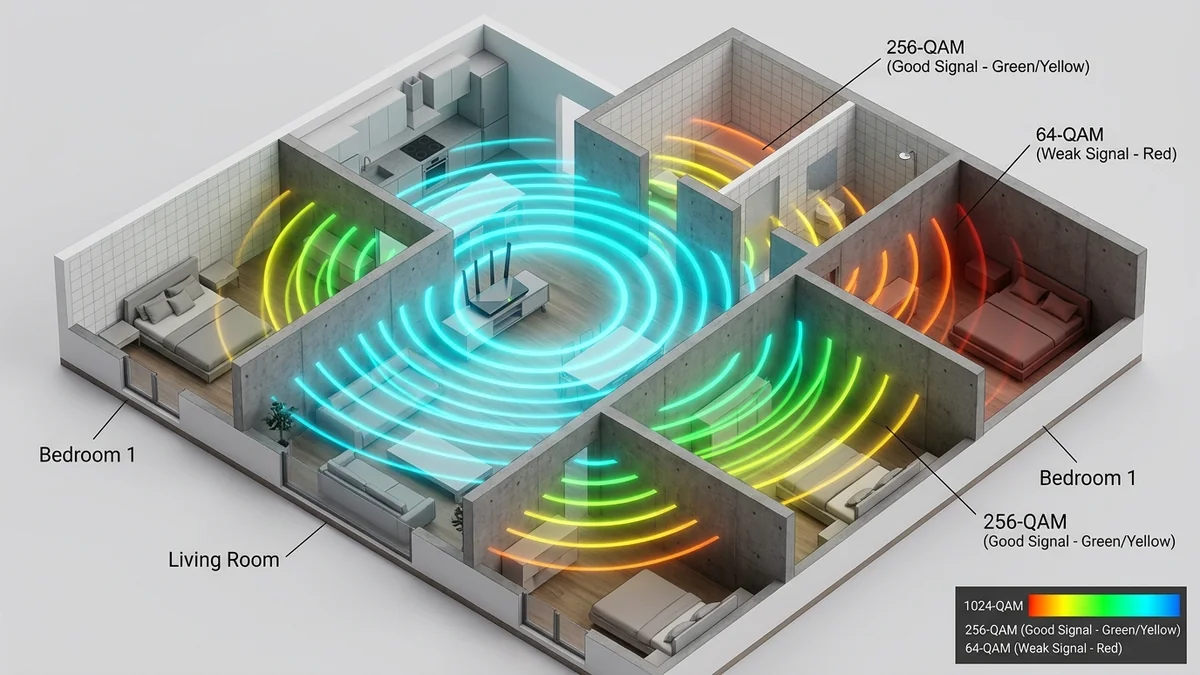
You stand three feet away from your Wi-Fi 6 router in the living room, run a speed test, and happily record a blazing 800 Mbps. You walk 30 feet down the hallway into your bedroom, close the door, run the test again—and your speed plunges to 28 Mbps with high packet loss. Why does wireless throughput collapse so dramatically over relatively short distances? The answer is rooted in the physics of Radio Frequency (RF) Free-Space Path Loss, dynamic QAM modulation constellation step-downs, and physical wall attenuation. Here is the technical breakdown and how to solve Wi-Fi range drop-offs in 2026.
1. The 3 Physical Causes of Wireless Speed Drop-Off
1. Dynamic QAM Modulation Step-Down (The Density Law)
Wi-Fi encodes digital data onto radio carrier waves using Quadrature Amplitude Modulation (QAM):
- Near the Router (RSSI > -55 dBm): The signal is pristine, allowing the router to use 1024-QAM (Wi-Fi 6) or 4096-QAM (Wi-Fi 7), transmitting 10 to 12 bits of data per sub-carrier symbol.
- In the Bedroom (RSSI < -75 dBm): Background noise degrades signal clarity. To prevent catastrophic packet corruption, the router automatically steps down modulation to 64-QAM, 16-QAM, or even QPSK (transmitting only 2 to 4 bits per symbol). This automatically cuts throughput by 70% to 90%.
2. The Inverse-Square Law of Radio Propagation
Electromagnetic radiation follows the Inverse-Square Law: physical signal power decreases proportionally to the square of the distance. Doubling your distance from the router reduces received RF power to one-fourth (25%) of its original strength.
3. Material Attenuation (The Wall Tax)
Radio waves lose energy when passing through physical barriers:
| Building Material | 2.4GHz Signal Loss | 5GHz Signal Loss | 6GHz Signal Loss (Wi-Fi 6E/7) |
|---|---|---|---|
| Standard Drywall / Hollow Door | 1 – 2 dB | 3 – 4 dB | 4 – 6 dB |
| Solid Hardwood / Glass Window | 3 – 5 dB | 6 – 9 dB | 8 – 12 dB |
| Brick / Ceramic Tile Bathroom | 6 – 10 dB | 12 – 18 dB | 16 – 24 dB |
| Reinforced Concrete / Metal Lath | 15 – 22 dB | 25 – 35 dB+ (Dead Zone) | 35 – 45 dB+ (Complete Block) |
2. 🛠️ 4 Ways to Restore Full Speed Across Your Whole Home
- Elevate and Center Your Router: Place the router at least 4 to 6 feet off the floor in an open central living area, away from metal appliances and mirror cabinets.
- Lock to 5GHz UNII-3 High-Power Channels: Configure 5GHz to Channel 149–161, where FCC regulations allow maximum transmit power (up to 4 Watts EIRP).
- Deploy a Wired Mesh System with Ethernet Backhaul: Place a secondary access point in the bedroom connected via Cat 6 or MoCA 2.5 coax, delivering 1024-QAM speeds in every room.
- Avoid Cheap Plug-In Range Extenders: Repeaters cut bandwidth in half and double latency due to single-radio airtime retransmissions.
3. 🔬 Wi-Fi 7 vs Wi-Fi 6: 4096-QAM vs 1024-QAM Constellations
Modern Wi-Fi 7 routers introduce 4096-QAM (4K-QAM), which packs 12 bits of data into every single wireless transmission symbol. However, maintaining a pristine 4096-QAM constellation requires an extremely high Signal-to-Noise Ratio (SNR > 38 dB).
As soon as you walk into an adjacent room, physical drywall absorption reduces SNR to 25 dB, forcing the router down to 256-QAM (8 bits/symbol). While throughput drops, this adaptive modulation ensures your connection remains stable without dropping packets.
4. 📊 Signal Strength (RSSI) vs. Maximum Wi-Fi Speed
| Received Signal (RSSI) | Active QAM Modulation | Real-World Throughput | Connection Stability |
|---|---|---|---|
| -30 to -50 dBm | 1024 / 4096-QAM | 800 – 1,600+ Mbps | Pristine Line-of-Sight |
| -55 to -65 dBm | 256-QAM | 450 – 700 Mbps | Great for 4K Streaming |
| -70 to -78 dBm | 64-QAM / 16-QAM | 75 – 200 Mbps | Noticeable gaming jitter |
| < -80 dBm | QPSK / BPSK | 5 – 25 Mbps | Severe Packet Drops / Disconnects |
5. 📡 Beamforming and Spatial Multiplexing Explained
Modern Wi-Fi 6 and Wi-Fi 7 routers utilize Explicit Transmit Beamforming (TxBF). Rather than broadcasting radio waves in a uniform spherical circle, the router uses an array of multiple antennas (e.g. 4x4 or 8x8 MU-MIMO) to calculate the precise phase delay between antennas.
This allows the router to dynamically focus electromagnetic energy in a concentrated, high-gain directional beam directly toward your smartphone or laptop. However, when passing through dense obstacles (like a tiled bathroom or concrete floor), reflected multipath waves cancel each other out (destructive interference), breaking the beam and forcing the router to fall back to lower modulation rates.
6. 🏁 Final Summary: Eliminating Dead Zones Forever
Overcoming distance-related Wi-Fi slowdowns requires matching wireless physics with your home's physical layout. By placing your router in an elevated, central location, locking to high-power UNII-3 5GHz channels, and extending coverage to distant bedrooms using wired Ethernet backhaul mesh nodes, you guarantee blazing gigabit speeds in every corner of your home.
7. 🔬 The Technical Impact of Channel Width on Distant Signals
While 80MHz and 160MHz channel widths maximize speeds close to the router, wider channels distribute total transmission power across more spectrum, slightly increasing the thermal noise floor (-174 dBm/Hz). If you have a device far away in a bedroom with weak signal (-78 dBm), dropping channel width from 160MHz down to 80MHz or 40MHz concentrates RF energy into fewer sub-carriers, improving signal-to-noise ratio (SNR) and stabilizing connection reliability through walls.