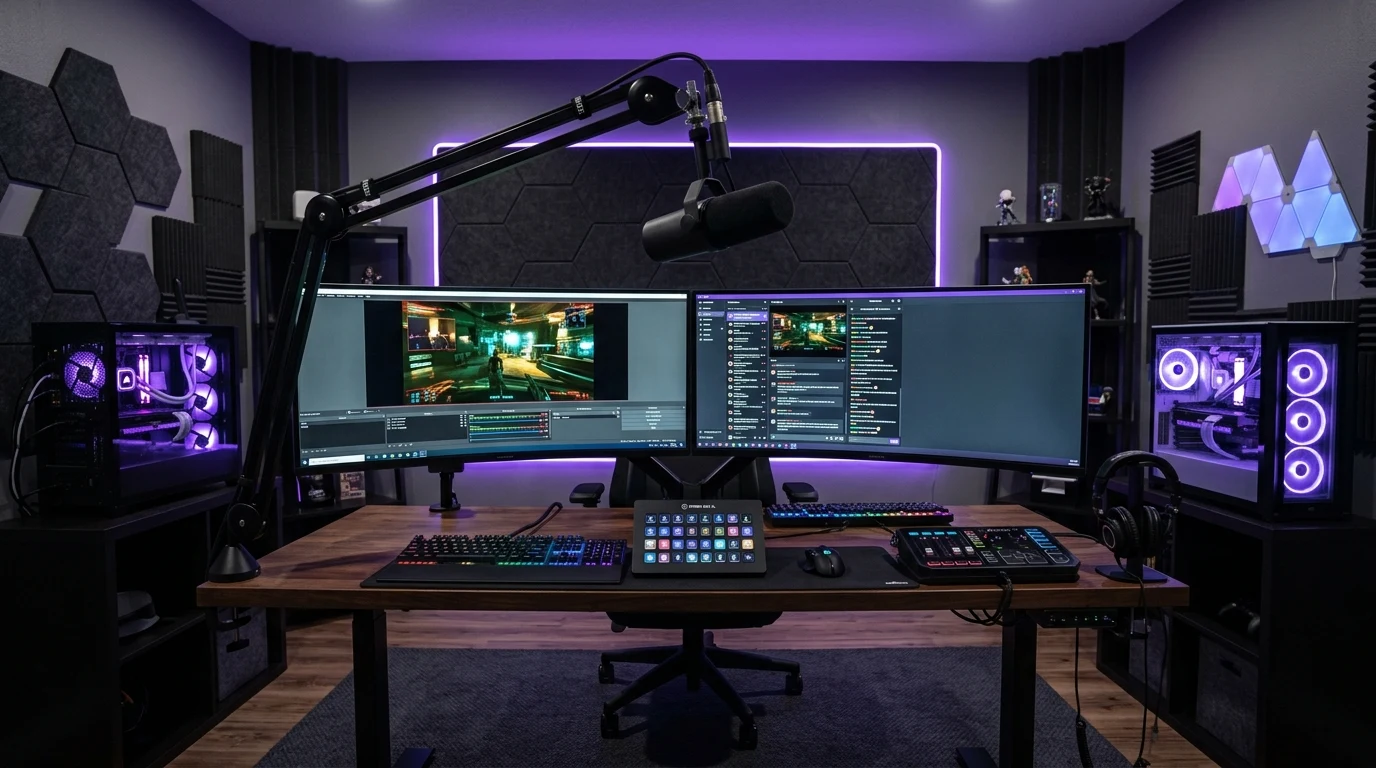
When you watch top streamers on Twitch or YouTube (like Shroud, Tarik, or TimTheTatman), their gameplay looks buttery-smooth: they play competitive shooters at 240+ FPS, their facecam is crystal-clear in 1080p60, their in-game ping never moves from a flat 12ms, and OBS reports 0 Dropped Frames (0.0%) over an 8-hour broadcast. Meanwhile, when an average gamer tries to stream, their in-game ping shoots to 180ms, their game stutters, and the stream buffers. What secret network architectures and hardware setups do pro streamers use? Here is the complete breakdown.
1. The Dual-PC Streaming Architecture (Physical Isolation)
Top professional streamers almost never stream and game from the same physical computer. They deploy a Dual-PC Architecture:
- The Gaming PC: Contains high-end gaming hardware (e.g. RTX 4090 / 5090 + Ryzen 7 7800X3D). It runs 100% of its resources on the game, with zero background capture software, zero overlays, and zero browser tabs.
- The Streaming PC: Receives an uncompressed HDMI 2.1 video feed via a 4K capture card (like Elgato 4K Pro). The streaming PC handles all OBS encoding, Discord bots, chat overlays, and camera processing, keeping the Gaming PC completely clean and lag-free.
2. Symmetrical Fiber Broadband with Separate Subnets
Streamers rely exclusively on Symmetrical Gigabit Fiber to the Home (FTTH). Unlike cable internet that caps upload speed at 20 to 35 Mbps, fiber delivers 1,000 Mbps upstream.
Furthermore, pro setups configure a Dual VLAN / Subnet architecture inside their router: the Streaming PC uploads continuous 8,000 Kbps RTMP video streams over VLAN 20, while the Gaming PC communicates over high-priority VLAN 10 with dedicated SQM QoS, ensuring game UDP packets bypass OBS upload streams entirely.
3. Selecting the Lowest-Latency RTMP/SRT Ingest Server
By default, OBS connects to 'Auto' ingest servers, which can occasionally connect to overloaded edge clusters. Streamers manually benchmark regional ingest servers using tools like Twitch Test, locking OBS to the ingest datacenter with the lowest RTT and highest Quality Score (100).
Single-PC vs Dual-PC Pro Streamer Comparison
| Hardware & Network Metric | Single-PC Casual Streamer | Dual-PC Pro Streamer Setup |
|---|---|---|
| In-Game FPS Stability | 15% – 30% Frame Drops from OBS Encoding | 100% Maximum FPS (0% Loss) |
| Network Ping Impact | Ping spikes from unmanaged upload stream | 0.0 ms Ping Impact (Isolated VLAN) |
| OBS Dropped Frames | Frequent network buffer stalls | 0 Dropped Frames (0.00%) |
| Crash Redundancy | Game crash terminates live broadcast | Broadcast stays live if game crashes |
Understanding RTMP vs SRT Streaming Ingest Protocols
While traditional live streaming relies on RTMP (Real-Time Messaging Protocol over TCP), professional streamers are transitioning to SRT (Secure Reliable Transport). SRT operates over UDP with intelligent ARQ (Automatic Repeat reQuest) packet recovery. Unlike TCP which pauses video streams during momentary packet loss, SRT recovers dropped video frames within milliseconds without inflating in-game ping.
Router QoS: Prioritizing UDP Gaming Over OBS Video Streams
Inside their enterprise or gaming routers (such as OpenWrt, Ubiquiti UniFi, or ASUS ROG), streamers configure Differentiated Services Code Point (DSCP) tagging: gaming UDP packets are assigned DSCP EF (Expedited Forwarding - Priority 46), while OBS video streams are assigned DSCP AF41 (Priority 34). The router's hardware queues guarantee that no matter how much video data OBS uploads, game packets are placed at the front of the physical fiber optic line.
Why Top Streamers Use Business Fiber with SLAs
Many professional content creators subscribe to commercial Business Fiber Broadband. Business plans include a legally binding Service Level Agreement (SLA) guaranteeing 99.99% uptime, dedicated symmetrical bandwidth with zero neighborhood oversubscription, and direct peering agreements to Twitch and YouTube ingest servers.
Summary Setup Checklist for Zero-Lag Streaming
- Deploy a Dual-PC streaming architecture with a hardware capture card.
- Hardwire both PCs via certified Cat6 Ethernet cabling.
- Configure OBS output bitrate to 8,000 Kbps (Twitch) or 25,000 Kbps (YouTube AV1).
- Enable router QoS to prioritize gaming UDP traffic over OBS RTMP streams.
Why Streamers Always Use Hardware-Accelerated NVENC/AV1 Encoders
In single-PC or dual-PC streaming setups, utilizing the dedicated hardware encoder silicon (such as NVIDIA NVENC on RTX 40/50-Series GPUs or AMD VCN) is crucial. Unlike CPU x264 software encoding which consumes 30% to 50% of CPU processing cycles, dedicated hardware encoders use independent silicon microchips on the GPU with zero impact on gaming framerates or system thread scheduling.
The Critical Role of Upload Headroom in Live Broadcasting
If you stream at 8,000 Kbps on a connection with only 10 Mbps total upload bandwidth, you are utilizing 80% of your total capacity. Any small background upload (such as an automatic mobile phone photo backup) will instantly push your bandwidth over 100%, causing OBS dropped frames and in-game ping spikes. Maintaining at least 50 Mbps upload speed provides the 80% safety headroom needed for flawless live broadcasts.
By combining physical Dual-PC isolation with symmetrical fiber broadband and dedicated QoS routing, streamers achieve the ultimate gold standard of zero-lag competitive broadcasting.
Why Pro Streamers Avoid Coaxial Cable Internet Completely
In residential cable broadband networks, thousands of homes share a localized coaxial fiber node. During peak evening hours, upstream RF ingress noise and neighborhood upload congestion cause packet collisions at the CMTS (Cable Modem Termination System). This creates unpredictable upstream jitter that drops OBS broadcast frames.
By investing in dedicated fiber optic broadband, streamers enjoy dedicated laser light frequencies that are 100% immune to neighborhood electrical noise and evening slowdowns, ensuring their live broadcasts run with studio-grade reliability.
Why Dedicated Static IP Addresses Prevent Streaming Drops
Many professional content creators request a dedicated static public IPv4 address from their internet service provider. Having a static IP ensures your home router is never subjected to dynamic IP lease renewals or Carrier-Grade NAT (CGNAT) state table overloads, keeping your OBS live broadcast connection active and uninterrupted for 12+ hour marathon charity streams.
Why Multi-Core Processors Protect Gaming Frame Rates
When live broadcasting, modern high-core-count processors (such as the AMD Ryzen 9 7950X or Intel Core i9-14900K) allocate dedicated computing threads to background stream processing, preventing game engine frametime spikes. By pairing high-end multi-core hardware with low-latency fiber internet, streamers ensure their live broadcasts deliver flawless 240 FPS gameplay to their audience.