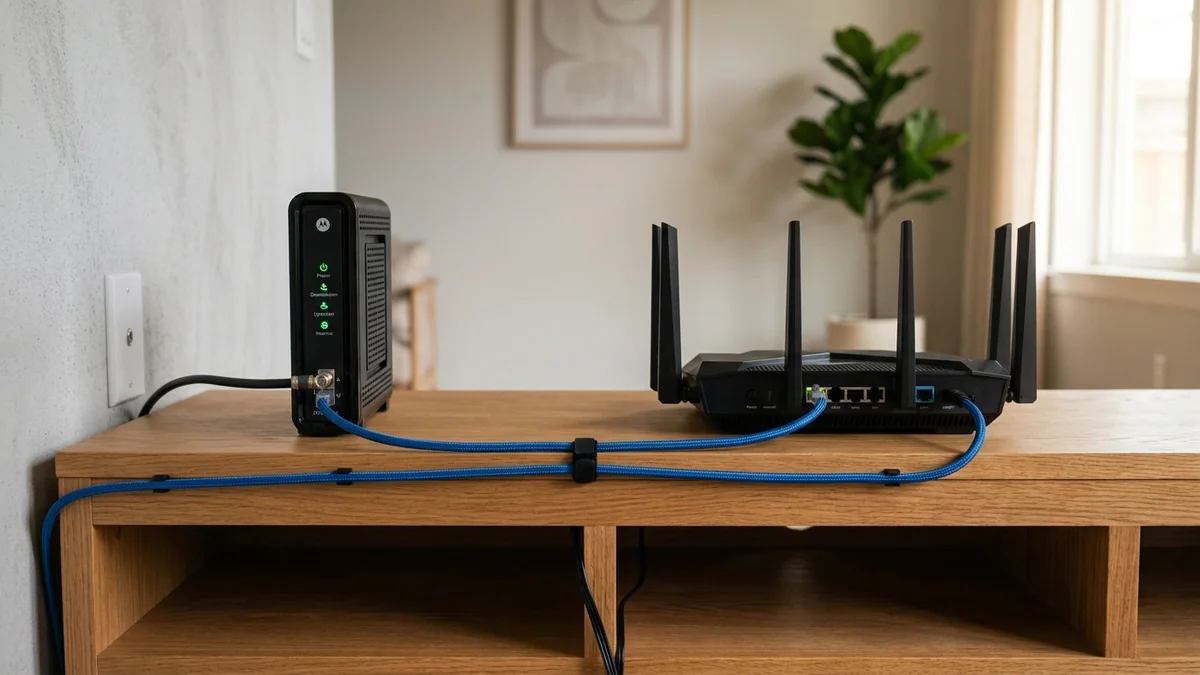
When you sign up for home broadband from Comcast Xfinity, Spectrum, AT&T, or Cox, the technician hands you a single large plastic box: a 2-in-1 Modem-Router Combo Gateway. It houses a cable/fiber modem, a Wi-Fi access point, a 4-port Ethernet switch, and a telephone adapter all on a single circuit board. For casual users, having one box plugged into the wall seems clean and convenient. But for gamers, remote workers, and tech enthusiasts, ISP combo gateways are notorious for poor Wi-Fi range, locked-down firmware, thermal throttling, and endless $15/month rental fees. Is buying a separate standalone modem and router worth the investment in 2026? Here is the complete hardware comparison.
The Architectural Dilemma: Single SoC vs Dedicated Processors
To understand why separate networking gear outperforms combo units, you must look inside the chassis:
- 2-in-1 Combo Gateway: A single system-on-chip (SoC) processor must simultaneously demodulate high-frequency RF DOCSIS cable signals, handle packet routing and NAT translation, manage firewall state tables, and power high-gain Wi-Fi radios. The immense heat inside a sealed enclosure causes thermal throttling that degrades throughput during peak hours.
- Standalone Architecture: A dedicated modem (such as an Arris SURFboard S33) handles only physical RF-to-Ethernet translation. A separate high-performance router (such as an Asus RT-AX88U Pro or GL.iNet Flint 2) utilizes a dedicated quad-core ARM processor and 1 GB of RAM to execute advanced queue scheduling and Wi-Fi beamforming with zero compromise.
Direct Comparison: Combo Gateway vs Separate Components
Below is the detailed capability matrix comparing ISP gateway rentals against standalone ownership:
| Comparison Metric | ISP 2-in-1 Combo Gateway | Standalone Modem + Separate Router |
|---|---|---|
| Annual Equipment Cost | $180 / year ($15/mo rental fee) | $0 / year (One-time $180 purchase) |
| Bufferbloat / SQM Support | Locked firmware; No SQM (High lag) | Full Cake / FQ-CoDel Support (Grade A+) |
| Wi-Fi Upgradability | Must wait for ISP to issue new box | Upgrade router to Wi-Fi 7 anytime |
| DNS & Custom Firmware | Locked to ISP DNS servers | Custom DNS (Cloudflare DoH), OpenWrt, VPNs |
| Hardware Lifespan | 2 to 3 years before thermal degradation | Modem lasts 6+ years; Router modular |
The Financial Math: Saving Over $1,000 Over 5 Years
At an average rental fee of $15.00 per month, renting your ISP's combo unit costs $900 over five years. You can purchase a certified DOCSIS 3.1 multi-gigabit modem for $130 and a high-performance Wi-Fi 6E/7 router for $150 (Total: $280). You save over $620 in pure cash while enjoying vastly superior performance.
How to Convert an ISP Combo to a Pure Modem (Bridge Mode)
If your ISP mandates using their combo unit (common on AT&T Fiber and certain cable tiers):
- Log into the gateway admin panel (usually
192.168.1.254or192.168.0.1). - Locate 'Bridge Mode' (or 'IP Passthrough' / 'DMZ+').
- Enable Bridge Mode and turn off the gateway's internal Wi-Fi radios.
- Connect your standalone router's WAN port to Gateway Port 1. Your standalone router now handles all DNS, firewall, SQM, and Wi-Fi duties with zero double NAT.
Audit your network responsiveness before and after setting up your standalone router on DCSpeedTest to confirm pristine bufferbloat and latency performance.
The Freedom of Upgrading Routers Independently of Cable Standards
When you own separate components, your networking hardware is modular. When Wi-Fi 7 releases, you can upgrade your standalone router in five minutes without touching your cable modem or calling ISP customer support to re-provision your internet line.
Similarly, when your cable provider upgrades their neighborhood headend to DOCSIS 4.0, you can swap out the modem while keeping all your custom Wi-Fi network names, passwords, and static IP reservations completely intact.
Eliminating ISP Remote Telemetry and Wi-Fi Sharing
Many ISP combo gateways broadcast a secondary public hotspot network (such as Xfinity WiFi or Spectrum Free WiFi) that shares your home's electrical power and radio frequency airtime with passing strangers. Deploying your own standalone router shuts down these public radios, reclaiming 100% of wireless airtime for your family.
Managing Dedicated Local Storage and Media Servers
A high-performance standalone router includes high-speed USB 3.2 ports and multi-gigabit Ethernet interfaces capable of running lightweight local NAS storage servers, VPN servers, and automated BitTorrent downloaders without bogging down everyday internet traffic.
The Final Decision on Home Networking Hardware
Buying a dedicated modem and standalone router saves hundreds of dollars in rental fees, provides Cake SQM support to kill bufferbloat, and gives you total control over your home network performance.
The Advantage of Custom Third-Party Firmware (OpenWrt)
A standalone router allows you to install open-source firmware like OpenWrt or Asuswrt-Merlin. This unlocks enterprise-level routing features, AdGuard Home network-wide ad blocking, and advanced WireGuard VPN clients that ISP combo units deliberately block.
Investing in your own standalone modem and router is one of the smartest upgrades you can make for performance, security, and long-term savings.
The Trade-Off Most Guides Skip
A combo gateway isn't automatically worse — it's a genuine convenience trade-off. Separate devices give you the freedom to upgrade either component independently and generally offer more advanced configuration options, but they also mean two devices to manage, two sets of firmware to keep updated, and one more point of failure to troubleshoot when something goes wrong. For a household that just wants internet to work without fuss, a modern combo unit from a reputable ISP is often perfectly adequate; the separate-device advantage matters most for anyone who wants control over their router choice specifically.