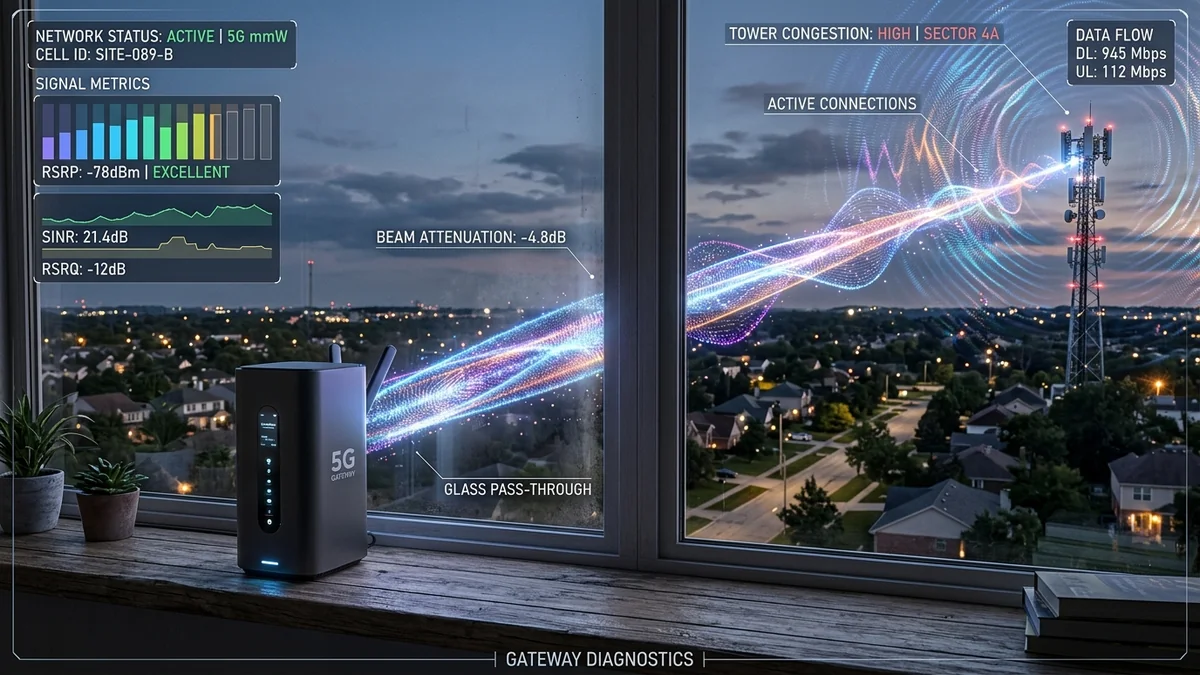
In recent years, Fixed Wireless Access (FWA)—commonly marketed as 5G Home Internet by T-Mobile, Verizon, and AT&T—has disrupted the broadband industry with attractive $50/month pricing, zero contracts, and self-installation gateways. For casual web browsing and standard HD video streaming, 5G home internet is a viable, budget-friendly alternative. However, for competitive gaming, remote work screen sharing, and latency-sensitive households, 5G wireless broadband frequently falls short of expectations due to cellular deprioritization (QCI), carrier-grade NAT (CGNAT), and fluctuating radio frequency signal metrics.
1. The 4 Inherent Limitations of 5G Home Broadband
1. Cellular Deprioritization (QCI Class Allocation)
Mobile towers operate on prioritized Quality of Service Class Identifiers (QCI). In virtually all cellular carrier network policies, mobile smartphone subscribers (paying premium per-gigabyte rates) have higher traffic priority than 5G Home Internet gateways. During evening commute hours or neighborhood peak cell tower usage, your home gateway's packets are deprioritized at the base station scheduler, causing speeds to drop by up to 80%.
2. Severe Bufferbloat & Jitter Under Load
Because cellular spectrum is inherently shared over the air, 5G radio links must constantly adapt modulation schemes (from 256-QAM down to 64-QAM or QPSK) depending on interference. This causes unpredictable round-trip time (RTT) variance. While idle ping may show 25ms, active downloads can spike latency to 250ms–600ms+, rendering online multiplayer games unplayable.
3. Carrier-Grade NAT (CGNAT) & Strict NAT Types
5G home internet providers do not assign a public IPv4 address to your gateway. Instead, thousands of subscribers share pooled IP addresses behind CGNAT. This results in permanent Strict/Moderate NAT types on PlayStation, Xbox, and Nintendo Switch consoles, preventing direct peer-to-peer hosting and voice chat connectivity.
4. Physical RF Attenuation (Window Glass & Foliage)
Mid-band (C-Band / n41 / n77) and millimeter-wave (mmWave) 5G frequencies struggle to penetrate Low-E energy-efficient modern window glass, brick walls, and dense summer tree foliage, causing frequent tower handoffs and packet loss.
2. 📊 5G Home Internet vs. Cable (DOCSIS) vs. Pure Fiber (FTTH)
| Performance Metric | 5G Home Internet (FWA) | Cable Broadband (DOCSIS) | Pure Fiber (FTTH) |
|---|---|---|---|
| Downstream Speeds | 75 – 300 Mbps (Variable) | 300 – 1,000 Mbps | 500 – 5,000 Mbps (Symmetric) |
| Upstream Speeds | 10 – 35 Mbps | 10 – 35 Mbps (Capped) | 500 – 5,000 Mbps (Symmetric) |
| Idle Latency (Ping) | 28ms – 55ms | 12ms – 25ms | 2ms – 8ms |
| Loaded Latency (Bufferbloat) | 150ms – 600ms+ (Poor) | 45ms – 180ms | < 15ms (Grade A+) |
| Public IPv4 / Open NAT | No (CGNAT Locked) | Yes (Dynamic Public IP) | Yes (Dynamic/Static Public IP) |
3. How to Maximize 5G Home Internet Performance
- Optimize Gateway Placement: Place the gateway on the highest floor facing the direct line-of-sight to the nearest cell tower, avoiding metal window screens and Low-E coated glass.
- Check RSRP and SINR Signal Metrics: In the carrier app, aim for an RSRP better than -90 dBm and a SINR greater than +15 dB for maximum spectral efficiency.
- Use External Antennas (Waveform 4x4 MIMO): For rural installations, connecting an external 4x4 MIMO panel antenna directly to the gateway's U.FL ports substantially stabilizes signal strength.
- Pair with a Dedicated Router running SQM: Place the 5G gateway in IP Passthrough mode and let a router manage buffer queues.
4. 📡 The Physics of 5G Radio Signal Degradation: RSRP, RSRQ, and SINR
Unlike guided physical mediums like fiber-optic glass or copper coax, 5G Fixed Wireless Access (FWA) performance is strictly governed by radio frequency physics. In the carrier configuration application (T-Mobile Internet app or Verizon My Access), three critical cellular metrics determine your stability:
- RSRP (Reference Signal Received Power): Measures the raw signal strength in decibel-milliwatts (dBm). Optimal performance requires an RSRP between
-70 dBm and -85 dBm. Anything worse than-105 dBmresults in frequent dropped connections and severe speed collapses. - RSRQ (Reference Signal Received Quality): Measures the quality of the received pilot signal. A good RSRQ ranges from
-5 dB to -10 dB. A value below-15 dBindicates high interference from overlapping cell towers. - SINR (Signal-to-Interference-plus-Noise Ratio): The single most vital metric for latency and speed stability. Measures signal strength relative to background radio noise. A clean connection requires an SINR greater than
+15 dB. When SINR drops below0 dB, packet retransmissions spike to catastrophic levels.
5. 🎮 Overcoming the 5G CGNAT Double-NAT Dilemma
Because 5G Home Internet gateways operate behind Carrier-Grade NAT, setting up port forwarding for self-hosted servers, NAS storage, or open gaming NAT types is impossible through standard router settings. To bypass CGNAT limitations:
- Utilize IPv6 Wherever Possible: Major cellular carriers provide native /64 IPv6 address allocations. Modern game titles that support native IPv6 routing automatically bypass IPv4 CGNAT translation, establishing clean peer-to-peer tunnels.
- Deploy a WireGuard / Tailscale VPN Tunnel: For remote access to home servers or Plex libraries, deploy a reverse-proxy mesh tunnel using Tailscale or a cheap cloud VPS with a public IPv4 address to establish an encrypted inbound gateway.
6. 📋 Who Should (and Shouldn't) Buy 5G Home Internet in 2026
Ideal For: Single-person households, cord-cutters streaming 1080p/4K video, casual web browsing, remote workers with standard email/SaaS needs, and rural users currently stuck on slow legacy DSL or expensive geostationary satellite internet.
Not Recommended For: Competitive esports gamers (Valorant, CS2, Fortnite), multi-camera 24/7 cloud surveillance homes, remote video editors uploading 100GB+ daily, and households with 40+ concurrent smart devices requiring low jitter.