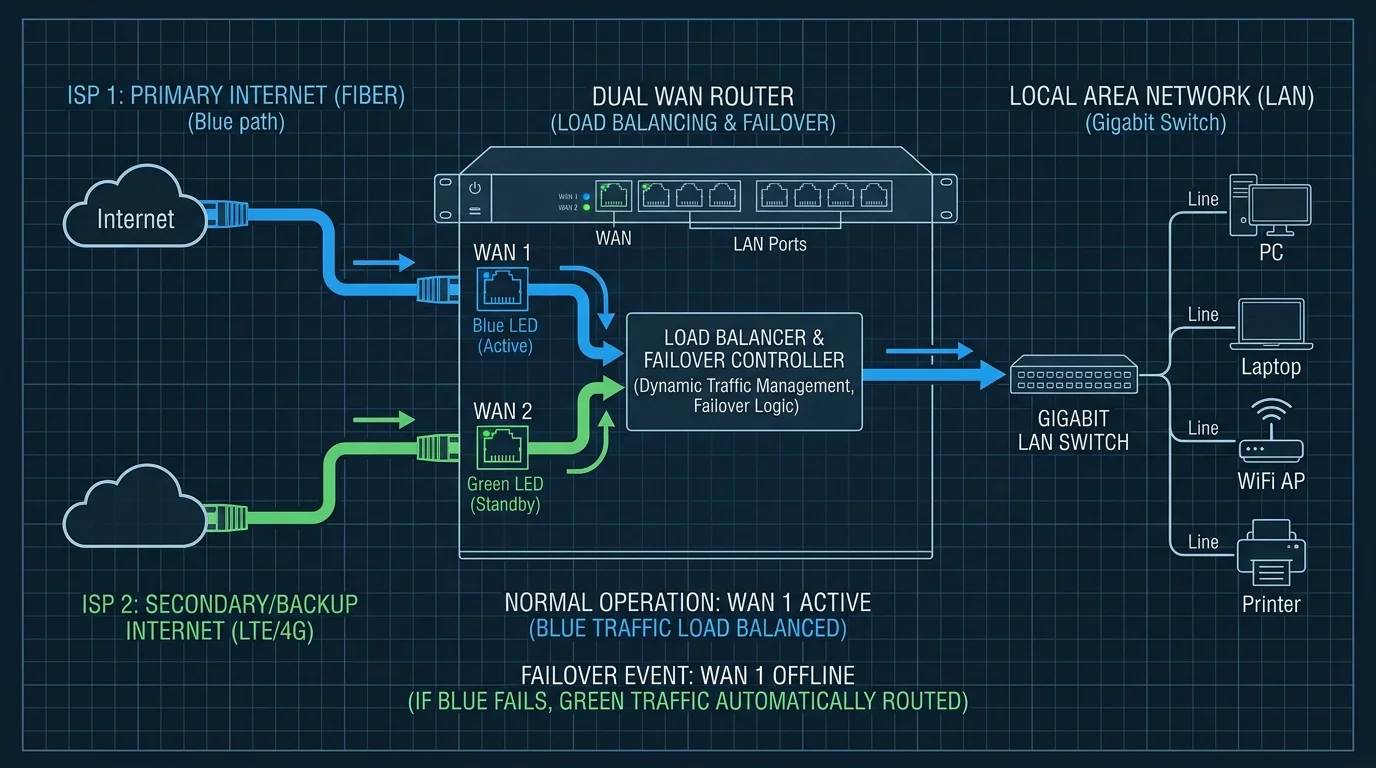
Redundancy is Luxury
Imagine this: You're presenting to a client, and a construction worker cuts the fiber cable outside your house. Show over? Not if you have Dual-WAN.
Failover vs. Load Balancing
- Failover: You use your primary connection (Fiber). If it dies, the router automatically switches everything to the backup (5G/Starlink) in seconds.
- Load Balancing: You use BOTH connections simultaneously. A download might be split across both lines, effectively doubling your bandwidth (in theory).
Hardware Requirements
You need a router with dual WAN ports. Brands like Ubiquiti (UDM Pro), Mikrotik, and Synology offer excellent Dual-WAN support. For the secondary connection, a simple 5G T-Mobile Home Internet box or a Starlink dish works perfectly.
When Dual WAN Actually Makes Sense
Dual WAN is a genuine solution for two specific problems: failover (keeping you online when one ISP goes down) and load balancing (splitting traffic between two connections for higher aggregate throughput). For home gaming, failover is the compelling use case — configuring your router to automatically switch to a 5G backup when your primary connection drops keeps your game session alive instead of disconnecting. Load balancing is trickier: most game sessions can't be split across two connections mid-match without disrupting the connection, so true multi-WAN gaming throughput requires application-level support that most games don't provide.
Frequently Asked Questions
Can dual WAN double my internet speed for gaming?
Not for a single gaming session. Load-balanced dual WAN can double aggregate throughput across multiple devices, but a single TCP/UDP connection (like a game session) follows one path. You'd see the benefit if multiple people in your household are gaming simultaneously on different connections, but one player won't experience double the speed from a single dual-WAN setup.
What router do I need for dual WAN?
Most consumer routers don't support dual WAN natively. The notable exceptions include ASUS routers with AiMesh or Dual-WAN mode, pfSense/OPNsense running on a mini-PC, and prosumer options like the Firewalla Gold. If failover is your goal, a simpler approach is configuring your existing router with a 5G USB modem as a backup WAN interface — many mid-range routers support this without requiring a full dual-WAN-capable unit.
Consumer-Friendly Failover Without Enterprise Hardware
Several consumer mesh systems and mid-range routers now support basic failover to a USB cellular modem or hotspot without needing a full dual-WAN enterprise router — a more accessible entry point for households wanting outage protection without a Ubiquiti or pfSense-level setup.
Cost-Benefit: Is Dual WAN Worth It for a Home?
For most households, the cost of a backup connection (even a basic prepaid 5G hotspot plan) is worth it specifically if remote work income depends on uptime — for casual home use, the cost rarely justifies itself against the relatively rare occurrence of a full outage.
Testing Failover Before You Need It
Manually unplugging your primary WAN connection to confirm failover actually triggers correctly — rather than assuming the configuration works — catches setup mistakes in a controlled moment instead of during an actual outage when it matters most.