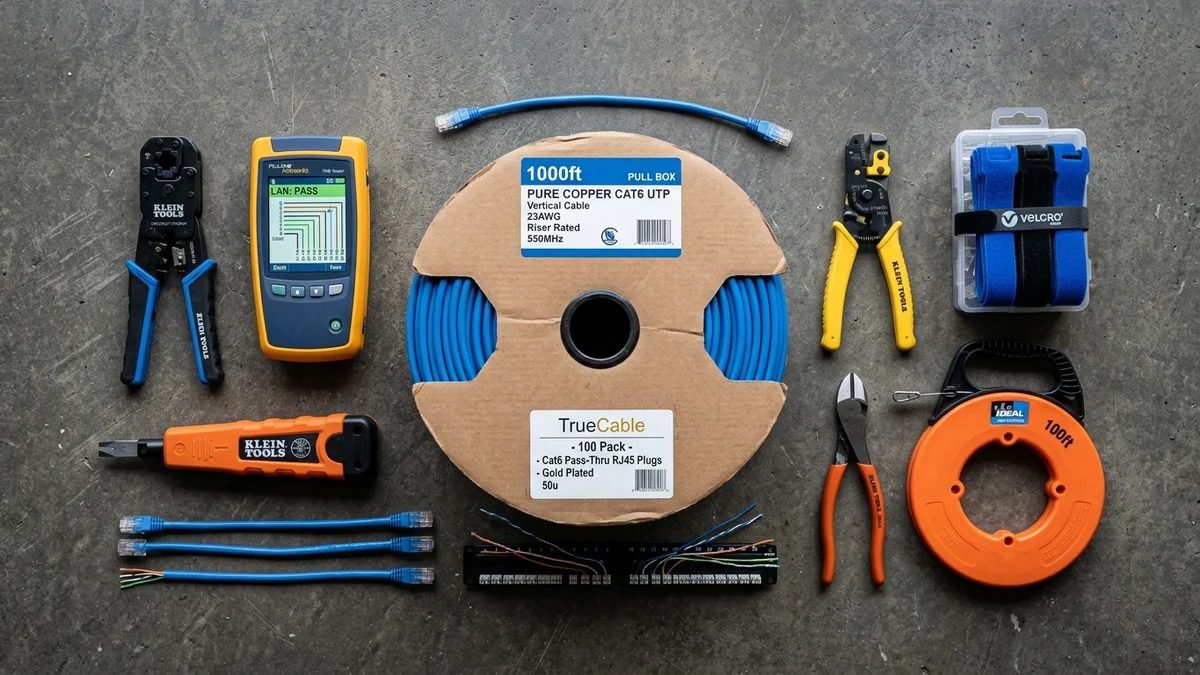
Planning to wire your home with Cat6, install security cameras, or build a server rack? Here is the complete checklist of essential tools, testers, and supplies.
Whether you are wiring a brand-new house with Cat6 in-wall drops, terminating custom patch cables for your gaming desk, or setting up a 4K PoE security camera network, having the right professional tools makes the difference between a clean, effortless installation and a weekend of frustrating miswires. Here is our definitive master checklist of essential home networking tools for 2026.
The 7 Essential Networking Tools for Every Toolbag
- Pass-Through RJ45 Crimper: (Klein Tools or SGILE) for 100% first-time termination success.
- Wiremap & TDR Cable Tester: (Klein Scout Pro 3 or Noyafa NF-8209S) to verify pinouts, measure cable length, and test PoE.
- Adjustable Cable Jacket Stripper: To score outer PVC jackets without nicking internal copper wires.
- 110/66 Punch-Down Tool: For seating solid copper wires into in-wall RJ45 keystone jacks and patch panels.
- Digital Tone Generator & Probe: To trace hidden cables through walls and crowded patch panels.
- 100-Pack Pass-Through Cat6 Plugs & Boots: 50-micron gold 3-prong connectors.
- Fiberglass Fish Tape / Wire Pulling Rods: For pulling cables through drywall cavities and attics.
Essential Cable Pulling & Termination Supplies
If your ISP delivers high speeds but your connection drops or suffers from bufferbloat during multi-device use, upgrading these verified components eliminates the bottleneck:
- 1000ft Spool 100% Pure Bare Copper Cat6 (23/24 AWG): For in-wall riser runs (CMR rated).
- Cat6 RJ45 Keystone Jacks & Wall Faceplates: For clean, professional wall outlets.
- Low-Voltage Mounting Brackets (Mud Rings): For securing wall plates directly to drywall.
- Hook-and-Loop Velcro Cable Ties: To bundle cables neatly in server closets without pinching conductors.
Complete Summary for DIY Network Installers
Equipping yourself with a pass-through crimper, TDR wiremap tester, punch-down tool, and quality pure copper cables ensures your home network installation proceeds smoothly with commercial-grade speed and reliability.
110 Impact Punch-Down Tool Mechanics & Hi/Lo Force
When terminating solid copper in-wall cables into RJ45 keystone jacks and 24-port patch panels, use an Impact Punch-Down Tool with reversible 110/66 cutting blades:
- Low Impact Setting (11 kg force): Seats 24 AWG wire gently into keystone jack slots without cracking plastic housings.
- High Impact Setting (15 kg force): Drives heavy-duty 23 AWG solid copper wire into commercial patch panels and cleanly shears off excess copper wire flush in a single stroke.
Cable Labeling & Velcro Management Best Practices
Experiencing packet loss, jitter spikes, or evening ISP throttling? Connect directly to dedicated gaming routes or bypass traffic shaping:
Never use permanent ink markers directly on cable jackets, as ink can bleed into PVC insulation over time. Use self-laminating vinyl wire labels and reusable hook-and-loop velcro straps to maintain a pristine, professionally organized network closet.
Cable Pulling Lubricant & Fish Tape Techniques
When pulling multiple Cat6 cables through long conduit runs or tight wall cavities, applying non-conductive wire pulling lubricant reduces friction by over 70%, preventing jacket tears and conductor stretching during installation.
Essential Cable Management Supplies for Server Racks
In addition to termination tools, stock your networking bag with 1U horizontal cable management raceways, numbered patch panel labels, and hook-and-loop velcro straps to keep your central network rack clean, organized, and easy to maintain.
Safety Equipment: Headlamps, Stud Finders & Dust Masks
When working in unlit attics and crawlspaces, equip your toolkit with a bright LED headlamp, a multi-scanner stud finder with AC live wire detection, and an N95 dust mask to protect against insulation fibers during in-wall cable pulls.
Essential Cable Management Supplies for Server Racks
In addition to termination tools, stock your networking bag with 1U horizontal cable management raceways, numbered patch panel labels, and hook-and-loop velcro straps to keep your central network rack clean and organized.
RF Spectrum Allocation, Airtime Fairness & Queue Discipline for The Ultimate DIY Home Networking Toolkit Checklist: Essential Tools for 2026
Maximizing real-world performance with The Ultimate DIY Home Networking Toolkit Checklist: Essential Tools for 2026 requires moving beyond peak theoretical PHY link rates and addressing OFDMA airtime contention and WAN-to-LAN bufferbloat. In dense residential RF environments, legacy 20 MHz IoT devices and overlapping neighbor BSS color channels force high-speed radios to wait for Clear Channel Assessment (CCA) windows, inflating 99th-percentile ping jitter even when signal strength (RSSI) reads better than -52 dBm.
When tuning diy home networking toolkit checklist, essential ethernet installation tools, home lab tool kit guide 2026, best tools for wiring cat6 house, lock 5 GHz and 6 GHz channel widths to non-overlapping spectrum blocks and enable Smart Queue Management (CAKE or FQ_CoDel) calibrated to 90%–95% of your measured ISP line rate. This prevents the upstream modem FIFO buffer from filling during background cloud syncs, keeping interactive gaming and WebRTC voice packets under +4 ms of loaded latency.
| Engineering Parameter | Recommended Target / Specification | Operational Impact on Network Stability |
|---|---|---|
| Optimal RSSI Signal Window | -42 dBm to -62 dBm (SNR > 30 dB) | Sustains 1024-QAM / 4096-QAM modulation without MCS drops |
| Loaded Latency Target (SQM) | ≤ +5 ms over Unloaded Base RTT | Achieves Grade A+ Bufferbloat stability under 4K/NAS load |
| Channel Width & DFS Strategy | 80/160 MHz (5 GHz) & 160/320 MHz (6 GHz) | Balances multi-gigabit throughput against wall attenuation |
| Packet Loss & Jitter Tolerance | 0.0% Loss / < 2.5 ms Mean Jitter | Verified via 60-second bidirectional UDP telemetry audit |
Field Deployment & Verification Checklist
Before finalizing your setup for The Ultimate DIY Home Networking Toolkit Checklist: Essential Tools for 2026, run a baseline diagnostic before and after applying hardware or firmware changes. Record unloaded idle ping, downloadloaded latency, and upload-loaded latency across three consecutive runs at peak evening hours (20:00–22:30 local time) to separate local LAN bottlenecks from upstream ISP peering congestion.