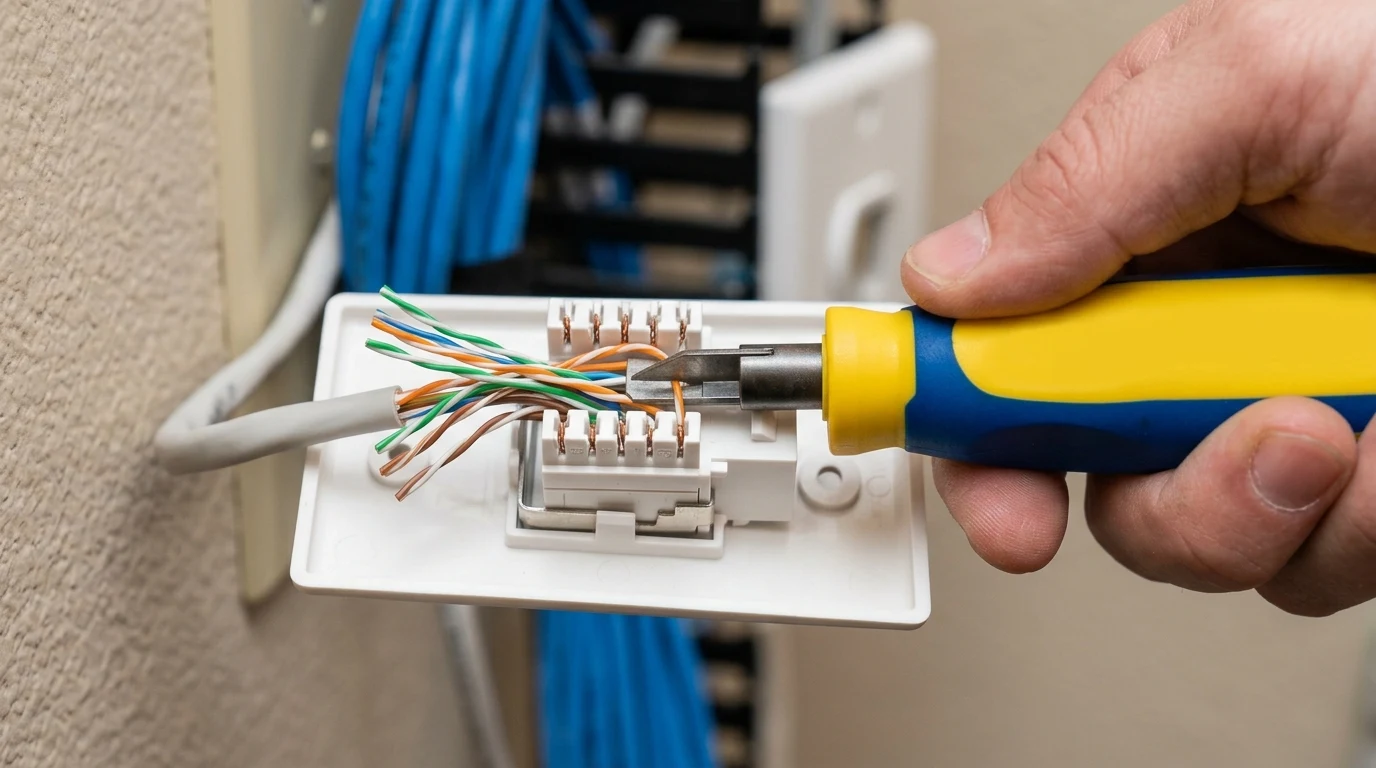
When installing professional in-wall Ethernet wiring, terminating cables into RJ45 keystone jacks and 24-port patch panels requires an impact punch down tool. Attempting to force wires into Insulation Displacement Connector (IDC) slots with screwdrivers or plastic tools damages the copper contacts, leading to high resistance and intermittent packet loss. The Cable Matters Adjustable Impact Punch Down Tool with 110/66 blades is the standard tool used by network installers. Here is our hands-on review.
Tool Construction & Ergonomics
The Cable Matters punch down tool features a heavy-duty ABS body with an internal steel spring-loaded impact mechanism:
- Adjustable HI / LO Impact Dial: Allows you to switch between Low force (ideal for 24 AWG wire and sensitive keystone jacks) and High force (for thick 23 AWG solid copper wire).
- Reversible Dual-Sided Blades: Hardened SNCM-21 tool steel blade featuring a punch/cut side and a punch-only side.
- Internal Handle Blade Storage: Twist-lock compartment inside the base of the handle securely stores spare 110 or 66 blades when not in use.
- Integrated Wire Pick and Spudger: Fold-out metal hook tool to remove mis-punched wires and a flat spudger to guide conductors into slots.
Step-by-Step Guide: Punching Down a Cat6 Keystone Jack
- Strip 1 Inch of Jacket: Remove 1 inch of outer cable jacket, preserving the tight twist of the copper pairs right up to the IDC terminal blocks.
- Follow the T568B Color Legend: Keystone jacks have colored stickers showing T568A and T568B wiring. Place each wire into its corresponding color-coded slot.
- Orient the Tool with 'CUT' Facing Out: Always ensure the side of the blade marked 'CUT' faces the outer perimeter of the jack so it trims the excess wire tail, not the active link wire.
- Press Firmly Downward: Push the tool straight down until the internal spring mechanism clicks. The tool seats the wire into the IDC metal knife-blade and cleanly shears off the excess wire flush with the housing.
Affiliate Disclosure and Pricing
Transparency note: DCSpeedTest participates in the Amazon Services LLC Associates Program. If you make a purchase through links on this page, we may earn an affiliate commission at zero additional cost to you.
Professional Adjustable Impact Punch Down Tool
Includes dual-ended 110 and 66 blades with internal handle storage and adjustable impact force. The essential tool for wall jacks and patch panels.
Insulation Displacement Contact (IDC) Physics
Understanding the mechanical physics of Insulation Displacement Connectors (IDC) explains why a dedicated impact punch down tool is mandatory for professional networking. Inside a Cat6 keystone jack or 110 patch block, each terminal slot contains two opposing V-shaped nickel-plated phosphor bronze blades.
When the impact tool strikes, it forces the insulated 23 AWG solid copper wire down between the blades. The sharp edges of the blades slice through the outer plastic insulation and physically swage into the solid copper conductor under constant spring tension, creating a gas-tight, oxidation-free electrical contact with less than 0.005 ohms of resistance. Using screwdrivers spreads the blades apart permanently, destroying the jack.
Maintenance & Blade Longevity
The reversible SNCM-21 tool steel blades on the Cable Matters punch down tool are rated for over 5,000 impact cycles into standard polycarbonate keystone blocks. If the cutting edge ever becomes dull after thousands of terminations, spare 110 and 66 blades can be swapped in seconds using the twist-lock retention collar, and stored safely inside the hollow internal handle.
Comparing Punch Down Tools: Impact vs Non-Impact vs Palm Tools
To understand why a spring-loaded impact punch down tool is the professional standard for Cat6 and Cat6a terminations:
| Tool Type | Seating Mechanism | Wire Cutting Action | Termination Reliability |
|---|---|---|---|
| Cable Matters Impact Tool | Internal Spring Hammer (HI/LO) | Automatic Flush Shear Blade | 100% Certified Gas-Tight Contact |
| Manual Plastic Push Tool | Hand Pressure (Weak) | None (Requires manual scissors) | Frequent loose contacts (Packet loss) |
| Non-Impact Palm Puncher | Direct Muscle Force | Manual Trim | High hand fatigue after 10 jacks |
Structured Cabling Patch Panel Dressing Best Practices
- Maintain Pair Twists to within 0.375 Inches: TIA-568 standards require untwisting no more than 3/8 inch (9.5 mm) of conductor pair before punching into the IDC terminal block to maintain 250 MHz NEXT cancellation.
- Support the Jack Housing: Always rest the keystone jack or patch panel on a solid surface or use a dedicated keystone punch-down stand when pressing downward to prevent cracking the plastic frame.
- Velcro Over Zip Ties: Secure cables behind the patch panel using reusable hook-and-loop Velcro straps rather than plastic zip ties, which pinch and deform internal copper pair spacing.
Cat6a 10G Shielded Keystone Jack Termination Guide
When terminating high-density shielded Cat6a keystone jacks (which feature heavy metal die-cast zinc housings), setting the Cable Matters punch down tool to the HIGH impact setting is recommended. The extra spring force ensures the 23 AWG solid copper conductors pierce through the IDC contacts cleanly, while the internal metallic ground flap of the jack is properly grounded against the cable drain wire for certified 500 MHz 10GbE transmission.
Troubleshooting Defective Keystone Terminations
If an Ethernet keystone jack fails certification testing after punching down, check for these three common installation errors:
- Wire Not Fully Seated in IDC Blade: If the impact force was too low, the copper conductor may sit loosely in the upper notch of the blade. Adjust the dial to HIGH and re-punch.
- Pinched Pairs from Over-Tightening Wall Plates: When screwing the keystone faceplate into the electrical box, ensure excess cable is pushed back into the wall cavity without crushing the rear wire terminals against metal junction boxes.
- Accidental Conductor Snip: Ensure the 'CUT' side of the blade was not accidentally facing inward toward the jack contacts during punching.
Final Verdict
Verdict: Dependable, razor-sharp, and durable. If you are wiring wall plates or patch panels, this tool guarantees clean, certified terminations every time.